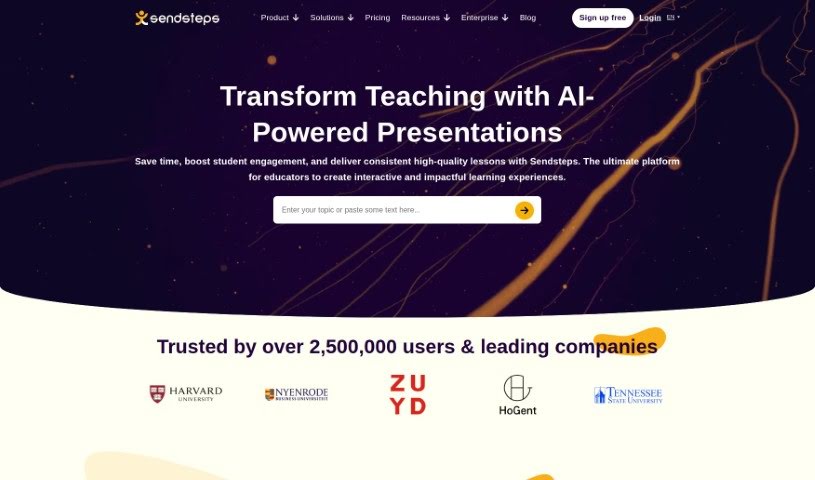
Screenshot of Sendsteps

Sendsteps

Discover what Sendsteps is and how to use it to make your presentations and meetings more engaging in 2025. We'll explore its features and see how it stacks up against other Meeting Assistants.

Screenshot

What is Sendsteps?

Sendsteps is a really neat AI-powered platform that’s all about making your presentations and meetings way more engaging. It is a smart assistant that helps you create interactive content super fast. You’ve got a few ways to get started with your presentations: you can use their AI presentation maker, build one from scratch, upload your own documents, or even import your existing PowerPoint slides. The whole idea is to save presenters a ton of time by handling the writing, design, and storytelling parts. This way, you can really focus on delivering your message. Plus, Sendsteps has features like live polling, live Q&A, surveys, and feedback tools that really get your audience involved during live presentations or events. You can also customize questions and polls, it supports multiple languages, and it works for any kind of event – whether it’s in-person, virtual, or a mix of both. Honestly, Sendsteps is trying to shake up the old way of doing presentations, offering something unique, interactive, and time-saving, and it’s got a solid base of happy users and global recognition to back it up.

Who created Sendsteps?

Sendsteps was actually founded way back in 2008 by Mike Coumans and Steven Blom. These two guys, based in Amsterdam, really wanted to make presentations and events more interesting, exciting, and valuable. Their platform is all about creating those interactive experiences. They’ve built a team of over 20 people from all over the world, and their goal is to help presenters everywhere connect better with their audiences globally.

What is Sendsteps used for?

Sendsteps is super handy for a bunch of things:

  • Save time creating presentations with AI: Seriously, it cuts down the time you spend making slides.
  • Encourage active engagement for better meeting results: Get your audience involved, and you’ll see better outcomes.
  • Interactive activities promote message understanding and strategic discussions: When people participate, they grasp your points better and can have more productive conversations.
  • Promote effective communication and student understanding: It’s great for teachers and students to make sure everyone’s on the same page.
  • Stimulate healthy competition, boosting student motivation and efficiency: A little friendly competition can really get students fired up and working harder.
  • Make learning fun: Who doesn’t love learning when it’s enjoyable?
  • Enhance the enjoyment of the event and contacts with participants: It makes events more pleasant for everyone involved.
  • Get closer with your audience through interactive activities: Building that connection is key.
  • Distinguish your event with a unique, immersive, and memorable experience: Make your event stand out from the crowd.
  • AI-assisted presentations save time, enabling focus on crucial tasks: Let the AI handle the grunt work so you can concentrate on what truly matters.
  • Save time creating presentations with AI or use the AI Quiz Maker: It’s a double win for efficiency.
  • Promote effective communication and student understanding for students/teachers: This is a big one for educators.
  • Stimulate healthy competition, boosting student motivation and efficiency for students/teachers: Again, great for the classroom.
  • Enhance the enjoyment of events and contacts with participants: It just makes things better for everyone.
  • Get closer with the audience through interactive activities: Building rapport is easier with interaction.
  • Distinguish events with a unique, immersive, and memorable experience: Make your event unforgettable.
  • Make learning fun for students/teachers: Learning should be engaging!
  • Empower people to be self-confident in giving presentations: It helps presenters feel more secure and effective.

Who is Sendsteps for?

Sendsteps is a great tool for:

  • Business professionals: To make their meetings and pitches more impactful.
  • Students/teachers: To make learning more interactive and engaging.
  • Event organizers: To create memorable and dynamic experiences for attendees.
  • Event organizers/presenters: Anyone who needs to present and wants to connect with their audience.

How to use Sendsteps?

Using Sendsteps is pretty straightforward. Here’s a quick rundown:

  1. Create Your Presentation:
    • You’ve got four solid options to get your presentation going:
      • Jump right in with the AI presentation maker.
      • Start completely from scratch if you have a clear vision.
      • Upload a document you already have.
      • Import a PowerPoint presentation to give it an interactive twist.
    • Once you’ve chosen your path, you’ll define and approve the layout, fill in the presentation details, and then you’re ready to start presenting.
  2. Engage Your Audience:
    • This is where the magic happens! Use live polls, Q&A sessions, surveys, and other interactive tools to get your audience actively involved while you’re presenting or during your event.
  3. Customize Questions and Polls:
    • You can really tailor your questions and polls to perfectly fit what you need for your presentation. Think multiple-choice, open-ended questions, or even full surveys.
  4. Suitable for Any Event:
    • Whether you’re hosting an in-person seminar, a virtual webinar, or a hybrid event, Sendsteps works beautifully. It lets you connect with your audience no matter where they are.
  5. Anonymity Options for Audience Responses:
    • Want honest feedback? You can choose to keep audience responses anonymous. Or, if you need to follow up, you can collect their information. You get to set the level of anonymity that works best for you.
  6. Pricing Plans:
    • Sendsteps offers different pricing plans to suit your needs, like the Starter, Professional, or Enterprise plans. Each one comes with a different set of features and capabilities, so you can pick the one that’s just right.
  7. Top Features:
    • Definitely check out features like the AI Presentation Generator, live polling, live Q&A sessions, surveys, and even animated backgrounds. They’re all designed to boost your presentations and engagement levels.
  8. AI Presentation Creation:
    • Creating presentations with AI is super fast. You can use pre-made templates or let the AI help with writing, design, and storytelling. It really frees you up to focus on the actual presenting part.
  9. Core Values of Sendsteps:
    • At its heart, Sendsteps is all about empowerment. They focus on providing unique experiences, a bit of entertainment, and creating engaging presentations that benefit both the presenters and the audience.

By following these steps and diving into the features Sendsteps offers, you can create presentations or events that are not only interactive but also leave a really strong, lasting impression on your audience.

Related AI Tools

Discover more tools in similar categories that might interest you

Stay Updated with AI Tools

Get weekly updates on the latest AI tools, trends, and insights delivered to your inbox

Join 25,000+ AI enthusiasts. No spam, unsubscribe anytime.