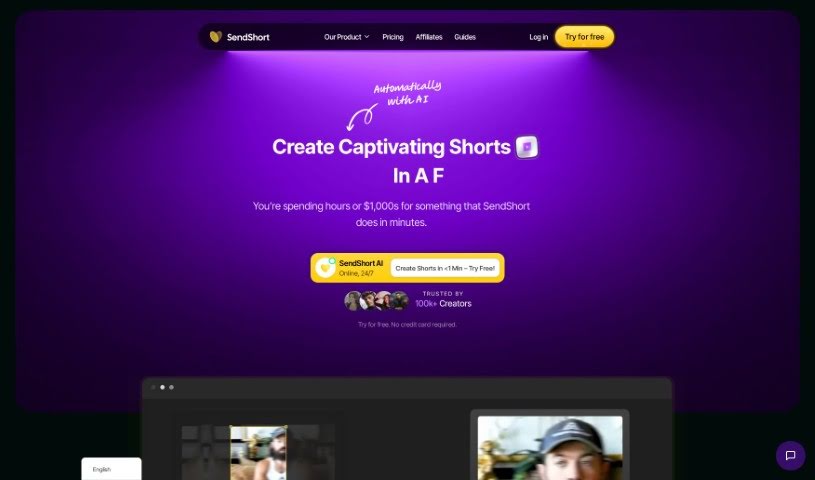
Screenshot of SendShort

SendShort

Discover SendShort in 2025! Learn what this video editing tool is, how to use its features for social media growth, and how it stacks up against other short video makers.

Screenshot

What is SendShort?

SendShort is a video editing tool that over 100,000 creators trust to help grow their social media accounts. It offers features like auto-subtitles in more than 50 languages, smart auto-cropping, custom templates, and the ability to triple your output on short clips. Many users have shared that they’ve seen significant improvements in efficiency, saved a lot of time, and become more productive since they started using SendShort. Plus, the tool has different subscription plans to fit various needs, including a free trial with limited features and paid options for more advanced users and agencies.

SendShort handles both short-form and long-form videos. It gives you the tools to edit and transform longer videos into engaging short clips that are perfect for different platforms. The interface is really intuitive, making it easy for beginners who have never edited video before. So, everyone can use it without a problem. SendShort also provides automatic captioning with impressive accuracy, lets you add subtitles quickly, includes social media management tools for scheduling content and checking performance analytics, and allows you to add extra video footage or ‘B-rolls’ to make your videos even better.

Basically, SendShort is designed to make the video editing process smoother. It’s great for everyone, from beginners to agencies, offering essential features like subtitles, social media management, format detection, cropping tools, and analytics. This helps you create professional, engaging video content that works well on various platforms. By combining easy-to-use functionality with advanced editing capabilities, SendShort aims to empower creators to produce high-quality content without the hassle.

Who created SendShort?

SendShort Overview:

Launch Date: SendShort first launched on October 12, 2023. It was created by SendCorp SAS, a company based in Paris, France.

Founder: Romain is the founder of SendShort. He’s been leading the development of this innovative video editing tool, which is all about boosting productivity and efficiency for content creators and video editors.

Company Details: SendCorp SAS is located at 60 Rue Francois 1er, 75008, Paris, France, and they operate the SendShort platform. You can find their VAT number (Business ID No.) as FR42981213598, and their website is SendShort.ai. SendShort offers a variety of video editing features. These include automatic captioning that’s highly accurate, support for over 50 languages, social media management tools, performance analytics, and a user-friendly interface that works well for both beginners and experienced users. The platform has already attracted over 200,000 users and offers different plans to suit various needs, from starter to expert and enterprise levels.

If you have any questions or need help, you can reach out to SendShort by emailing [email protected] or by joining their Discord channel for direct support and guidance.

Citation: [4:0†source] [4:3†source]

What is SendShort used for?

  • Supports multiple languages
  • Creating short-form videos
  • Turning long-form content into short-form videos
  • Importing videos from YouTube
  • Scheduling posts
  • Editing tools for cutting, cropping, and adding subtitles
  • Integrating ‘B-rolls’
  • Monitoring performance analytics
  • Managing social media platforms
  • Automatically cropping videos to fit different platforms perfectly
  • An intuitive editing interface
  • Accepting various video formats
  • Integrating long-form content into short-form clips
  • Importing videos from your device storage
  • Importing videos using YouTube links
  • Automatically detecting video formats
  • Using a cropping tool to optimize for platforms
  • Adding subtitles using templates
  • Integrating B-rolls

Who is SendShort for?

  • Video editors
  • Marketing professionals
  • Content creators
  • Social media managers

How to use SendShort?

Here’s how you can use SendShort:

  1. Upload Your Video:
    • You can upload videos in .mp4 or .mov formats directly from your device storage. Alternatively, you can import them straight from YouTube links.
  2. Create Short Videos:
    • SendShort helps you create short-form video content by letting you transform your long videos into engaging short clips.
  3. Use Editing Tools:
    • Take advantage of the various editing tools SendShort provides, such as cutting, cropping, adding subtitles, integrating extra footage, and adding personalized music files.
  4. Leverage Automatic Features:
    • Make the most of automatic features like format detection, cropping for platform optimization, and integrating ‘B-rolls’.
  5. Benefit from Multilingual Support:
    • SendShort supports over 50 languages, making it accessible for creators worldwide.
  6. Manage Social Media:
    • You can manage your social media platforms, schedule your content, and view performance analytics all within SendShort.
  7. Analyze Performance:
    • Keep track of how your content is performing to help you refine your strategies for the best engagement.
  8. Get Support and Assistance:
    • If you have any questions or need help, users can reach out via Discord or email at [email protected].
  9. Choose Subscription Plans:
    • Select from different subscription plans that fit your needs, ranging from a free trial to enterprise-level support.
  10. Utilize Automatic Captioning:
    • The automatic captioning feature is highly precise, exceeding 97% accuracy, and you also have the option to edit and modify captions as needed.

By following these steps, you can effectively use SendShort to create, edit, and manage your video content with both ease and efficiency.

Related AI Tools

Discover more tools in similar categories that might interest you

Stay Updated with AI Tools

Get weekly updates on the latest AI tools, trends, and insights delivered to your inbox

Join 25,000+ AI enthusiasts. No spam, unsubscribe anytime.