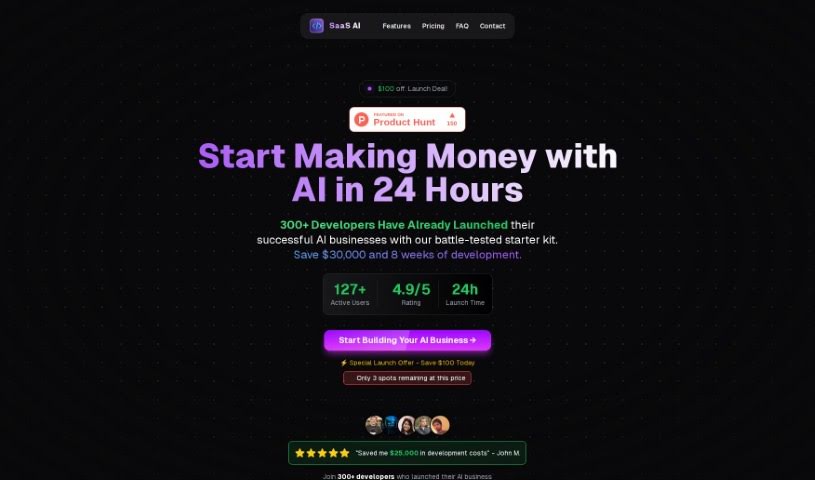
Screenshot of Saas Ai

Saas Ai

Discover what SaaS AI is and how to use it effectively in 2025. We'll explore its features and compare it with other website builders, giving you a clear picture of its capabilities.

Screenshot

What is SaaS AI?

SaaS AI, which stands for Software as a Service Artificial Intelligence, is essentially a ready-to-go starter kit built with Next.js. It is a powerful shortcut for launching AI-focused businesses. It comes packed with all the fundamental code you’ll need for key functions like integrating with GPT-4, setting up payment systems, managing databases, handling user logins, and providing essential UI components. What SaaS AI really does is speed up the development process. Instead of getting bogged down in the technical groundwork, you can get your AI web applications up and running much faster, focusing instead on the unique features that will make your product stand out. While it’s specifically designed for AI projects, it’s also super flexible and can be adapted for any kind of SaaS business. You can easily integrate AI components based on what your specific project requires.

Who created SaaS AI?

SaaS AI was founded by Eric Salazar. His company offers what’s described as the only Next.js Starter Kit specifically made for AI Web-Apps. The whole point is to make development smoother and save you weeks of work, so you can concentrate on building the core features that matter most.

What is SaaS AI used for?

SaaS AI is incredibly versatile and can be used for a wide range of applications:

  • AI Chatbots: Build intelligent conversational agents.
  • AI Infrastructure: Create the backbone for AI-powered services.
  • Humanize AI Text: Make AI-generated content sound more natural and human.
  • AI Integration: Seamlessly connect AI capabilities into your existing systems.
  • Authentication: Securely manage user access and logins.
  • SEO: Optimize your web presence for search engines.
  • Landing Page Builders: Quickly create effective marketing pages.
  • Payments: Integrate secure payment processing.
  • Landing Page: Design and deploy professional landing pages.
  • Database: Manage your data efficiently.
  • AI Integration with leading platforms: Connect with major AI services like OpenAI, LangChain, Mistral, Google Gemini, Anthropic, and Hugging Face.
  • User Authentication: Securely manage users with Supabase, supporting various login methods.
  • Stripe Integration: Handle subscriptions, checkout pages, and payments smoothly.
  • Modern Landing Pages: Build responsive pages with features like dark mode, pricing details, FAQs, and contact forms.
  • Analytics: Track user behavior and geographical data.
  • File Storage: Use Supabase for efficient file storage and delivery.
  • Customer Support: Improve communication with Crisp integration.
  • Comprehensive Documentation: Get detailed guides for quick deployment of SaaS solutions.
  • Superior Development Workflow: Benefit from the seamless integration of Next.js and Supabase.
  • Private Discord Community: Access direct support and connect with other users.

Who is SaaS AI for?

SaaS AI is a valuable tool for a broad spectrum of professionals:

  • Software developers
  • Data scientists
  • Business analysts
  • Project managers
  • Digital marketers
  • Product Managers
  • Customer Support Representatives
  • Content creators
  • Educators
  • Healthcare professionals
  • Financial Analysts
  • Sales Executives
  • Graphic designers
  • Human Resources Managers
  • IT Consultants

How to use SaaS AI?

Getting started with SaaS AI is straightforward. Here’s a step-by-step guide:

  1. Choose Your Provider: First, look around and pick a reliable SaaS AI provider that fits your specific needs and budget. It’s worth doing a little research here.
  2. Sign Up: Once you’ve chosen, head over to their website, create an account, and select the subscription plan that works best for you.
  3. Understand the Features: Take some time to get familiar with what the SaaS AI tool can do. Pay attention to features like data processing, analytics, and any machine learning capabilities it offers.
  4. Integrate Your Data: Connect your own data sources to the SaaS AI platform. This is how it gets the information it needs to process and analyze.
  5. Set Up Parameters: Configure the settings for the AI algorithms. Make sure they’re aligned with what you want to achieve – your specific goals and objectives.
  6. Train the Model (If Needed): If your project requires it, you might need to train the AI model using your data. This helps improve its accuracy and overall performance.
  7. Use Predictions and Insights: Start making the most of the predictions and insights the SaaS AI tool provides. Use them to make smarter, more informed decisions.
  8. Monitor and Evaluate: Keep an eye on how the AI model is performing. Regularly check its effectiveness in helping you reach your desired outcomes.
  9. Optimize: Based on the feedback and results you’re seeing, fine-tune the AI model. This continuous process helps enhance its performance over time.
  10. Stay Updated: Keep up with the latest news and updates from your SaaS AI provider. This way, you can take advantage of new features and improvements as they become available.

By following these steps, you can really make the most of SaaS AI. It’s a great way to streamline your processes, uncover valuable insights, and make smart, data-driven decisions for your business or project.

Related AI Tools

Discover more tools in similar categories that might interest you

Stay Updated with AI Tools

Get weekly updates on the latest AI tools, trends, and insights delivered to your inbox

Join 25,000+ AI enthusiasts. No spam, unsubscribe anytime.