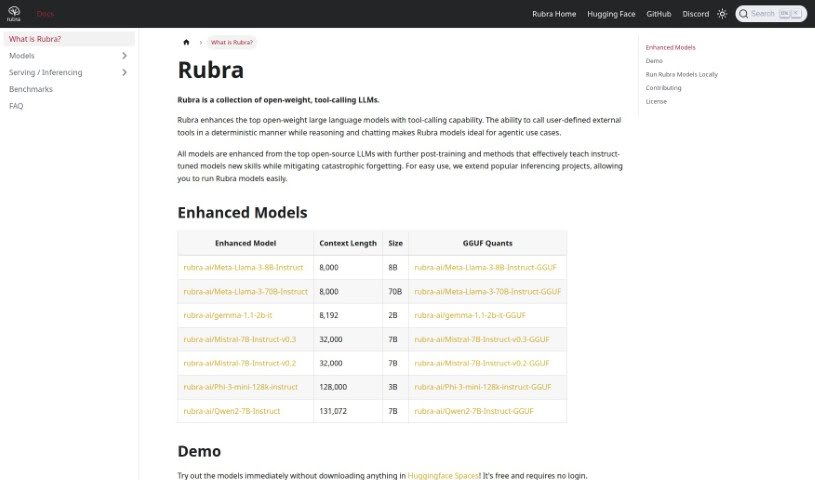
Screenshot of Rubra

Rubra

Discover Rubra, an open-source platform for building local AI assistants in 2025. Learn about its features, cost-saving benefits, privacy focus, and how it stacks up against other Software Development Tools.

Screenshot

What is Rubra?

Rubra is an open-source platform built for creating local AI assistants. It is a way to build AI-powered applications without needing those costly API tokens. It’s pretty neat because it lets you work entirely on your own computer, which saves you money on tokens and keeps your data private. All the processing happens right there on your machine. Plus, it’s got a user-friendly chat interface that makes interacting with AI models really efficient, and it can handle data from different sources.

When you compare Rubra to something like OpenAI’s ChatGPT, Rubra really shines because it’s designed for local development, prioritizes your privacy, comes with its own LLMs built-in, and gives you the flexibility to switch between local and cloud setups.

Rubra comes with several pre-trained AI models that are optimized for local use. You’ll find options like Mistral-7B, Phi-3-mini-128k, and Qwen2-7B. These are actually improvements on some of the best open-source LLMs out there, and they let you chat with AI right from your computer. If you prefer, Rubra also lets you connect with models from OpenAI and Anthropic, so you can pick the AI model that best suits what you’re trying to do.

Rubra also features a really easy-to-use chat interface, making it simple to communicate with your AI assistants and the models. It even has an API that works just like OpenAI’s Assistants API. This makes it super smooth to move your work between your local machine and the cloud. And because Rubra is all about privacy, everything stays on your computer, keeping your chat histories and data safe.

What’s more, Rubra is an open project, meaning you can contribute and give feedback through its GitHub repository. They welcome bug reports and code contributions to help make the tool even better. By offering a place to test AI assistants locally, developers can see how they perform in a real-world setting while keeping their privacy and data secure.

Who created Rubra?

The Rubra team created Rubra. They launched it on February 14, 2024, as an open-source platform specifically for building AI assistants that run locally. The idea behind Rubra was to give developers a way to create AI-powered applications that were both affordable and private, cutting out the need for API tokens altogether. Rubra’s main goal is to empower the creation of AI assistants that are powered by large language models (LLMs) running right on your computer.

What is Rubra used for?

Rubra is great for a variety of tasks:

  • Keeping your data private and secure.
  • Building AI assistants that run on your local machine.
  • Creating applications that use AI.
  • Working in a way that’s both cost-effective and private.
  • Comparing how different AI models perform.
  • Calling external tools that you define, in a predictable way.
  • It’s especially useful for agentic tasks where AI needs to act independently.
  • It helps improve open-weight large language models by giving them the ability to call tools.
  • It can help prevent models from ‘forgetting’ things they’ve learned.
  • Running Rubra’s own models directly on your computer.
  • Contributing your own ideas and code to help improve Rubra.
  • Building AI applications affordably and privately, without needing API tokens.
  • Working locally saves tokens and protects your data privacy.
  • Accessing built-in open-source Large Language Models (LLMs).
  • Skipping the need for tokens when making API calls.
  • Focusing specifically on developing AI assistants.
  • Switching easily between developing locally and in the cloud.
  • Calling your own external tools deterministically while the AI reasons and chats.
  • Giving top open-weight large language models the ability to call tools.
  • Interacting with AI models directly on your computer.
  • Adding tool-calling capabilities to large language models.
  • Making agentic use cases easier to implement.
  • Running Rubra’s models without any hassle.
  • Creating AI applications in a cost-effective way.
  • Working locally without needing API tokens.
  • Accessing built-in open-source LLMs.
  • Calling your own external tools.

Who is Rubra for?

Rubra is ideal for:

  • Developers
  • Creators of AI-powered applications
  • AI Application Creators
  • AI developers
  • Developers of assistants
  • AI Programmers
  • Chatbot developers
  • AI researchers
  • Application Developers
  • AI Assistants developers

How to use Rubra?

Getting started with Rubra is straightforward. Here’s how:

  1. Installation: You can install Rubra with a single command: curl -sfL https://get.rubra.ai | sh -s -- start.
  2. Model Creation: Create and fine-tune your AI assistant models. Rubra comes with a fully integrated Large Language Model (LLM), based on the Mistral model, which you can customize.
  3. Local Interaction: Chat with models directly on your machine using Rubra’s user-friendly interface.
  4. API Compatibility: Use the API that’s compatible with OpenAI’s Assistants API. This makes it simple to switch between local and cloud development environments.
  5. Privacy Assurance: Rest assured that all processes run locally on your machine. This safeguards your chat histories and ensures your data never gets transferred to external servers.
  6. Model Access: You get access to pre-configured open-source LLMs, including Mistral-based models, and you can also integrate other models from providers like OpenAI and Anthropic.
  7. Local Testing: Test your AI assistants locally. This lets you evaluate their performance in realistic conditions, all from the safety and privacy of your own computer.
  8. Documentation: For more in-depth guidance on features, installation, and other details, check out the documentation available on the Rubra website.
  9. Community Support: If you need help or run into issues, you can connect with the Rubra community on GitHub or their Discord channel.

Following these steps will help you make the most of Rubra’s capabilities, allowing you to develop AI-powered applications locally with a focus on privacy, cost savings, and efficiency.

Related AI Tools

Discover more tools in similar categories that might interest you

Stay Updated with AI Tools

Get weekly updates on the latest AI tools, trends, and insights delivered to your inbox

Join 25,000+ AI enthusiasts. No spam, unsubscribe anytime.