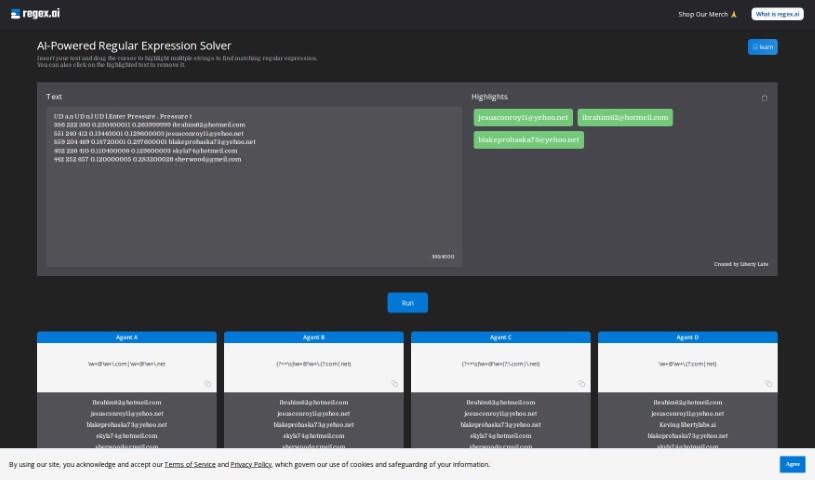
Screenshot of Regex.ai

Regex.ai

Discover what Regex.ai is and how to use it effectively in 2025. We'll explore its features and see how it stacks up against other code generators.

Screenshot

What is Regex.ai?

Regex.ai is a platform designed to help programmers create regular expressions, often called regex. It was built to tackle the common struggle of writing effective regex patterns efficiently. This tool uses advanced AI to really understand what you need and then generates regex that not only works but often does even better than expected. The main idea behind Regex.ai is to make programming and handling data simpler by automating regex creation. This, in turn, makes the whole coding process more approachable and enjoyable for everyone. The team behind Regex.ai envisions pushing AI’s role in programming further, aiming to create a comprehensive, AI-driven solution for developers everywhere. At its heart, the company values innovation, simplicity, and making sure customers are happy, which drives them to constantly improve their AI algorithms.

Who created Regex.ai?

Liberty Labs is the company that created Regex.ai. They’re focused on making programming tasks easier by using AI to automatically generate regular expressions. This is super helpful for programmers at any skill level. Their core values are innovation, simplicity, and customer satisfaction, which really guides their ongoing work to improve their AI.

What is Regex.ai used for?

  • Data extraction: Pulling specific information out of text.
  • Data validation: Checking if data fits a certain format.
  • Crafting regular expressions with ease: It automatically generates regex patterns just by you selecting text.
  • Efficient regex matching: You can easily insert text and see interactive highlights to help you match patterns.
  • Simultaneous matching: Just drag your cursor to highlight and match multiple strings at once.
  • Easy deselection: If you need to remove a selection, simply click on the highlighted text.
  • Creating regex for data extraction, validation, or manipulation: It helps you build the patterns you need for all sorts of data tasks.
  • Simplifying programming and data handling tasks using AI: It takes the heavy lifting out of creating regex.
  • Assisting programmers worldwide: It’s there for everyone, from beginners to seasoned pros.
  • Making coding more accessible and enjoyable: It aims to make regex less intimidating.
  • Enhancing coding productivity: Get your regex done faster with automatic generation.
  • Streamlining the process of finding the perfect regex pattern: No more endless trial and error.
  • Revolutionizing regex creation and management: It’s a whole new way to work with regular expressions.
  • Covering a wide range of programming needs: AI-driven solutions for many different tasks.

Who is Regex.ai for?

  • Programmers
  • Developers
  • Beginners just starting out
  • Seasoned professionals with years of experience
  • Data scientists
  • Software engineers
  • Data Analysts
  • IT professionals
  • Computer Scientists

How to use Regex.ai?

Here’s a simple guide to using Regex.ai effectively:

  1. Access the Tool: First, head over to the Regex.ai platform. Remember, it’s an AI-powered regular expression generator developed by Liberty Labs.
  2. Input Your Text: Next, paste the text where you want to create your regular expressions. Any relevant text or data will work here.
  3. Select Strings: Now, use your cursor to highlight and select the specific parts of the text you want to match with regex patterns.
  4. Automatic Generation: Regex.ai will then use its AI smarts to automatically create the regular expression patterns based on what you’ve selected.
  5. Review and Refine: Take a look at the generated regex to make sure it does exactly what you need. You can always make small adjustments if necessary.
  6. Remove Selections: If you decide you don’t need a particular highlighted selection, just click on it to remove it easily.
  7. Boost Your Productivity: Make the most of the user-friendly interface and advanced technology. Regex.ai is designed to make creating and managing regular expressions much smoother.
  8. Enjoy the Benefits: You’ll find features like highlighting multiple strings at once, easy text insertion, interactive highlights, and the handy click-to-remove function all contribute to efficient regex matching.

By following these steps, you can use Regex.ai to effortlessly generate accurate regular expressions that fit your specific programming needs. It’s a great way to boost your coding productivity and efficiency.

Related AI Tools

Discover more tools in similar categories that might interest you

Stay Updated with AI Tools

Get weekly updates on the latest AI tools, trends, and insights delivered to your inbox

Join 25,000+ AI enthusiasts. No spam, unsubscribe anytime.