What Exactly is Prototyper?
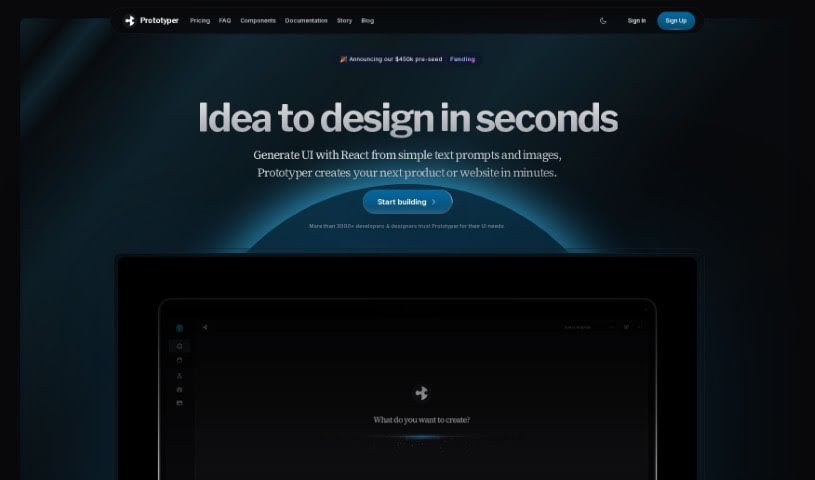
Prototyper is a smart design tool that uses AI to help you create UI elements. All you need to do is give it a simple text prompt or even an image, and it’ll generate what you need. This means you can prototype your products much faster and more efficiently. The whole idea behind Prototyper is to let you build and test UIs really quickly, just by describing your ideas in plain language. It taps into artificial intelligence to turn those descriptions into actual code, making the whole prototyping process feel more natural and speedy. Plus, you can tweak the code in real-time using the editor right there beside your preview, so you see the results of your changes instantly. Prototyper plays nicely with different development needs, supporting popular frameworks like Tailwind, HTML, and React. It also has features that let teams work together smoothly on prototypes.
Who’s Behind Prototyper?
Prototyper, this AI design assistant, was actually developed by the team at Wavyr. They’re the folks behind this innovative tool. Their company is really focused on making UI prototyping fast and efficient, and it’s no wonder over 1000 developers and designers have come to trust them. Wavyr Prototyper is all about making it easy for people to create UI designs using AI, and it definitely stands out as a great platform for quick prototyping and code generation.
What Can You Actually Do with Prototyper?
Here’s a look at what Prototyper is great for:
- Custom Branding: Tailor designs to fit your specific brand identity.
- Github Integration: Seamlessly connect with your Github repositories.
- Publish to Your Own Domain: Easily share your prototypes by publishing them directly to your domain.
- Bring Your Own Components: Integrate your existing UI components into the prototyping process.
- Largest AI Model: Benefit from the power of a comprehensive AI model for design generation.
- Single Sign-On: Enjoy a streamlined login experience with SSO.
- Platform APIs: Access and utilize platform APIs for extended functionality.
- AI-Powered Design Tools: Harness the power of AI for intuitive design creation.
- Real-time Iteration: Make instant adjustments and see the results immediately.
- Front-End Frameworks: Work with popular frameworks like React, Tailwind, and HTML.
- Generate UI with React from Simple Text Prompts and Images: Turn your ideas into functional React code with just text or screenshots.
- Prototype Products in Minutes Using AI-Powered Design Tools: Speed up your workflow by creating product prototypes rapidly.
- Convert Text Prompts or Design Screenshots into Working Code: Transform your concepts into ready-to-use code.
- Supports Multiple Frameworks such as Tailwind, HTML, and React: Get the flexibility you need with broad framework compatibility.
- Directly Interact with and Refine Prototypes in Real-Time: Get hands-on with your designs and make immediate improvements.
- Manage Projects Across Different Organizations and Teams: Keep your work organized, even when managing multiple projects or teams.
- Collaborate with Team Members Within Shared Workspaces: Work together effectively in a shared environment.
- Increase Efficiency and Elevate the Generative UI Design Process: Boost your productivity and improve the quality of your AI-driven designs.
- Enhance Project Workflow with Industry-Leading AI Software: Streamline your projects with top-tier AI tools.
- Make Real-Time Code Changes While Previewing the Outcome: See your code adjustments reflected instantly in the prototype.
Who Should Be Using Prototyper?
Prototyper is a fantastic tool for:
- Designers: Quickly visualize and test design concepts.
- Frontend Engineers: Generate code efficiently and iterate rapidly.
- Product Managers: Bring product ideas to life and gather feedback easily.
How Do I Actually Use Prototyper?
Getting started with Prototyper is pretty straightforward. Just follow these simple steps:
- Describe Your Vision: Start by clearly describing what you want your UI to look like using natural language. You can also upload design screenshots if you have them.
- Let the AI Work Its Magic: Prototyper then uses its advanced AI technology to translate your descriptions into actual code for the UI components you need.
- Choose Your Framework: The tool is flexible and supports various frameworks like Tailwind, HTML, and React, so you can pick the one that best suits your project.
- Play Around with It: You can interact directly with the prototypes you create. Make changes to the UI in real-time and see exactly how they look instantly.
- Team Up: If you’re working with others, use the collaboration features to work together on projects in shared virtual workspaces.
- Consider Upgrading: You can start with the free basic plan to get a feel for the tool. As your projects grow and your needs become more advanced, you can then look at upgrading to more comprehensive plans.
By following these steps, you’ll be able to use Prototyper really effectively to create and test your UI designs, thanks to its powerful AI technology and real-time iteration capabilities.