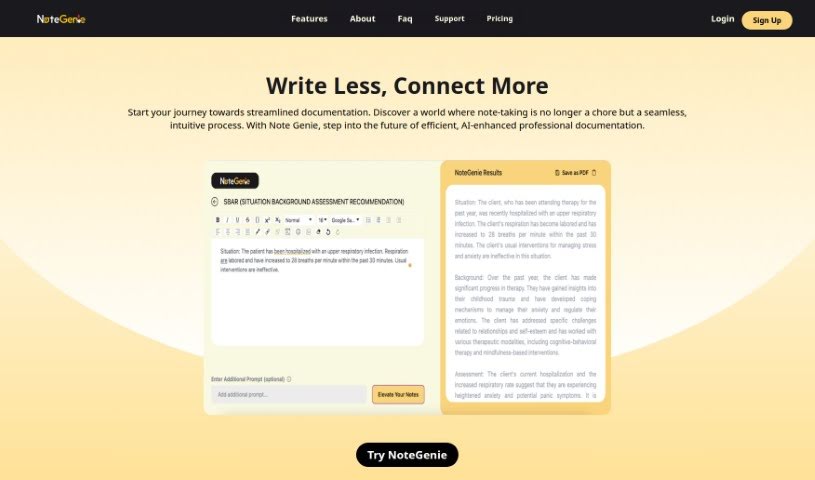
Screenshot of NoteGenie

NoteGenie

Discover what NoteGenie is and how to use it effectively in 2025. We'll explore its features and see how it stacks up against other AI note-taking tools.

Screenshot

What is NoteGenie?

NoteGenie is a smart AI tool designed to completely change how you take notes and boost your productivity. It uses advanced technology and machine learning to handle the note-taking for you, which saves you time and makes sure your notes are more accurate. Forget about typing mistakes or missing those crucial details – NoteGenie makes note-taking much smoother and more effective.

Who created NoteGenie?

NoteGenie was brought to life by a dedicated team of designers and industry pros who really wanted to make note-taking simpler and better. The people who started the company have backgrounds in medical and behavioral health. This means they understand firsthand the challenges professionals face when trying to keep up with strict standards. The whole team is committed to creating a product that’s efficient, professional, and easy to use. Their goal is to set a new standard for productivity and efficiency in the professional world.

What is NoteGenie used for?

  • For Educators: Take notes during lectures, create lesson plans, and keep track of how students are doing to teach more effectively.
  • For Project Management: Keep track of meeting notes, plan out projects, and capture brainstorming ideas to really boost your productivity.
  • For Researchers: Organize research findings, record experimental data, and jot down hypotheses in a clear, structured way.
  • For Writers: Easily capture ideas, map out articles, and start drafting content.
  • For Session Notes: Quickly jot down notes from sessions and then polish them up to create polished, well-written documents.
  • For Healthcare: Streamline how you document patient visits, manage medical research, and handle clinical notes.
  • For Legal Professionals: Organize case notes, research findings, and client communications so your legal practice runs more smoothly.
  • For Progress Notes: Improve your progress notes, making sure they’re specific, objective, and focus on outcomes you can measure.
  • For General Productivity: Organize your thoughts and ideas to help you be more productive.
  • For Precision Documentation: Make your clinical notes, educational notes, and legal case reports more accurate and efficient than ever before.
  • For Optimized Notes: Create notes that are perfectly suited for different kinds of content and how you work professionally.
  • For Time and Accuracy: Save time, cut down on mistakes, and even improve how accurately you get reimbursed by insurance, all thanks to AI-powered note optimization.
  • For Idea Organization: Organize your thoughts and ideas to boost both your productivity and overall efficiency.

Who is NoteGenie for?

  • Social Workers and Psychotherapists
  • Health Professionals (like Acupuncturists, Speech and Language Therapists, Physical Therapists, Occupational Therapists, Chiropractors)
  • Doctors and other Healthcare Professionals
  • Lawyers and Legal Professionals
  • Educators and Academic Professionals
  • Business Professionals
  • Researchers and Scientists
  • Writers and Content Creators
  • Social Workers and Psychotherapists (again, it’s that important!)
  • Other related health professionals (such as acupuncturists), speech and language therapists, physical therapists, occupational therapists, and chiropractors.

How to use NoteGenie?

Here’s how to get the most out of NoteGenie:

  1. Streamline Your Workflow:
    • Start by using templates that are made for your specific professional needs.
    • Pick the right template for the kind of notes you’re taking – maybe progress notes or treatment plans.
    • Feel free to customize the template so it perfectly fits what you need and how you like to work.
  2. Elevate Your Notes:
    • First, choose the specific type of note you want to create (like SOAP or BIRP).
    • Then, start typing your notes directly or paste in any existing text you have.
    • Once you’re ready, just select “Elevate Your Notes” to see what Note Genie has created.
  3. Got Questions? We’ve Got Answers:
    • Wondering who can use NoteGenie? We’ll tell you.
    • Curious about the different kinds of notes you can write? We cover that too.
    • Need to know about data safety? We’ll explain how NoteGenie keeps your information secure.
    • Want to know if you can export your notes? We’ll let you know.
    • Where do your notes actually get saved? We’ll clarify that.
    • Are there any limits on the notes you take? We’ll make sure you’re aware of any restrictions.
  4. Subscription Options:
    • NoteGenie offers a free 1-day trial so you can try it out before committing.
    • If you decide to subscribe, there’s a basic plan with 100 notes for $10.99. Or, for more extensive needs, a premium plan offers 500 notes for $14.99. These options are designed to fit different note-taking requirements.

By following these steps and checking out the features and subscription plans, you can really improve your note-taking. You’ll boost your productivity and get the full benefit of NoteGenie’s AI capabilities. Experience the next step in note-taking with NoteGenie and make your professional documents much better.

Related AI Tools

Discover more tools in similar categories that might interest you

Stay Updated with AI Tools

Get weekly updates on the latest AI tools, trends, and insights delivered to your inbox

Join 25,000+ AI enthusiasts. No spam, unsubscribe anytime.