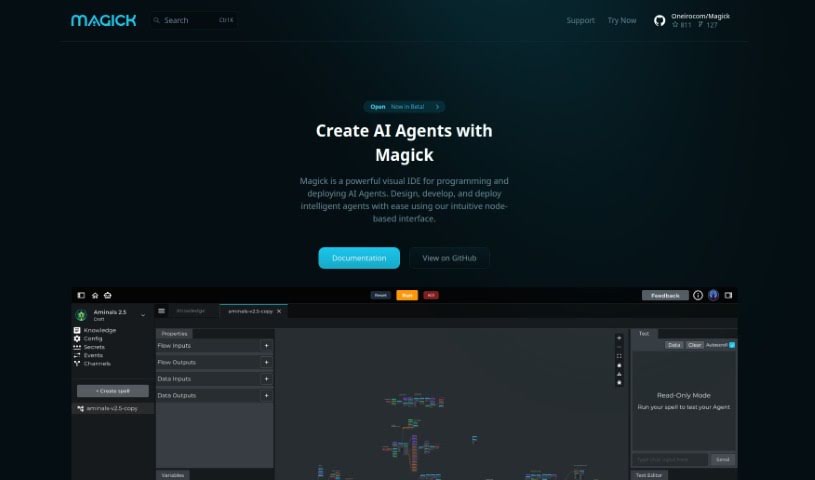
Screenshot of Magick

Magick

Discover what Magick is and how to use it effectively in 2025. Explore its features and see how it stacks up against other Software Development Tools.

Screenshot

What is Magick?

Magick is a cloud-based software platform built to help people create and launch AI applications and services. The best part? You don’t need to be a coding wizard, worry about managing servers, or handle hosting yourself. It’s designed with a really user-friendly interface, featuring drag-and-drop visual builders that make creating and customizing AI components a breeze. Magick gives you access to various machine learning providers, supports deploying complex AI pieces, and even comes with pre-made templates to speed up your application development. Whether you’re just starting out or you’re a seasoned pro, Magick aims to make AI development feel fun and straightforward.

Is there anything specific about Magick you’d like to dive into more deeply?

Who created Magick?

Magick was brought to life by a team of innovators: visionary CEO Heru (Michael Sharpe), CTO Moon (Shaw Walters), CDO Dragon (Andrew Da Silva), and strategic CPO Mr. Metaverse (Jesse Alton). They launched the platform on February 14, 2023. It’s a cloud-based AI development solution that stands out with its user-friendly interface, drag-and-drop builder, and seamless integration with leading machine learning providers like OpenAI and AI21. The goal was to create a tool that empowers both experienced developers and those new to AI, making it efficient to build and deploy AI applications.

What is Magick used for?

  • Crypto/Web3: Building applications in the decentralized space.
  • Knowledge Bots & Customer Service Bots: Creating intelligent assistants for information retrieval and support.
  • Chatbots Development: Crafting conversational AI experiences.
  • Recommendation Engines: Building systems that suggest relevant content or products.
  • Image Recognition Tools: Developing applications that can identify and interpret images.
  • Powerful Low-Code Visual Programming: A flexible way to build complex systems without extensive coding.
  • Building Multi-Agent Systems: Creating interconnected AI agents that work together.
  • Building Generative Pipelines: Developing workflows for creating new content or data.
  • Flexible Usage: Adapts to a wide range of different needs and projects.
  • Ideal for Novice Users: Makes AI development accessible even if you’re just starting out.

Who is Magick for?

  • Professional Developers: For those who want to speed up AI integration and deployment.
  • Amateur Developers: A great entry point for learning and building AI projects.
  • Knowledge Bots Creators: Anyone looking to build bots that provide information.
  • Customer Service Bots Developers: For creating efficient customer support solutions.
  • Crypto/Web3 Professionals: To integrate AI into blockchain and decentralized applications.
  • Anyone interested in AI development: If you want to build AI applications, Magick is designed for you.

How to use Magick?

To get the most out of Magick, here’s a simple guide:

  1. Get to Know Magick: Think of Magick as your cloud-based AI workshop. It lets you build and deploy AI applications without getting bogged down in code or server management. Its user-friendly interface, complete with drag-and-drop tools, makes creating and customizing AI components really straightforward.
  2. Play with the Visual Builder: Dive into Magick’s drag-and-drop visual builder. It’s your go-to for creating and customizing AI components with ease. This intuitive interface means developers of all levels can jump right in.
  3. Build Your First AI Apps: If you’re new to AI, Magick’s no-code visual builder is your best friend. You can create and customize AI components without writing a single line of code.
  4. Deploy Your Magick Spells: Once you’ve created your AI components, called ‘Magick Spells,’ you can deploy them to platforms like Discord and Twitter. This lets your AI interact across different channels.
  5. Connect and Adapt: Magick plays well with others, integrating with multiple platforms to extend your AI applications’ reach. Plus, if you do want to code, you can – it’s flexible enough for both coders and non-coders.
  6. Use Your Magick Key: Access leading machine learning providers like OpenAI and AI21 through Magick Key, a single API. It makes managing your keys and choosing the right models for your tasks super simple.
  7. Jumpstart with Templates: Magick offers pre-made templates that let you quickly build and deploy AI applications. Whether you need a chatbot, a recommendation engine, or an image recognition system, there’s likely a template to get you started.
  8. Stay Flexible with Providers: Don’t get locked into one provider. Magick Key lets you easily switch between different machine learning models as your needs change, keeping your options open.
  9. Count on Support: Magick provides solid support for deploying even complex AI components. The expert team behind the platform is dedicated to ensuring quality and continuous innovation.
  10. Magick is for Everyone: Whether you’re a seasoned developer or just curious about AI, Magick offers an easy-to-use platform with a wide range of features. It’s designed to suit different skill levels and project requirements.

By following these steps, you can effectively use Magick to build, deploy, and customize AI applications with efficiency and ease.

Related AI Tools

Discover more tools in similar categories that might interest you

Stay Updated with AI Tools

Get weekly updates on the latest AI tools, trends, and insights delivered to your inbox

Join 25,000+ AI enthusiasts. No spam, unsubscribe anytime.