What is MAGE - GPT Web App Generator ✨?
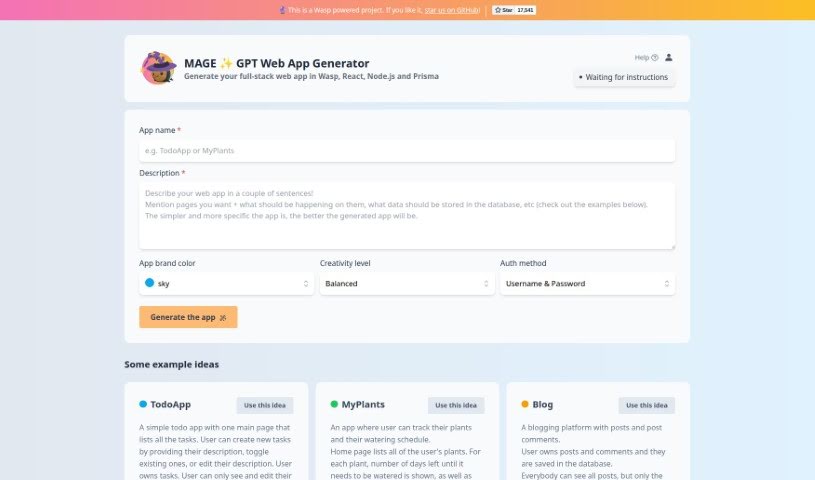
MAGE is a really cool GPT Web App Generator that’s changing how we build full-stack web applications. It uses awesome technologies like Wasp, React, Node.js, and Prisma to make it super easy for anyone to bring their web app ideas to life. The platform has a simple interface that guides you through adding basic details – think your app’s name, what it does, its main color, how creative you want it to be, and how users will log in. MAGE even offers some neat example app ideas, like “TodoApp,” “MyPlants,” and “Blog,” each with a quick description so you can get a feel for what the app can do. It’s more than just an app builder; it really shows how far web development has come and highlights a strong dedication to open-source principles.
Who created MAGE - GPT Web App Generator ✨?
MAGE GPT started as an experimental project from Wasp. It’s a great example of their commitment to open-source values, using modern tech like Wasp, React, Node.js, and Prisma. The platform itself is designed with an easy-to-use interface and includes helpful example app ideas, making it easier for people with different technical skills to build web applications.
What is MAGE - GPT Web App Generator ✨ used for?
- Blog: A complete platform for blogging, featuring posts and comment sections.
- TodoApp: A simple tool for managing your tasks.
- MyPlants: Helps plant lovers keep track of their plants and when to water them.
- Home Page: Displays all blog posts and is accessible to everyone.
- New Post Page: A form for creating new blog posts, but only logged-in users can access it.
- Edit Post Page: Allows the owner of a post to edit it.
- View Post Page: Shows the full details of a post and includes a form for adding comments.
- App Ideas: Provides inspiring suggestions for apps, complete with brief descriptions to give you a clear idea of their functionality.
- Intuitive User Interface: Makes creating web apps straightforward for everyone.
- Open-Source Commitment: Supports a collaborative development environment where everyone can contribute.
Who is MAGE - GPT Web App Generator ✨ for?
- Anyone building full-stack web applications.
- Web application developers.
- Plant enthusiasts who want to track their plants.
- Bloggers looking for a platform.
- General web developers.
- App developers.
- Full-stack developers.
How to use MAGE - GPT Web App Generator ✨?
Using Magegpt is pretty straightforward. Here’s a quick guide:
- Get Started on the Platform: First, head over to Magegpt. The interface is really user-friendly, designed to be simple and efficient, so you should feel comfortable right away.
- Add Your App’s Basic Info: You’ll need to provide some key details about the web app you want to create. This includes things like the app’s name, a short description of what it does, your preferred brand color, how creative you want the app to be, and how users will log in. This sets the stage for your project.
- Check Out the Example Apps: If you’re not sure where to start, Magegpt has some great pre-made app ideas like “TodoApp,” “MyPlants,” and “Blog.” Each one comes with a description to help you understand what it’s all about.
- Built with Modern Tech: Magegpt uses powerful technologies like Wasp, React, Node.js, and Prisma. This means you can build solid, full-stack web applications with confidence.
- Personalize Your App: You can go beyond the basics to really make the app your own. Just specify your brand colors, the level of creativity you’re aiming for, and the authentication methods you prefer to match your vision and branding perfectly.
- It’s Open-Source!: Remember, Magegpt is an open-source project from Wasp. This is fantastic because it means developers from all over the world can jump in, contribute, make improvements, and innovate together.
By following these steps, you can really speed up the process of building full-stack web applications with Magegpt, using modern tech and features tailored just for you.