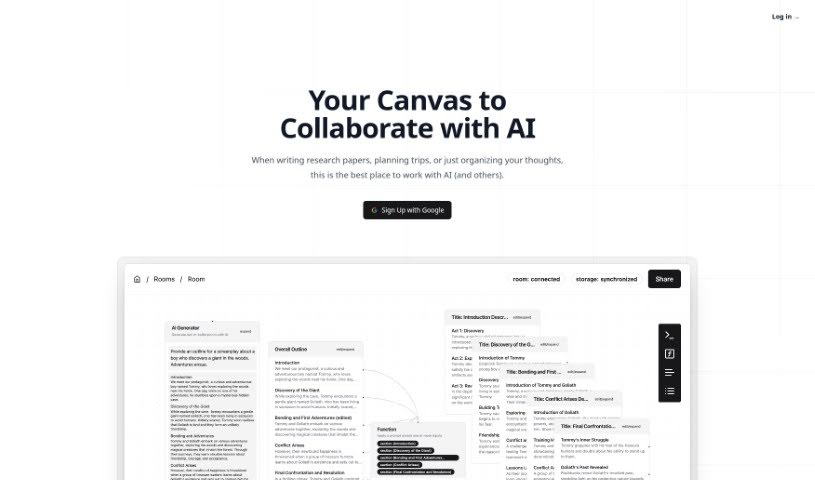
What is Lxi AI?
Lxi AI is a custom tool designed to answer your questions accurately, using OpenAI’s GPT model. It’s built to work with your personal documents. You can upload PDFs, docx files, and text files, or even import content directly from webpages. Lxi AI breaks down your documents into manageable pieces of information, making it easier to find what you need quickly. It then gives you clear, factual answers based on that data. Keep in mind, the quality of the answers really depends on the quality of the documents you upload. Lxi AI offers a 14-day free trial. After that, they charge based on how large your documents are and how many questions you ask. It’s also capable of handling a large number of documents, and they provide dedicated customer support for their enterprise clients.
Who created Lxi AI?
A Look at Lxi AI’s Origins:
Lxi AI, a tool that lets you ask questions about your own documents, first launched on April 19, 2024. It was started by a team who wanted to improve how people work by using OpenAI’s GPT model to deliver dependable answers from personal files. This innovative company lets users upload PDFs, docx files, text files, and even content from webpages for processing. Lxi AI aims to change how we handle documents by chunking data for storage, offering straightforward, factual answers, and providing features for real-time teamwork to speed up workflows.
What is Lxi AI used for?
- Processing documents efficiently: It can handle large volumes of documents without a hitch.
- Drafting content with AI: Get help from AI to draft sections of your documents, making the writing process smoother.
- Providing context: It connects relevant information, helping to generate context for your tasks.
- Teamwork: Collaborate in real-time with your teammates.
- Getting quick answers: Receive concise and factual answers to your questions.
- File support: Works with PDF, docx, and txt files.
- Web content import: You can import content directly from webpages.
- Handling many documents: It’s designed to manage thousands of documents effectively.
- Secure storage: Your document information is stored securely.
- Cost control: You can manage your question costs by using your own OpenAI API Key.
- Enterprise support: Dedicated customer support is available for enterprise users.
- Process enhancement: It helps improve your workflow without replacing your tasks.
- Contextual content generation: Create content that’s relevant to the specific context.
- Real-time collaboration: Share your workspace with teammates and see their interactions as they happen.
- Document library: Build your own library of documents for easy access.
- Specific answers: Extract precise answers from your personal documents.
- Information retrieval: Find relevant information from your document library.
- AI-assisted drafting and revision: Use AI to draft sections and then refine them with your guidance.
- Connecting information for AI: Link related pieces of information to give the AI better context for its tasks.
- Real-time teamwork: Share your canvas with colleagues and see their contributions live.
- Comprehensive processing: It handles and extracts information from PDFs, docx files, text files, and webpage content.
- Secure data storage: Information chunks are stored securely for quick retrieval.
- Efficient large-scale processing: It’s built to handle large quantities of documents efficiently.
- Accurate answers: Get concise and factual answers, thanks to OpenAI’s GPT model.
- Flexible pricing: Charges are based on document size and the number of questions asked.
- Free trial: A 14-day free trial is available.
- Language support: Currently supports English, with plans to add more languages.
- Task augmentation: Enhances your processes without taking over your tasks.
- Document format support: Works with PDF, docx, and text files.
- High-volume handling: Capable of managing thousands of documents.
- Clear answers: Provides concise and factual responses.
- Data security: Ensures stored document information is secure.
- Flexible usage: Handles different document sizes and question volumes.
- AI drafting assistance: Helps draft sections of documents.
- Collaborative work: Enables real-time teamwork with teammates.
- Contextual content creation: Generates content by linking relevant information.
- Personalized answers: Extracts specific answers from your document library.
- Data extraction: Processes and extracts information from PDFs, docx files, and text files.
- Information retrieval: Retrieves relevant information chunks when you ask questions.
- Secure storage: Stores information securely.
- AI-powered answers: Provides concise and factual answers with help from OpenAI’s GPT model.
Who is Lxi AI for?
- Content creators: Get help generating and refining your content.
- Researchers: Quickly find and synthesize information from your research materials.
- Professional writers: Streamline your writing process and improve accuracy.
- Knowledge workers: Access and manage information efficiently.
- Legal professionals: Analyze documents and extract key information.
- Educators: Create and organize educational materials.
- Marketers: Generate marketing copy and analyze campaign data.
- Research and data analysis professionals: Process and understand large datasets.
- Writers and editors: Enhance your editing and writing workflow.
- Healthcare professionals: Manage patient records and research papers.
- Customer Support Representatives: Quickly find answers to customer queries.
- Educators and trainers: Develop and deliver training materials.
- Marketing and Advertising Professionals: Craft compelling campaigns and analyze results.
- Business analysts and consultants: Process business documents and extract insights.
- Financial advisors and accountants: Manage financial reports and client data.
- Writers: A general term for anyone who writes professionally.
- Professionals dealing with large quantities of documents: Anyone who needs to manage and extract information from many files.
How to use Lxi AI?
Here’s how you can get started with Lxi AI:
- Upload Your Documents: Lxi AI makes it easy to upload PDFs, docx files, text files, and even content directly from webpages.
- Let it Process: The platform uses smart technology to break down your documents into smaller, relevant pieces. This helps with retrieving information later.
- Secure Storage: Lxi AI securely stores the information from your documents, so it’s ready when you need it.
- Ask Away: Simply ask your questions. Lxi AI will find the relevant information in your library and give you clear, factual answers.
- Try it Free: You can use Lxi AI for free for 14 days. This trial period lets you explore all its features and see how it can help you.
- Understand the Costs: After the trial, pricing is based on document size ( $0.1 per MB per month) and the number of questions you ask ( $0.0025 per question).
- Language: Right now, Lxi AI only works with English. They do have plans to add support for more languages in the future.
- Manage Your Costs: You can keep an eye on your question costs by using your own OpenAI API Key within Lxi AI.
- Enterprise Support: If you’re an enterprise user, dedicated customer support is available to help you.
- Collaborate: Share your workspace with teammates in real-time. This can really boost collaboration and speed up your work.
By following these steps, you can effectively use Lxi AI for processing documents, finding information, and getting clear answers.