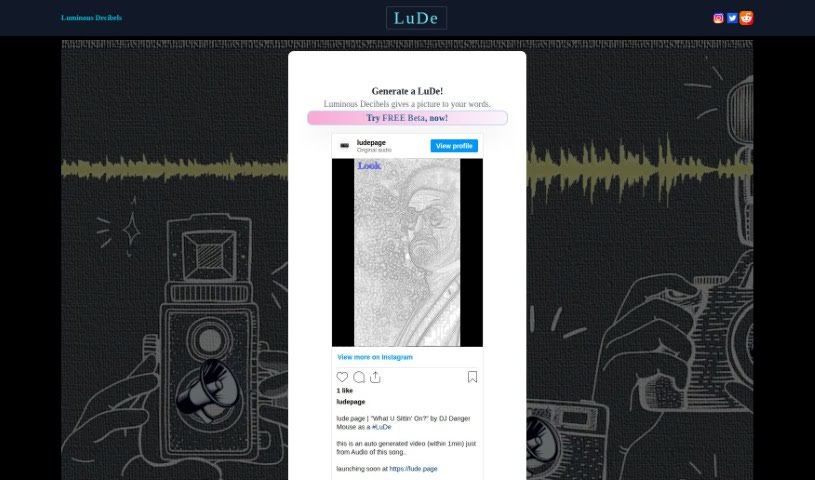
Screenshot of Lude

Lude

Discover what Lude is and how to use it effectively in 2025. We'll explore its features and see how it stacks up against other Text-to-Video tools.

Screenshot

What is Lude?

LuDe is an AI tool built for making short videos, especially those lyrical ones you see on YouTube Shorts or Instagram Reels. You can give it an audio file or just type in some text, and it’ll create the video for you. Right now, LuDe is in beta, but it already has some neat features. You can pick different backgrounds, tweak the script, and use something called ‘Luminate’ processing to generate visuals based on what you input. If you want to upload audio, LuDe accepts files like wav, mp3, m4a, aac, and flac, with a maximum file size of 64MB. It also lets you edit scripts, trim longer audio clips down to 30 seconds, and basically create those short, catchy videos you’re used to seeing on Instagram Reels. They even have a demo video to walk you through how it all works.

Who created Lude?

LuDe Overview:

LuDe, which launched on June 18, 2024, is an AI-powered tool that’s really good at making short videos, particularly for lyrics, much like you’d find on YouTube Shorts and Instagram Reels. You can either type in text or upload audio files to get your video made. Plus, you get options to customize backgrounds and edit the script. It’s still in beta, but it’s pretty user-friendly, automatically transcribing your audio and capping uploads at 64MB. While it’s mainly for short videos and doesn’t have super advanced editing, LuDe makes it easy to create videos without much fuss.

What is Lude used for?

  • Making lyrical videos that feel like YouTube Shorts or Instagram Reels.
  • Uploading audio files or typing in text to generate videos.
  • Customizing the background of your videos.
  • Editing the script for your video.
  • Trimming audio files so they’re 30 seconds long.
  • Creating videos specifically for Instagram Reels.
  • Adding a personal touch to videos using AI-generated visuals with ‘Luminate’.
  • Making short videos that are similar to YouTube Shorts.
  • Accessing and using LuDe right from your web browser.
  • Turning your audio files into an editable script automatically.
  • Crafting short videos that fit the style of YouTube Shorts or Instagram Reels.
  • Choosing from various background options to personalize your videos.
  • Adjusting the script to perfectly match what you need.
  • Cutting down audio files that are longer than 30 seconds to fit the time limit.
  • Producing short videos that are ideal for Instagram Reels.
  • Making your videos unique by customizing backgrounds and editing scripts.
  • Using the ‘Luminate’ process for cool AI-generated visual effects.
  • Creating short, lyrical videos that are perfect for YouTube Shorts.
  • Getting your uploaded audio transcribed into a script you can edit.
  • Attaching audio files to create videos.
  • Typing in text to generate videos.
  • Editing the script to meet your specific needs.
  • Trimming audio files that are longer than 30 seconds down to exactly 30 seconds.
  • Making short videos where the audio file is no larger than 64MB.
  • Using Luminate to make your visuals even better.
  • Customizing videos to give them your own personal feel.
  • Creating short videos that work best on platforms like Instagram Reels.

Who is Lude for?

  • Content creators
  • Social media managers
  • Marketers
  • Musicians
  • Small Business Owners
  • Digital marketers
  • Advertisers
  • Social media marketers
  • Influencers

How to use Lude?

Want to make short-form videos like YouTube Shorts or Instagram Reels with LuDe, the AI video creator? It’s pretty straightforward. Here’s how:

  1. Head over to LuDe: Just go to their website at https://lude.page/.
  2. Add Your Audio or Text: You can upload audio files in formats like wav, mp3, m4a, aac, or flac. Or, if you prefer, just type in the text you want for your video.
  3. Pick a Background: LuDe offers different background themes – think nature, city scenes, waves, or even paper textures. Choose one that fits your video.
  4. Edit the Script: You’re welcome to edit the script to your liking. LuDe also helps by transcribing your audio into a script format that you can easily edit.
  5. Trim Your Audio: If your audio file is longer than 30 seconds, LuDe will automatically trim it down to fit the 30-second limit.
  6. Make it Personal: For an extra touch, use the ‘Luminate’ feature. It generates unique visuals based on what you’ve provided.
  7. Generate the Video: Click the ‘Luminate’ button, and let the AI work its magic to create the visuals for your video.
  8. Final Touches: Give your video a quick review and make any last adjustments before you save or share it.

Just a heads-up, LuDe is still in beta, so you might run into a few minor bugs now and then. If you need a bit more guidance, there’s a demo video available on the LuDe website. Have fun creating your personalized short-form videos easily with LuDe!

Related AI Tools

Discover more tools in similar categories that might interest you

Stay Updated with AI Tools

Get weekly updates on the latest AI tools, trends, and insights delivered to your inbox

Join 25,000+ AI enthusiasts. No spam, unsubscribe anytime.