Langui (Web Development)
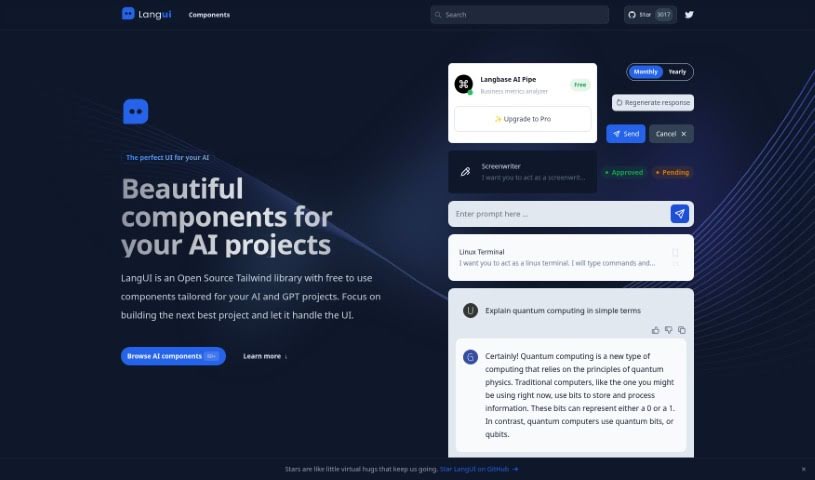
Screenshot of Langui

Langui

Discover Langui, a free, open-source Tailwind library with components designed for AI and GPT projects. Learn about its features, customization, and

Screenshot

What is Langui?

LangUI is an open-source Tailwind library offering free components designed for AI and GPT projects. Its components are responsive, reusable, and work in both dark and light modes, so you can focus on your project’s core features rather than UI design. Customization is simple thanks to a two-color palette (slate and blue), and everything looks good on any screen size.

Who created Langui?

Langui was created by Ahmad Bilal, who founded the company behind this open-source Tailwind library.

What is Langui used for?

  • Free, open-source Tailwind components for AI and GPT projects
  • Responsive, reusable components that support both dark and light modes
  • Easy customization via a simple slate and blue color palette
  • Integration by copying and pasting components into your project
  • Component requests and collaboration through GitHub
  • MIT licensing, free for both personal and commercial projects
  • Zero dependencies or installations required

Who is Langui for?

LangUI is aimed at developers and professionals working in AI and GPT.

How to use Langui?

LangUI requires no setup. Pick the component you need, copy it, and paste it into your project. Key points:

  1. No installations needed: Components are ready to copy and paste directly into your codebase.
  2. Free under the MIT license: Use it in any personal or commercial project at no cost. You can support the project by starring it on GitHub.
  3. Dark and light modes: All components come ready for both modes for a consistent user experience.
  4. Fully responsive: Components look polished on any screen size, from desktop to mobile.
  5. Easy customization: Tailor the look and feel using the two-color slate and blue palette.
  6. Suggest new components: Share ideas and requests on GitHub.

Visit LangUI on GitHub to browse the full component collection and start integrating UI elements into your AI and GPT projects.

Related

Related AI Tools

Discover more tools in similar categories

New tools, in your inbox.

Weekly picks of the best AI tools we've researched and added — no spam, unsubscribe anytime.

Join 25,000+ AI enthusiasts. No spam, unsubscribe anytime.