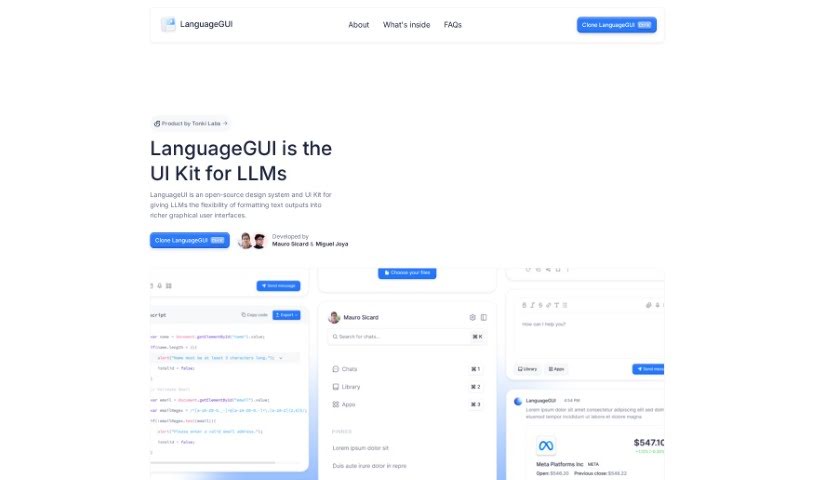
What is LanguageGUI?
LanguageGUI is a really neat open-source UI kit. Its main goal is to boost what large language models (LLMs) can do by letting you add graphical user interfaces right into their text outputs. It is a way to make AI conversations more visual and interactive. It comes packed with over 100 different UI components, widgets, and even ready-made screens. You can use these for all sorts of conversational interfaces, like chat bubbles, sidebars, or setting up multi-prompt workflows. Plus, it’s super adaptable for both your personal projects and commercial ventures, all thanks to the MIT License. It gives developers a solid starting point for building really engaging AI applications.
Who created LanguageGUI?
LanguageGUI was actually built by the folks at Tonki Labs. Mauro Sicard and Miguel Joya were the main drivers behind it, with a few other team members chipping in with smaller contributions. As I mentioned, this open-source UI kit is all about making large language models (LLMs) even better by weaving graphical user interfaces into their text outputs. It provides a wide variety of UI components and screens, perfect for anyone working on conversational AI projects.
What is LanguageGUI used for?
LanguageGUI is incredibly versatile, making it useful for a bunch of things:
- Building chat interfaces: Create those familiar chat windows that feel natural and easy to use.
- Setting up multi-prompt workflows: Manage complex interactions where users might need to input information in stages.
- Customizing chat sidebars: Add helpful navigation or information panels alongside your chat.
- Crafting rich conversational UIs: Go beyond basic text to create more dynamic and engaging user experiences.
- Boosting LLM capabilities: Essentially, it helps make your AI models more powerful by giving them a visual dimension.
- Creating intuitive conversational experiences: Make interacting with AI feel as simple as talking to another person.
- Designing versatile user interfaces: Whether it’s a simple chat or a complex workflow, LanguageGUI has you covered.
- Jumpstarting design processes: With over 100 UI components and 30+ pre-built screens, you can get a head start on your designs.
- Adapting text outputs into GUIs: This is its core function – transforming plain text from LLMs into interactive graphical elements.
- Providing a foundation for engaging AI apps: It’s a great base for building applications that really capture users’ attention.
- Enhancing LLM capabilities: Again, it’s all about making those language models work better.
- Integrating GUIs into text outputs: This is the key feature – bridging the gap between text and visuals.
- Versatile user interfaces: It’s designed to be flexible for many different needs.
- Jumpstarting design with templates: Save time by using pre-made interface templates.
- Adaptable for personal and commercial projects: Use it freely for whatever you’re building.
- Dark mode included: For those who prefer a darker interface, it’s there for user comfort and screen adaptability.
- Figma Auto Layout: It uses Figma’s Auto Layout, which means your interfaces will be flexible and responsive, adapting nicely to different screen sizes.
- Supports various workflows: It’s built to handle chat bubbles, sidebars, and multi-prompt setups.
- Over 100 UI components & customizable screens: That’s a lot of building blocks!
- 10+ conversational UI widgets: Specific tools for chat-like interactions.
- 30+ pre-built screens: Ready-to-go layouts to get you started quickly.
- Dark Mode included: A nice touch for aesthetics and usability.
- Designed with variables and styles: Makes customization easier and more consistent.
- Creating chat bubbles, sidebars, and multi-prompt workflows: These are the core use cases it supports.
- Personal and commercial projects under the MIT License: You can use it without worrying about licensing fees.
- Specialized tools for intuitive conversational experiences: It’s built with the user’s interaction in mind.
- Utilizing advanced Figma capabilities: It’s designed to take advantage of Figma’s powerful features.
- Dark mode included: Again, a great option for design flexibility.
- Adaptable design system: It’s a flexible system that can be tailored for different conversational interfaces.
Who is LanguageGUI for?
This UI kit is a great resource for a variety of professionals:
- Developers: Especially those working with AI and LLMs.
- Designers: Anyone looking to create user-friendly interfaces for AI.
- Conversational AI Professionals: Specialists in building AI that communicates effectively.
- UI/UX Designers: Those focused on user interface and user experience.
- AI application developers: People building applications powered by AI.
- AI developers: A broader category for those in AI development.
- Conversational AI specialists: Experts in creating AI dialogue systems.
How to use LanguageGUI?
To get the most out of LanguageGUI, here’s a simple breakdown of how to use it:
- Access LanguageGUI: First off, remember that LanguageGUI is an open-source UI kit. It’s specifically designed to help large language models (LLMs) make their text outputs more graphical and interactive.
- Explore Key Components: You’ll find it’s packed with over 100 customizable UI components. On top of that, there are more than 10 conversational UI widgets and over 30 pre-built screens. These are all there to help you create different kinds of conversational interfaces, like chat bubbles or sidebars.
- Check Out the Features: LanguageGUI also includes a dark mode, which is nice for user comfort and screen adaptability. It also offers a robust selection of prompt boxes and makes great use of Figma’s Auto Layout feature, meaning your designs will be flexible and responsive.
- Got Questions? Check the FAQs:
- Cost: Good news – LanguageGUI is completely free! There are no hidden costs to worry about.
- Commercial Use: You can use it freely for both personal and commercial projects because it’s released under the MIT License. You don’t even need to ask for permission or provide attribution.
- Creators: It was developed by the team at Tonki Labs, with Mauro Sicard and Miguel Joya being the main contributors.
- Future Plans: There was some talk about turning LanguageGUI into a code library, but honestly, due to time constraints and the complexity of custom implementations, that plan is on hold for now. They’re waiting to see if there’s enough community interest first.
- Cloning and Starting: Think of LanguageGUI as a fantastic starting point for making your conversational AI interfaces much better. You can easily access and use it for your projects.
By following these steps, you should be able to use LanguageGUI to build really engaging and interactive AI applications without too much trouble.