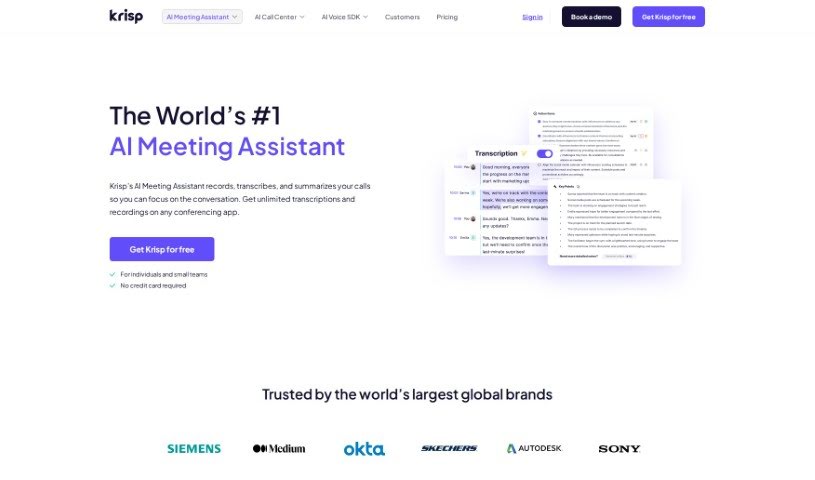
What is Krisp AI Meeting Assistant?
Krisp AI Meeting Assistant is a handy tool designed to make your online meetings much better. It offers a bunch of useful features, like canceling out background noise, providing accurate transcriptions, creating meeting summaries, and even recording your calls. It really simplifies collaboration by giving you AI-powered tools that can automatically take notes, summarize discussions, assign tasks, set deadlines, and let you play back recordings synced with the transcriptions. The best part? It works with any conferencing app you use, and you get unlimited transcriptions for free! It’s also been recognized for its innovation, snagging Webby Awards and making lists like Forbes’ “AI 50” and TIME 100 for “Best Inventions of 2020”.
Who created Krisp AI Meeting Assistant?
Krisp AI Meeting Assistant was actually created by Davit Petrotyan and Arto Minasyan. They launched the platform back in March 2017, with a clear goal: to build AI-powered voice technologies that really improve how effectively we communicate. The company, which used to be called 2Hz, has hit some major milestones. They were named to the TIME 100 list of “Best Inventions of 2020” and have won awards like the Webby Award for “Best Use of AI and Machine Learning.” The AI Meeting Assistant feature itself was introduced more recently, in March 2023, bringing services like call transcriptions, summaries, and action items to the table. Krisp keeps pushing forward, recently adding features like audio and video recording.
What is Krisp AI Meeting Assistant used for?
Here’s a look at what you can do with Krisp AI Meeting Assistant:
- Get AI-powered summaries of your meetings.
- Boost your team’s collaboration.
- Easily assign tasks and set deadlines for them.
- Have your meeting notes taken and shared automatically.
- Automate the process of assigning tasks.
- Capture your meetings smoothly, no matter which app you’re using.
- Play back recordings perfectly synced with AI transcriptions.
- Get transcriptions for call center conversations.
- Gain real-time insights directly from your transcriptions.
- Enjoy a noise-free experience during your online meetings.
- Transcribe client consultations for accurate records.
- Automate note-taking and sharing so you can really focus on making important decisions.
- Make sure you capture every single important detail discussed in your meetings.
- Improve team collaboration by capturing and sharing all discussions and action items.
- Help agents’ accents sound clearer in real-time for better communication.
- Integrate award-winning voice technologies into your own applications if you’re a developer.
- Support hybrid and remote teams by making communication clearer and collaboration smoother.
- Use AI Noise Cancellation in call centers to eliminate distracting background noise from customer calls.
- Securely transcribe agent-customer conversations in real-time right within your call center setup.
- It’s super beneficial for anyone who owns meetings, leads teams, manages projects, or consults with clients – it automates note-taking, helps improve decisions, and keeps track of discussions.
- You get unlimited transcriptions on the free plan, and they’re impressively accurate at 96%.
- Benefit from AI-powered meeting summaries and note-taking.
- Enjoy streamlined recordings and playback.
- Share and collaborate securely.
- Get real-time call transcriptions.
- Use AI accent localization to help with global communication.
- Have meeting notes distributed automatically.
- Support hybrid work and remote teams effectively.
Who is Krisp AI Meeting Assistant for?
Krisp AI Meeting Assistant is a great tool for a variety of roles, including:
- Agile transformation coaches
- Executive Compensation Associates
- Client Services Managers
- Principal Owners
- Solutions Architects
- Anyone who owns meetings
- Leaders and managers
- Consultants
- Heads of Workplace Collaboration
How to use Krisp AI Meeting Assistant?
Using Krisp AI Meeting Assistant is pretty straightforward. Just follow these steps:
- Download and Install: First, grab the latest version of Krisp to get access to the AI Meeting Assistant. Once it’s installed, the Meeting Assistant package will start downloading automatically.
- Configure Settings: Head over to your communication app and make sure you select both Krisp Speaker and Krisp Microphone. Then, turn on the Note Taker feature within the Krisp app itself. You can choose whether to just transcribe your meeting or to transcribe and record it directly from the app. Connecting your calendar to Krisp also makes accessing your meetings super easy.
- Start Meeting: When you’re ready, just start your meeting! Krisp will then work its magic, capturing notes and transcribing the conversation in real-time.
- Collaborate Post-Meeting: After the meeting wraps up, you can manage your tasks efficiently. Share the notes with your team, delegate tasks, decide on priorities, and set deadlines.
- Who Benefits: Krisp really helps meeting owners by automating the note-taking process. Leaders and managers find it useful for making better decisions, and consultants can easily track their discussions with clients.
- Security: Your data privacy is a priority. Krisp processes voice conversations locally on your device, meaning your transcriptions and meeting summaries are secure and only you can access them unless you choose to share them.
- Integration: Krisp fits right in with any voice or conferencing app you use. You don’t need any extra plugins or extensions to get it working.
By following these simple steps, you can really make your online meetings better with Krisp AI Meeting Assistant. It helps streamline communication, manage noise, and ensure you capture all the important details.