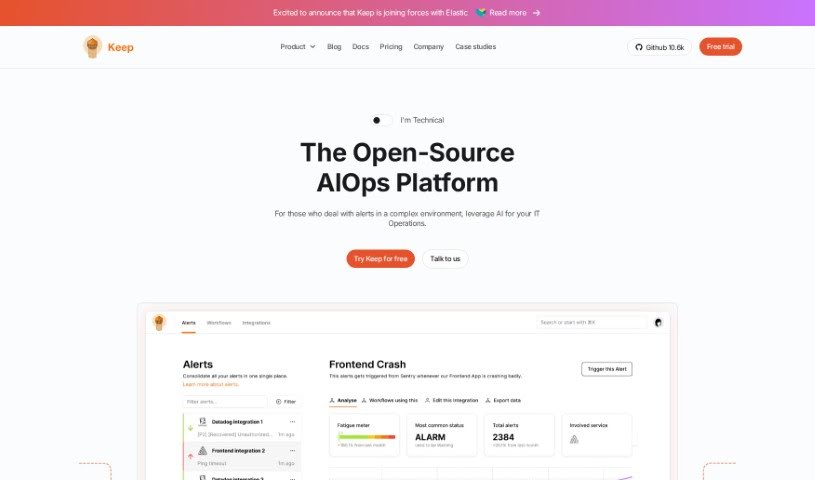
Screenshot of KeepHQ

KeepHQ

Discover KeepHQ in 2025! Learn what this open-source alert management tool is, how to use its features effectively, and how it stacks up against other Software Development Tools.

Screenshot

What is KeepHQ?

A Quick Look at KeepHQ

KeepHQ is an open-source tool designed specifically for software developers to manage alerts. It is your smart assistant for dealing with all the notifications you get. It uses AI to help you cut through the noise, focusing on the alerts that really matter – the ones that impact your business. You can get your own alerts set up in about five minutes, using the open-source examples they provide right on the platform. KeepHQ has some really neat features, like smart noise reduction. This feature takes a flood of alerts and bundles them into smaller, more meaningful groups, which is a lifesaver when you’re trying to avoid alert fatigue. You’ll also get alerts that come with helpful context, lots of ways to connect it with other tools, and soon, they’ll be rolling out playbook automation. Plus, there’s a dedicated team and a growing community ready to help. It’s built to handle complex setups and is great for enterprises, offering features like two-way integration and subscription-based syncing to keep everything up-to-date.

Here’s a bit more on how it helps:

  • KeepHQ makes managing alerts much simpler by bringing everything together in one place – a single pane of glass. This means you can easily see and handle alerts from all your different sources.
  • The smart noise reduction feature is pretty clever. It filters and prioritizes your alerts, turning many individual notifications into fewer, more important packages. This really helps reduce that overwhelming feeling of alert fatigue, letting developers focus on what’s truly critical.

Seriously, if you have more questions or want to dive deeper into any of this, just ask!

Who created KeepHQ?

Shahar, Matvey, and Tal are the brilliant minds behind KeepHQ. They launched the platform on June 18, 2024. While the company is based in Tel Aviv, Israel, their team works remotely. Tal is the CEO, Shahar is the CTO, and Matvey is a co-founder. Keep itself is an open-source alert management tool built for software developers, aiming to reduce alert noise and help them concentrate on the most critical issues.

What is KeepHQ used for?

  • It works with tons of different providers.
  • Helps automate fixing incidents.
  • Does enterprise-level alert correlation.
  • Continuously improves how alert issues are handled.
  • Adds more information to alerts.
  • Groups alerts and signals together.
  • Connects with various corporate systems.
  • You can deploy it in the cloud.
  • Or you can host it yourself.
  • It has a large, active community.

Who is KeepHQ for?

  • Software developers
  • Engineers

How to use KeepHQ?

To get the most out of KeepHQ, here’s a straightforward guide:

  1. Set Up Your Alerts:
    • You can quickly create your own alerts by using the open-source examples available right on the platform. It’s designed to be straightforward.
    • Make sure to use the smart noise reduction feature. It’s really effective at managing and prioritizing alerts, turning them into more manageable packages.
  2. Connect Your Tools (Integration):
    • Take advantage of the two-way and subscription-based integration options. This keeps all your synchronized elements current and in sync.
    • You can connect KeepHQ with many monitoring tools you might already be using, like Datadog, Grafana, Zabbix, and others.
  3. Make It Your Own (Customization):
    • Since KeepHQ is open-source, you have a lot of freedom to customize it to fit exactly what you need. It allows for a high degree of personalization.
  4. Automate Your Workflow:
    • Use the YAML-based workflow engine. It’s a great way to simplify your processes and effectively automate how you handle incidents.
  5. Manage All Your Alerts:
    • The single pane of glass feature is a big help. It lets you see and manage all your alerts in one central spot, making the whole process much simpler.
  6. Consider the Business Plan:
    • If you need more advanced features, like dedicated alerting dashboards, a managed cloud version, or access to an alerts marketplace, you might want to look into upgrading to the business plan.

KeepHQ’s AI-driven noise reduction, its flexibility for customization, and how easy it is to set up alerts make it a fantastic choice for software developers who need efficient alert management, especially in complex environments.

Related AI Tools

Discover more tools in similar categories that might interest you

Stay Updated with AI Tools

Get weekly updates on the latest AI tools, trends, and insights delivered to your inbox

Join 25,000+ AI enthusiasts. No spam, unsubscribe anytime.