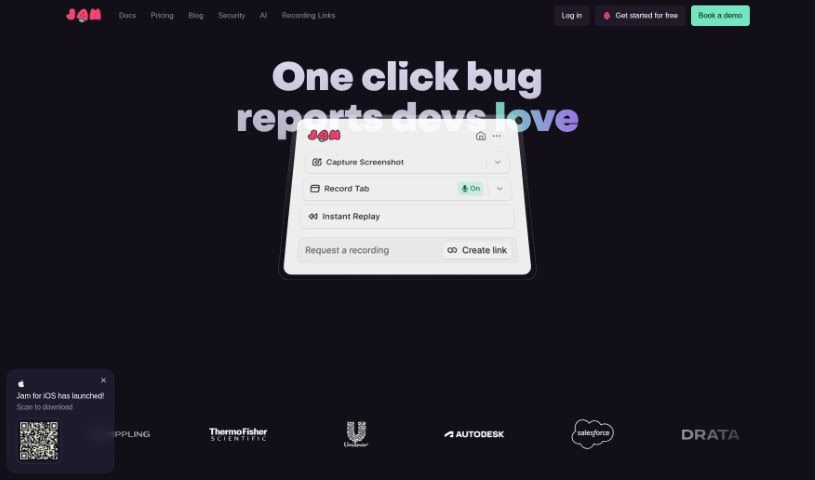
Screenshot of Jam

Jam

Discover what Jam is, how to use it effectively in 2025, and its key features. We'll also compare it with other Testing Tools to help you make the best choice.

Screenshot

What is Jam?

Jam is a smart AI assistant designed to help developers fix bugs faster. It uses AI to figure out what’s wrong with your code and suggests ways to fix it, really streamlining the whole bug-fixing process. Some of its most helpful features include automatically analyzing your source code, giving you personalized suggestions for bug fixes, and making it easier for teams to work together. Teams have found that Jam’s bug-tracking features really boost their workflow efficiency, making it a super useful tool for testing and sorting out issues.

Basically, Jam makes reporting bugs much simpler. It gathers all the necessary details into a single link that you can share with developers. This saves a ton of time, making it quicker to investigate issues and follow up. Plus, Jam’s AI model keeps getting smarter over time, offering even better fix suggestions thanks to its learning algorithms.

What’s also great is that Jam can handle all sorts of information you throw at it. This includes bug descriptions, details about the browser and operating system, console logs, network logs, user actions, and even GitHub repositories. It uses all this to give you really specific advice for fixing bugs. You can also be sure that your codebase stays private and secure while you’re debugging. Jam also fits right into your existing bug reporting setup without any hassle. On top of that, Jam can look at your current codebases and suggest how to change your queries to handle your specific data.

All in all, Jam is a fantastic asset for developers and QA teams. It offers a straightforward and efficient way to track, diagnose, and fix bugs throughout the software development lifecycle.

Who created Jam?

Jam was brought to life by Matthew Haber and first launched on May 3, 2023. It’s a bug reporting tool that has made a big difference in how efficiently bugs are reported and has really smoothed out the workflow for QA and development teams. The tool lets you report bugs quickly, often with visual recordings, and includes handy features like automatic browser logs and integrations with popular tools like Sentry and Jira. People have really praised it for saving time on bug reporting and improving how teams communicate and work together.

What is Jam used for?

  • Save time reporting bugs: Get all the necessary information captured in one link to send to developers.
  • Streamline bug reproduction: Make it easier to reproduce bugs and cut down on miscommunication with developers.
  • Enhance workflow: Improve how you work with built-in bug-tracking capabilities that make identifying bugs simpler.
  • Automate analysis: Automatically analyze source code and get personalized suggestions for fixing bugs.
  • Boost collaboration: Make it easier for teams to work together and offer real-time help.
  • Integrate smoothly: Connect with your existing bug reporting workflows to make debugging more efficient.
  • Speed up investigations: Save time on reporting and investigating bugs by using visual recordings that include logs.
  • Improve teamwork: Enhance how your team works and understands issues with AI-driven input for discussions.
  • Get smarter suggestions: See bug-fixing suggestions improve over time thanks to AI-driven learning algorithms.
  • Handle specific needs: Work with particular infrastructures, get secure code reviews, and ensure your codebase remains private.
  • Bug reporting and tracking: Keep all your bug information organized.
  • Streamlined bug reproduction: Make it simple to recreate issues.
  • Better communication: Improve how you talk to developers about bugs.
  • Automated source code analysis: Let AI examine your code.
  • Personalized bug fix suggestions: Get tailored advice for your code.
  • Cross-team collaboration: Help your team work together more effectively.
  • Workflow integration: Fit Jam into how you already report bugs.
  • Debugging efficiency: Make the debugging process quicker.
  • Real-time assistance: Get help as you need it.
  • Adaptive learning: Benefit from AI that gets better with use.

Who is Jam for?

  • Quality Assurance Lead Engineer
  • Head of Product
  • Senior Product Manager
  • Web Developer
  • CEO
  • Product Support Engineer
  • Lead Product Manager
  • Quality Assurance Analyst
  • Software Quality Assurance Engineer
  • Senior QA Engineering Manager
  • Senior QA Engineer
  • QA Engineering Manager

How to use Jam?

To get the most out of Jam, just follow these simple steps:

  1. Install the Chrome Extension:
    • You can download the Jam Chrome extension directly from the Chrome Web Store.
  2. Reporting Bugs:
    • Use the Jam extension to create bug reports. Just add your detailed bug descriptions, browser/OS info, console logs, what the user did, network logs, and any linked services.
  3. Submit Your Reports:
    • Send your bug reports to Jam. It will securely analyze the details and offer personalized suggestions for fixing your code.
  4. Use Personalized Suggestions:
    • Take advantage of Jam’s AI diagnosis to get custom suggestions for fixing specific bugs in your codebase.
  5. Collaborate Across Teams:
    • Make your teamwork better by using Jam’s features for cross-team collaboration and discussing the AI-driven bug fix suggestions.
  6. Keep Improving:
    • Use Jam regularly so its AI model can learn over time, leading to more accurate and helpful bug fix recommendations.
  7. Codebase Privacy and Security:
    • You can be confident that Jam keeps your codebase private and secure throughout the entire debugging process.
  8. Compatibility Notes:
    • Remember that Jam is a Chrome extension. It works with specific infrastructures and has limitations when it comes to cross-platform compatibility.
  9. Explore Resources:
    • Check out the Jam blog for extra help and guidance on using the tool effectively.

By following these steps, you’ll be able to fully utilize Jam’s capabilities for efficient bug diagnosis and code fix suggestions in your development workflow.

Related AI Tools

Discover more tools in similar categories that might interest you

Stay Updated with AI Tools

Get weekly updates on the latest AI tools, trends, and insights delivered to your inbox

Join 25,000+ AI enthusiasts. No spam, unsubscribe anytime.