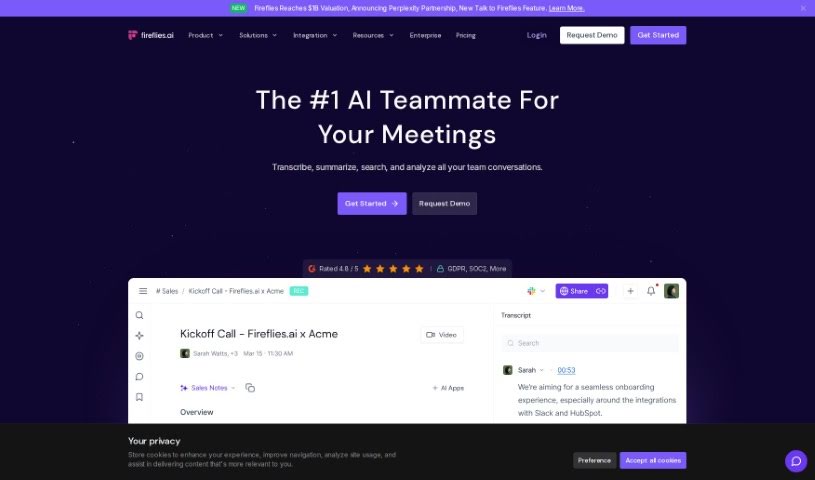
Screenshot of Fireflies AI

Fireflies AI

Discover what Fireflies AI is and how to make the most of it in 2025. We'll cover its features, how it stacks up against other AI note-takers, and practical tips for use.

Screenshot

What is Fireflies AI?

Fireflies AI is a smart tool designed to turn your conversations into actionable insights. It is a voice assistant and transcription service that helps automate your team’s workflows. It’s really good at things like creating meeting summaries, keeping track of action items, monitoring key topics, and even analyzing how much each person talks during a meeting. Plus, Fireflies AI takes security seriously, offering enterprise-grade protection with encryption, security logging, and compliance with GDPR and HIPAA for healthcare. Whether you’re an individual, a small team, a growing business, or a large enterprise, they have flexible pricing plans and extra services like Ask Fred and AI Apps to help you pull specific information from your meetings.

Who created Fireflies AI?

Krish Ramineni and Sam Udotong are the minds behind Fireflies AI. Krish leads as the Co-Founder & CEO, while Sam serves as the Co-Founder & CTO. This company is a global startup, bringing together talented individuals from well-known places like MIT, Microsoft, and Mozilla. They’ve also received backing from a number of investors and prominent figures in the tech world.

What is Fireflies AI used for?

Fireflies AI is incredibly versatile. Here’s a breakdown of what you can do with it:

  • Automatic Meeting Notes: Get notes generated for you automatically.
  • Transcription & Summaries: It transcribes and summarizes meetings held on all sorts of platforms.
  • AI-Powered Search: Easily find specific information within your past meetings.
  • Collaboration Tools: Work with your team by adding comments, pins, and reactions directly to conversations.
  • Conversation Intelligence: Analyze meetings to understand things like who spoke most, the overall sentiment, and more.
  • Performance Improvement: Measure how your sales, recruiting, and internal processes are doing and find ways to make them better.
  • Workflow Automation: Automate tasks that stem from meetings, like updating your CRM or creating new tasks.
  • Knowledge Base: Build a real-time knowledge base for your team using your voice conversations.
  • Flexible Capture: Record and transcribe meetings in many different ways, whether it’s through video, audio files, or direct integrations.
  • Seamless Integration: Connect Fireflies AI to your CRM and other collaboration apps to automatically log meeting notes, transcripts, and recordings.
  • Action Items & Transcripts: Get automatic meeting notes, action items, and transcripts.
  • Cross-Platform Summaries: Transcribe and summarize meetings from various platforms.
  • Information Retrieval: Use AI to search for information within your meetings.
  • Team Collaboration: Add comments, pins, and reactions to conversations to collaborate effectively.
  • Meeting Analysis: Use conversation intelligence to track speaker talk time and sentiment.
  • Automated Task Creation: Automate workflows by having Fireflies fill out your CRM and create tasks using voice commands during meetings.
  • Team Knowledge Hub: Create a real-time knowledge base for your team from voice conversations.
  • Privacy Controls: Customize how meeting information is shared and who can see it.
  • Multiple Capture Methods: Capture and transcribe meetings using various methods.
  • Robust Security: Benefit from enterprise-grade security measures to protect your data.
  • Task Management Integration: Automatically create tasks in Asana, Trello, and Monday.com with simple voice commands during meetings.
  • Instant Sharing: Quickly share meeting recaps with your team via Slack, Notion, Google Docs, and other collaboration tools.
  • Organized Recaps: Organize meeting recaps by department for easy information retrieval.
  • Custom Privacy Settings: Set specific privacy controls for your meeting information.
  • Workflow Automation: Automate your workflows directly from meetings.
  • CRM & App Logging: Log meeting notes, transcripts, and recordings into your CRM and collaboration apps.
  • Interactive Collaboration: Collaborate with team members by adding comments, pins, and reactions to specific parts of conversations.
  • Platform Summaries: Transcribe and summarize meetings across different platforms.
  • Team Communication: Collaborate with colleagues by adding comments and reactions to conversations.
  • Performance Insights: Analyze meetings using conversation intelligence to track speaker talk time and sentiment.
  • Voice-Command Automation: Automate workflows by letting Fireflies fill out your CRM and create tasks using voice commands.
  • Team Knowledge Hub: Create a real-time knowledge base for your team by organizing conversations.
  • Memorable Moments: Leave comments and reactions at different points in calls, and save memorable moments as soundbites.
  • Departmental Organization: Organize meeting recaps by department, team, or project, and track speaker talk time.
  • Team-Wide Knowledge: Create a real-time knowledge base for your entire team from voice conversations.
  • Meeting Visibility: Ensure custom privacy controls are in place for meeting visibility.
  • Versatile Capture: Capture and transcribe meetings in multiple ways.
  • CRM & Task Automation: Automate workflows from meetings, such as filling out CRM logs and creating tasks with voice commands.
  • Broad Integration: Log meeting notes, transcripts, and recordings in CRM and collaboration apps like Salesforce, HubSpot, Slack, and Zapier.
  • Detailed Collaboration: Collaborate with coworkers by adding comments, pins, and reactions to specific parts of conversations.

Who is Fireflies AI for?

Fireflies AI is a great tool for a variety of professionals and teams:

  • Knowledge workers
  • Sales professionals
  • Recruiters
  • Internal teams
  • Customer service representatives
  • Knowledge workers (again, it’s that useful!)
  • Salespeople
  • Recruiters (yes, again!)
  • Managers overseeing internal processes
  • Team administrators
  • Anyone managing internal processes

How to use Fireflies AI?

Getting the most out of Fireflies AI is pretty straightforward. Just follow these steps:

  1. Get Started: First, sign up. Then, you can either invite the Fireflies.ai Notetaker to your meetings directly or set it up to automatically join calls scheduled on your calendar. If you have audio or video files you need transcribed, you can upload those too – the AI will handle it.
  2. Capture & Transcribe: Fireflies.ai can transcribe your meetings in several ways. You can use its direct integrations with dialers, leverage the API, or simply upload files for quick transcription, complete with AI-powered meeting summaries.
  3. Enhance Your Workflow: If you use Google Meet, the Chrome extension is a game-changer. It automatically captures your calls and videos, letting you easily log meeting notes, transcripts, and recordings directly into your CRM and other collaboration apps.
  4. Collaborate & Analyze: Make meetings more interactive. Add comments, pins, and reactions to specific parts of your conversations. You can even create short soundbites of key moments and share meeting notes with your team through popular apps like Slack and Notion. Plus, use the conversation intelligence features to analyze meetings, tracking important metrics and finding ways to improve your processes.
  5. Explore Advanced Features: For enterprise users, Fireflies.ai offers even more. You can get custom speech models, single sign-on, AI Filters, the Topic Tracker, and robust enterprise-grade security measures.
  6. Customize & Get Support: If you’re on the Pro or Business plan, you can even customize the name of your Fireflies Notetaker Bot. Don’t hesitate to reach out to Fireflies.ai if you’re looking for volume discounts, extra add-ons, or custom solutions tailored specifically for your organization.
  7. Security You Can Trust: Fireflies.ai prioritizes your data’s safety. They use 256-bit AES encryption for data at rest and SSL/TLS encryption for data in transit. They also comply with important regulations like SOC 2 and GDPR, ensuring your information is private and secure.

By following these steps, you’ll be able to use Fireflies AI to make your meetings run smoother, boost team collaboration, and efficiently pull out valuable insights from all your conversations.

For a deeper dive, you can check out the Fireflies AI user guide, which should be available in the uploaded files.

Related AI Tools

Discover more tools in similar categories that might interest you

Stay Updated with AI Tools

Get weekly updates on the latest AI tools, trends, and insights delivered to your inbox

Join 25,000+ AI enthusiasts. No spam, unsubscribe anytime.