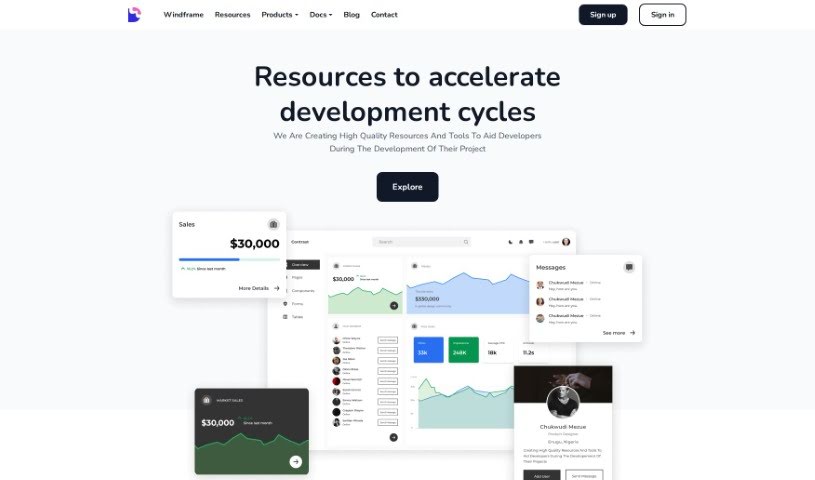
Screenshot of Devwares

Devwares

Discover Devwares, a platform packed with UI kits, admin dashboards, and design systems for Bootstrap, React, and Angular. Learn how to use its free and premium resources to speed up your web and app development in 2025.

Screenshot

What is Devwares?

Devwares is a really useful platform packed with tools and resources specifically made for developers and designers. It is a one-stop shop to make your project development process smoother and faster. They offer things like ready-to-use UI kits, admin dashboards, and comprehensive design systems. These are all built for popular frameworks such as Bootstrap, React, and Angular. Devwares really focuses on providing high-quality assets that save you time and are super flexible, which is exactly what you need for modern web and app development. You can find both free and premium resources here, so it’s accessible whether you’re a seasoned pro or just starting out. The components and templates they offer are carefully put together, designed to give your projects a great head start and really speed up your creative work.

Who created Devwares?

Devwares was actually started by a team of developers and designers who are really passionate about giving others top-notch resources and tools for building projects. Their main focus is on providing things like UI kits, admin dashboards, and design systems that work well with today’s web and app development needs, supporting frameworks like Bootstrap, React, and Angular. What’s great is that Devwares offers a mix of free and premium assets, making them available to a wide range of users. Their goal is to help make the creative process much easier and more efficient for both developers and designers.

What is Devwares used for?

Devwares is incredibly versatile and can be used for a bunch of things to boost your development and design work:

  • High-Quality Resources: Get top-notch assets to help with all your project development needs.
  • Versatile UI Kits: Easily find and use UI kits that work with different frameworks like Bootstrap, React, and Angular.
  • Efficient Design Systems: Designers can make the most of ready-to-use components to speed up their workflow.
  • Responsive Admin Dashboards: Build out your websites and apps with well-designed, responsive admin dashboards.
  • Visual Building Tools: Tools like Windframe are available, letting you work with Tailwind CSS using a drag-and-drop approach.
  • Streamlined Creative Processes: Devwares helps simplify your creative workflow, saving you valuable time.
  • Project Kickstarting: Get your projects off the ground quickly with meticulously crafted components and templates.
  • Wide Accessibility: Resources are available for everyone, with both free and premium options.
  • Enhanced Development: Generally, it helps improve the entire project development process for both developers and designers.
  • Smooth Workflows: It facilitates a smoother, more efficient design and development workflow.
  • Framework Support: You’ll find UI kits, admin dashboards, and design systems specifically for modern web and app development using frameworks like Bootstrap, React, and Angular.
  • Diverse Project Needs: The adaptable UI kits are great for all sorts of different projects.
  • Designer Efficiency: Designers can work more efficiently thanks to the ready-to-use components found in their design systems.
  • Free and Premium Options: You get access to both free and premium resources, ensuring quality and affordability.

Who is Devwares for?

Devwares is perfect for:

  • Developers
  • Designers

How to use Devwares?

Here’s a simple guide to using Devwares effectively:

  1. Visit the Website: Start by heading over to the Devwares website. You’ll find a wide selection of tools and resources there for both developers and designers.
  2. Browse Resources: Take some time to look through their offerings. They have UI kits, admin dashboards, and design systems that are made for popular frameworks like Bootstrap, React, and Angular.
  3. Choose Your Assets: Decide whether you need free or premium resources. Pick what best fits your project’s specific needs and your budget.
  4. Use UI Kits: Make the most of the versatile UI kits to speed up how you develop your projects. You can easily adapt them to fit whatever project you’re working on.
  5. Leverage Design Systems: Take advantage of the efficient design systems. They come with ready-to-use components that can really boost your design workflow.
  6. Explore Admin Dashboards: Check out the responsive admin dashboards Devwares offers. They’re great for your admin websites and applications.
  7. Consider Visual Tools: If you’re working with Tailwind CSS, you might want to try visual building tools like Windframe for a drag-and-drop experience.
  8. Stay Updated: To keep up with new releases, tools, and resources, consider subscribing to the Devwares newsletter on their website.

By following these steps, you can really use Devwares to make your design and development projects much better and more efficient.

Related AI Tools

Discover more tools in similar categories that might interest you

Stay Updated with AI Tools

Get weekly updates on the latest AI tools, trends, and insights delivered to your inbox

Join 25,000+ AI enthusiasts. No spam, unsubscribe anytime.