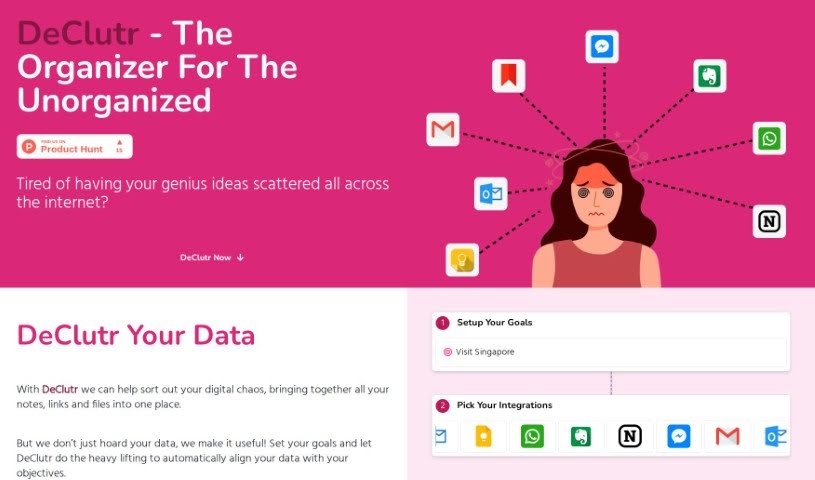
Screenshot of Declutr

Declutr

Discover what Declutr is and how to use it effectively in 2025. We'll explore its features and see how it stacks up against other AI note-taking tools.

Screenshot

What is Declutr?

DeClutr is your digital command center, built to gather all those scattered notes, links, and files you’ve been collecting and bring them together in one organized spot. It uses AI to really dig into your information, offering up personalized suggestions and concrete steps to help you hit your goals. What makes DeClutr stand out? It lets you set your own objectives, then its AI analyzes everything you’ve collected, matching it up with what you want to achieve. You get custom recommendations, and it even helps you create inspiring documents with its smart editor. Plus, there’s an AI assistant ready to offer insights, spark your creativity, and boost your productivity.

This AI assistant is a real game-changer for organizing your data. It doesn’t just sort things; it actively helps by giving you advice that fits your specific goals, sharing useful insights, asking thoughtful questions about your information, and providing clear tasks to keep you moving forward. You tell DeClutr what you’re aiming for, and it automatically lines up your collected data to match those objectives. This means a lot less manual work for you, as the tool efficiently aligns everything based on the goals you’ve already set.

DeClutr Boards is a really neat visual feature. It lets you curate and arrange all sorts of different sources in a way that makes sense to you, almost like a virtual pinboard where you can gather inspiration or map out your ideas. Then there’s the smart document editor. It makes transforming your data into polished, inspiring documents super simple with a drag-and-drop interface. And remember that AI assistant? It’s right there to offer valuable insights, helping to boost your creativity and overall productivity.

What’s more, DeClutr is designed to be really easy to use, even if you’re not a tech whiz. Its interface is straightforward and intuitive, and that drag-and-drop functionality for the smart document editor is a perfect example of how user-friendly it is.

Who created Declutr?

Declutr was developed by an AI software company and first launched on July 24, 2023. Their main focus is on cutting through digital clutter, adding real value to your data, and providing insightful data analysis. Essentially, Declutr’s mission is to help you consolidate all those stray notes, links, and files into a single, organized hub. It uses AI to analyze your information, offering personalized suggestions that are directly aligned with the goals you’ve set for yourself.

What is Declutr used for?

  • Helps you cut through digital clutter
  • Adds value to your data
  • Provides insightful data analysis
  • Maximizes the value you get from your data
  • Aligns your data with your goals automatically
  • Generates tasks based on your data
  • Offers actionable insights derived from your data
  • Boosts creativity and productivity
  • Lets you easily gather and arrange different sources
  • Provides organized visual layouts
  • Doesn’t work offline
  • Doesn’t have a mobile app
  • Doesn’t support multiple users working together
  • Has limited options for arranging visuals
  • Doesn’t keep a history of changes
  • Doesn’t sync directly with cloud storage

Who is Declutr for?

  • Professionals who find themselves with lots of scattered data and information
  • Entrepreneurs looking to stay organized
  • Creators who need a better way to manage their ideas
  • Anyone needing better digital organization
  • Individuals searching for tools to boost their productivity

How to use Declutr?

Getting started with Declutr is pretty straightforward. Just follow these steps:

  1. Gather Your Information: Start by bringing all your scattered notes, links, and files into one central place within Declutr.
  2. Set Your Goals: Tell the tool what you’re aiming for. Declutr will then automatically align your collected data with these objectives.
  3. Let the AI Analyze: Take advantage of the AI’s data analysis. It’ll give you personalized recommendations and specific tasks designed to help you reach your goals.
  4. Try DeClutr Boards: Use this visual layout feature to curate different sources, much like a virtual pinboard. It’s great for organizing ideas and finding inspiration.
  5. Use the Smart Document Editor: Easily turn your data into well-crafted documents using a simple drag-and-drop interface. The AI assistant is there to offer insights that can really boost your creativity and productivity.
  6. Stay on Track with Tasks: Get guidance from Declutr’s AI through actionable tasks. This helps you stay focused and make smarter decisions.
  7. It’s Easy to Use: Declutr is built with user-friendliness in mind. Its intuitive interface makes it accessible, no matter your tech experience.
  8. Tame Digital Chaos: Declutr centralizes your dispersed data, adds real value to your information, and offers transformative data analysis to make your information work harder for you.
  9. Align Your Data: Once you’ve set your goals, Declutr automatically aligns your collected data with them, making the whole organization process much smoother.

By following these steps, you can really make the most of Declutr to organize your data efficiently, improve your productivity, and meet your data management goals.

Related AI Tools

Discover more tools in similar categories that might interest you

Stay Updated with AI Tools

Get weekly updates on the latest AI tools, trends, and insights delivered to your inbox

Join 25,000+ AI enthusiasts. No spam, unsubscribe anytime.