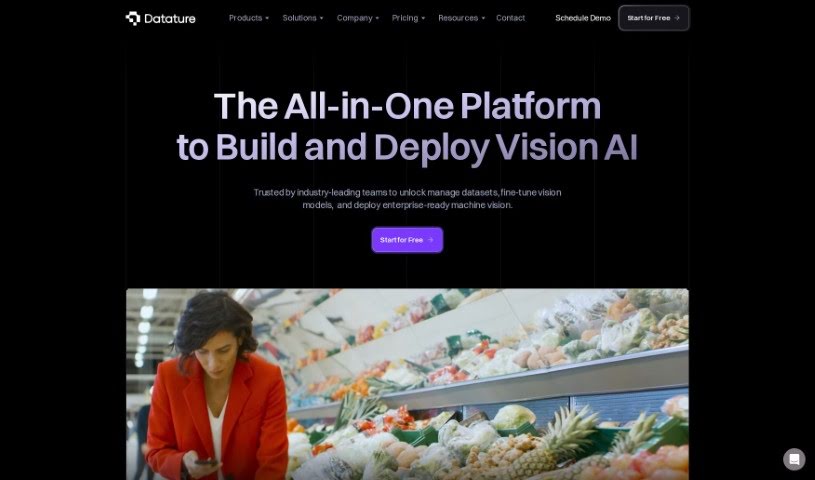
Screenshot of Datature

Datature

Discover what Datature is and how to use it effectively in 2025. We'll explore its features and see how it stacks up against other Software Development Tools.

Screenshot

What is Datature?

Datature is a platform built to make creating computer vision applications much simpler for teams and businesses. It is your all-in-one toolkit. It helps you manage your data efficiently, offers flexible tools for labeling images and videos, lets you train models using algorithms you can customize, automatically fine-tunes settings for the best results, and makes deploying your finished applications a breeze. Plus, it’s great for teamwork! Your team can collaborate on projects, keep track of different versions, and generally get more done together.

What’s really neat is that you can manage datasets, label your data, train models, and deploy your applications without needing to write a lot of complicated code. People often praise Datature for how fast it is, how smoothly everything flows, and its easy-to-use interface that works well for both small teams and large companies. It really brings together collaboration, powerful tools for handling datasets, training models, and deploying them across different platforms. Datature essentially gives you the power to build and deploy advanced computer vision solutions efficiently, even if you don’t have deep coding expertise.

Datature also supports academia and research by offering product credits, which is a nice touch. They have different plans with various features, like tools to automate annotation, a recommender for your model training workflow, and access to a technical support channel. Many users find it significantly cuts down the time it takes to get a product to market, streamlines their processes, and boosts productivity at every stage of building computer vision models. It’s used all over the world, and top AI engineers and CEOs have given it great reviews, noting how effective it is for scaling AI efforts, getting quick feedback on model performance, and its user-friendly interface that really speeds up the process of building computer vision models.

Who created Datature?

Datature was co-founded by David Nguyen, PhD. He’s also the CEO of BrainScanology and is listed as one of the co-founders. David has a Ph.D. and has been instrumental in developing Datature’s platform, particularly its ability to segment complex shapes in medical images with impressive accuracy and speed. The company focuses on AI and computer vision solutions, providing tools for efficient model training, managing datasets, and deploying applications across various industries. These include manufacturing, utilities, agriculture, construction, smart cities, retail, pharmaceuticals, and healthcare.

What is Datature used for?

Datature helps with a wide range of applications, including:

  • Pest Detection in Agriculture: Identifying and managing pests to protect crops.
  • Robotics Line Processing in Manufacturing: Automating tasks on production lines.
  • Inventory Management in Retail and E-Commerce: Keeping track of stock levels efficiently.
  • City Surveillance in Smart Cities: Enhancing public safety and urban management.
  • Life Stock Monitoring in Agriculture: Keeping an eye on animal health and well-being.
  • Automated Checkout in Retail and E-Commerce: Streamlining the shopping experience.
  • Digital Pathology in Pharmaceutical & Healthcare: Analyzing medical images for diagnosis.
  • Harvest Optimization in Agriculture: Improving crop yields and efficiency.
  • Occupancy Management in Smart Cities: Optimizing space usage and resource allocation.
  • Wafer Defect Detection in Manufacturing: Ensuring quality in semiconductor production.
  • Harvest Optimisation in Agriculture: (Note: This appears to be a repeat of an earlier point, but we’ll keep it as it was in the original.)

Who is Datature for?

Datature is a valuable tool for a variety of industries and professionals:

  • Agriculture
  • Manufacturing
  • Retail and e-commerce
  • Smart Cities
  • Pharmaceutical & Healthcare
  • Utilities & Energy
  • Construction
  • (Also noted as) Utilities and Energy
  • (Also noted as) Smart City
  • And for those looking for Powerful Developer Tools

How to use Datature?

Getting started with Datature is straightforward. Here’s a breakdown of the steps:

  1. Starting with Datature: First off, remember Datature is designed to simplify building computer vision applications, especially for teams and businesses. It handles dataset management, data annotation, model training, and deployment without needing complex coding.
  2. Dataset Management: You can easily import, organize, and preprocess your data. The platform also provides flexible annotation tools, making it seamless to label and annotate your images or videos.
  3. Training Models: Datature offers algorithms that you can customize for training models using your annotated datasets. It even includes automated hyperparameter optimization to help you achieve the best possible performance.
  4. Model Deployment: Once your model is ready, you can deploy your computer vision applications across various platforms, whether it’s in the cloud or on edge devices. You can tailor these deployment strategies to fit your specific needs.
  5. Collaboration: Datature really encourages teamwork. Team members can collaborate on projects, share annotations and models, and easily track version history, which is great for keeping everyone on the same page.
  6. Additional Features: Beyond the core functions, Datature offers advanced features like auto-scaling, load balancing, region selection, and developer-friendly tools complete with powerful APIs and SDKs.
  7. Payment and Support: For payment, you can use credit/debit cards or wire transfers. If you have specific feature requests or need to manage plan changes, you can simply contact Datature directly.
  8. Learning More: To dive deeper, you can explore the documentation, schedule a demo, or check out the Datature blog for more in-depth information and insights into product features and various use cases.

By following these steps, you’ll be well on your way to effectively using Datature’s capabilities for all your computer vision projects.

Related AI Tools

Discover more tools in similar categories that might interest you

Stay Updated with AI Tools

Get weekly updates on the latest AI tools, trends, and insights delivered to your inbox

Join 25,000+ AI enthusiasts. No spam, unsubscribe anytime.