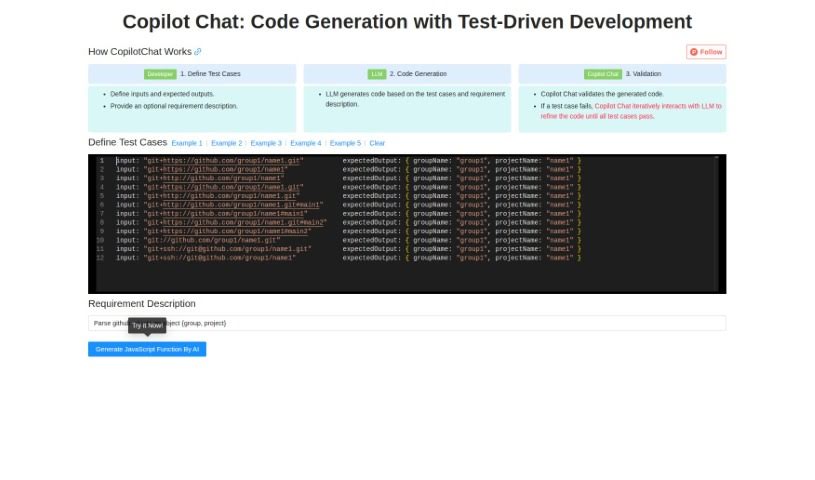
Screenshot of Copilotchat

Copilotchat

Discover Copilotchat in 2025! Learn what this AI-powered tool is, explore its features for test-driven development, and see how it stacks up against other code generators.

Screenshot

What Exactly is Copilotchat?

Copilotchat is your AI coding assistant, specifically designed to make writing code much simpler, especially when you’re following a Test-Driven Development (TDD) approach. It works in a straightforward, three-step process: first, you define your test cases; then, the AI engine, which is a type of Large Language Model (LLM), generates the code; and finally, it checks that code against your tests to make sure it’s solid and accurate. This whole system is built to help developers work faster, cut down on coding mistakes, solve problems more quickly, and ultimately produce better quality code. Some of its standout features include the ability to code collaboratively, automatically validate your code, and it all comes in a really easy-to-use interface. Essentially, it uses AI to speed up how you write code, based on the test cases and descriptions you give it.

Who’s Behind Copilotchat?

Copilotchat was developed by a company named Copilot. They officially launched this tool on January 27, 2024. The way it operates is pretty neat: you start by setting up your test cases, then the LLM part of the AI generates the code, and finally, it validates that code. The AI in Copilotchat really helps to accelerate the entire code development process, all while keeping an eye on quality and efficiency.

What Can You Do with Copilotchat?

Copilotchat is incredibly useful for a variety of tasks:

  • It offers a user-friendly interface that’s easy to navigate.
  • It handles automated code generation, taking the heavy lifting off your shoulders.
  • It’s a fantastic tool for facilitating test-driven development, making TDD much more manageable.
  • You can create detailed test case definitions to guide the AI.
  • It integrates seamlessly with LLM technology for smart code creation.
  • A built-in code validation feature ensures your code works as expected.
  • It supports iterative code refinement, helping you improve code step-by-step.
  • It really enhances developer productivity, letting you focus on more complex tasks.
  • It actively reduces coding errors, saving you time on debugging.
  • It speeds up troubleshooting by quickly identifying issues.

Who Should Be Using Copilotchat?

This tool is a great fit for:

  • Developers looking for efficiency.
  • Software engineers aiming for higher quality output.
  • Programmers who want to streamline their workflow.

How Do You Actually Use Copilotchat?

Getting started with CopilotChat is straightforward. Just follow these steps:

  1. Define Your Test Cases:
    • Start by clearly outlining the inputs your code will receive and what the expected outputs should be. If you have a specific requirement description for the code you’re developing, you can include that here too.
  2. Generate the Code:
    • Once your test cases are set, CopilotChat’s LLM component will get to work, generating the code based on everything you’ve provided.
  3. Validate the Code:
    • CopilotChat then checks the code it generated against your test cases. If any test doesn’t pass, it will intelligently refine the code and try again until all your tests are successfully met.
  4. Boost Your Productivity:
    • CopilotChat really helps boost your productivity. It streamlines the whole process of generating code, validating it, and troubleshooting, which means fewer errors and less time spent testing.
  5. Ensure High Code Quality:
    • Thanks to its AI-driven approach, consistent validation, and iterative improvements, CopilotChat helps you maintain really high standards for code quality assurance.
  6. Work Together on Code:
    • The tool is also great for collaborative coding. This means multiple developers can work together efficiently on creating, validating, and fixing code.
  7. Enjoy a Developer-Friendly Interface:
    • CopilotChat features an interface that’s designed with developers in mind, making it simple to input your test cases, expected outputs, and requirements for a smooth Test-Driven Development experience.

By following these steps, you can really make the most of CopilotChat’s AI capabilities. It’s a fantastic way to speed up how you generate code, ensure everything is high quality, and make your overall development process much smoother and more effective.

Related AI Tools

Discover more tools in similar categories that might interest you

Stay Updated with AI Tools

Get weekly updates on the latest AI tools, trends, and insights delivered to your inbox

Join 25,000+ AI enthusiasts. No spam, unsubscribe anytime.