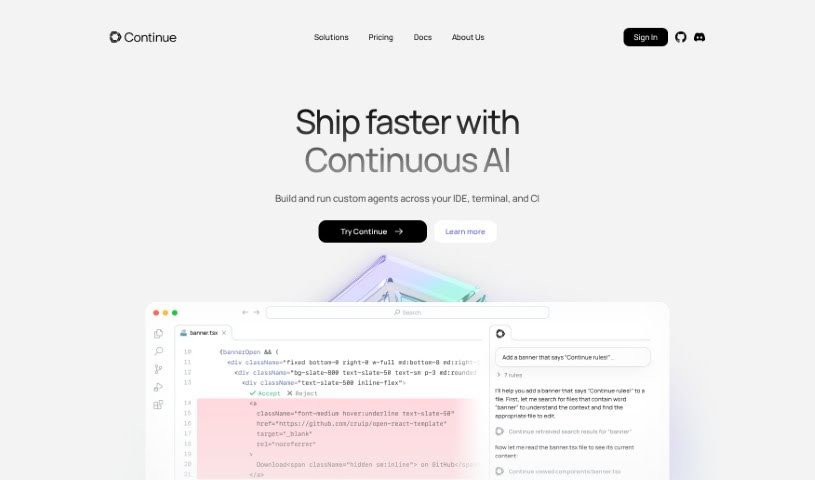
Screenshot of Continue.dev

Continue.dev

Discover what Continue.dev is and how to use it effectively in 2025. We'll explore its features and see how it stacks up against other software development tools.

Screenshot

What is Continue.dev?

Continue.dev is an open-source autopilot tool designed to help software developers. It brings the power of ChatGPT right into your Visual Studio Code (VS Code) environment, making it super easy to generate, refactor, and understand code. One of its coolest features is how it can answer your coding questions. If you highlight a piece of code, Continue can offer different ways to tackle a problem, giving you new perspectives. Plus, you can edit code just by telling it what to do in plain English – think of it as giving instructions to refactor code exactly how you need it. It can even create entire files from scratch, whether you need a Python script, a React component, or an SQL query. Want to keep up with what’s new? You can sign up for Continue’s newsletter or join their Discord community.

Who created Continue.dev?

Continue.dev is an open-source project brought to you by Continue Dev, Inc. This platform essentially integrates ChatGPT’s abilities directly into Visual Studio Code, which really helps developers when they’re generating code, refactoring it, or trying to understand it. You can ask it coding questions and get different viewpoints on how to solve problems. Plus, developers can edit code using natural language commands, and it can generate files from scratch. The company is really focused on making the developer experience better and they’re often looking for talented people, including software engineers, especially in San Francisco.

What can you do with Continue.dev?

  • Ask questions about your code
  • Refactor code based on specific needs
  • Generate new files from scratch
  • Get different ideas for solving coding problems
  • Edit code using natural language commands
  • Create new Python scripts
  • Write React components
  • Generate SQL queries
  • Set up an IAM policy for read-only S3 access
  • Change a plot into a bar chart in a dashboard component
  • Refactor existing code
  • Generate code from scratch
  • Edit code using natural language commands
  • Set up a Prisma schema that handles cascading deletes
  • Figure out the right place to make a backend request in a web page
  • Establish communication between iframes
  • Rewrite a function to make it asynchronous
  • Migrate a Digital Ocean Terraform file to work with Google Cloud Platform
  • Autocomplete single lines or entire code sections in any programming language as you type
  • Attach code or other context to ask questions about functions, files, and your entire codebase
  • Rewrite code from natural language by highlighting code sections and using keyboard shortcuts
  • Answer coding questions by offering alternative perspectives on how to approach a coding problem
  • Edit code using natural language commands to refactor code according to specific requirements
  • Generate files from scratch, like new Python scripts or React components
  • Subscribe to newsletters or join the Discord community to stay updated
  • Create a user experience designed from the ground up to feel natural within JetBrains IDEs
  • Drive growth and engagement in the Continue community at the intersection of AI and software development
  • Help build an open-source product by resolving and learning about user problems on GitHub and Discord
  • Answer coding questions
  • Refactor code using natural language commands
  • Generate files from scratch
  • Subscribe to the newsletter for updates
  • Join the Discord community
  • Autocomplete code as you type
  • Attach code or context to ask questions
  • Rewrite code from natural language

Who is Continue.dev for?

  • Software Engineers
  • Developer Relations Engineers

How do I use Continue.dev?

To get the most out of Continue.dev, here’s a simple guide:

  1. Install the Extension: First, add the Continue extension to your Visual Studio Code. This makes sure you can use all its features right inside the IDE.
  2. Ask Coding Questions: When you’re stuck on a problem, highlight the relevant code. Then, ask Continue for different ways to solve it. This is great for things like setting up schemas or figuring out where to put backend requests.
  3. Refactor Code: Highlight the code you want to change and tell Continue how to refactor it. For instance, you could ask it to turn plots into charts, make functions asynchronous, or even migrate code for different cloud platforms.
  4. Generate Code: Need a new file? You can prompt Continue to create things like Python scripts or React components from scratch based on what you need.
  5. Stay Informed: To keep up with the latest updates, make sure to subscribe to Continue’s newsletter or jump into their Discord community.
  6. For Teams: If you’re working with others, check out how Continue can help your whole engineering team use and improve a custom AI code assistant.

By following these steps, you can really use Continue.dev to make your coding experience better and make your software development process smoother.

Related AI Tools

Discover more tools in similar categories that might interest you

Stay Updated with AI Tools

Get weekly updates on the latest AI tools, trends, and insights delivered to your inbox

Join 25,000+ AI enthusiasts. No spam, unsubscribe anytime.