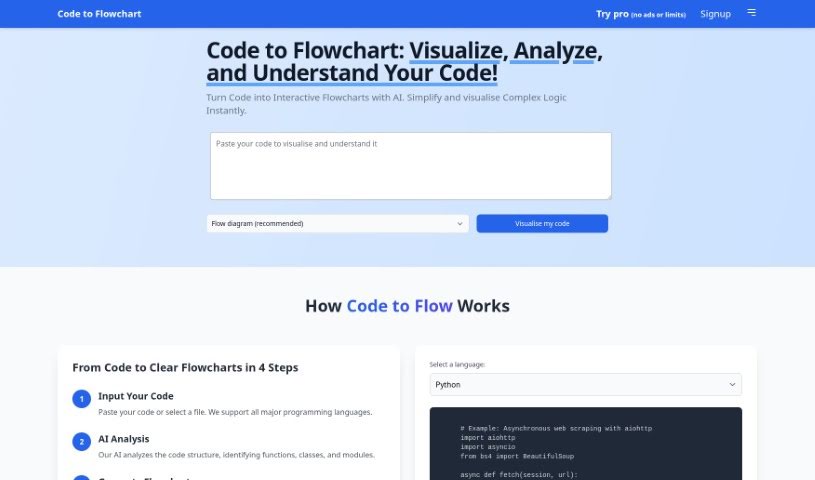
Screenshot of CodetoFlow

CodetoFlow

Discover CodetoFlow in 2025! Learn what this AI tool does, how to use its features effectively, and how it stacks up against other programming tools.

Screenshot

What is CodetoFlow?

CodeToFlow is a neat AI tool that turns your code into visual flowcharts. It is a way to see your code’s logic laid out, making it much easier to understand what’s going on. You just pop your code in, let the AI figure it out, and voilà – you get a visual map of how your code flows. This is super helpful for getting a handle on how your code actually works. It’s pretty versatile too, supporting major programming languages and frameworks like Python, JavaScript, Java, C++, and many others. If you decide to go for CodeToFlow Pro, you’ll get even more perks, like being able to visualize unlimited code, handle longer code snippets, and get faster help. It’s designed to really help you be more productive.

Plus, CodeToFlow is great for simplifying complicated code structures, making it easier to work with others, saving you valuable time, and giving you immediate insights into how your code is put together.

Who created CodetoFlow?

An AI tool called Codetoflow actually created Code To Flowchart. It first came out on November 27, 2023. This platform is designed to help users visualize complex code structures using interactive flowcharts, and it works with a bunch of popular programming languages and frameworks. The process is straightforward: you paste your code into the editor, pick the kind of diagram you want, and the tool generates the flowchart. You can then easily download or share it. The main idea behind this tool is to make understanding code simpler, improve how teams collaborate, and boost overall productivity by offering quick insights into code structure and flow.

What is CodetoFlow used for?

  • Visualize Code: Turn your code into easy-to-understand visual flowcharts.
  • Debugging Help: Make the debugging process smoother by seeing your code’s logic flow visually.
  • Better Collaboration: Share clear, visual flowcharts that everyone on your team can grasp easily.
  • Boost Productivity: Speed up code analysis with quick visual representations.
  • Broad Language Support: Works with many major programming languages and frameworks.
  • Customizable Diagrams: Choose from different diagram styles to best suit your code structure.
  • Free vs. Pro: There’s a free version with limits on visualizations, and a Pro version offering unlimited use.
  • Code Security: Your code is safe; it’s not stored or shared.
  • Teaching Aid: Make teaching and learning complex coding concepts much easier with visual aids.
  • Upgrade Offers: Keep an eye out for discounts and promo codes to upgrade to Pro.
  • Understand Your Code: Helps you grasp your code by creating visual flowcharts.
  • Debug Complex Logic: Aids in debugging by visualizing intricate code logic.
  • Teamwork: Enhances team collaboration through shared visual code representations.
  • Streamline Workflow: Boosts productivity by quickly visualizing code.
  • Simplify Teaching: Makes complex code structures easier to teach using visuals.
  • Flexible Styles: Offers customizable diagram styles for visual representations.
  • Multi-Language Support: Works with many popular languages and frameworks.
  • Premium Features: The premium version provides unlimited visualizations and access to special features.
  • Safe Code Handling: Ensures code safety by not storing or sharing your code.
  • Interactive Flowcharts: Generates interactive flowcharts to visualize code logic.

Who is CodetoFlow for?

  • Software developers
  • Programmers
  • Code Instructors
  • Debuggers
  • Collaborative Teams
  • Computer Scientists
  • Web Developers
  • System Analysts
  • Computer Engineering Professionals
  • Coding Instructors

How to use CodetoFlow?

Using Code To Flowchart is pretty straightforward. Here’s a quick rundown:

  1. Input Your Code: Just paste your code directly into Code To Flowchart, or you can select a file. It supports all the major programming languages, so you’re likely covered.
  2. AI Analysis: The tool’s AI then gets to work, analyzing your code’s structure. It automatically identifies things like functions, classes, and modules.
  3. Generate Flowchart: Code To Flowchart will then create an interactive flowchart that visually maps out your code’s logic and overall structure.
  4. Explore and Understand: You can then interact with this flowchart to get a much deeper understanding of how your code behaves.

Beyond these basic steps, it also offers support for all major programming languages, helps identify code paths and logic flows, and provides various diagram options like flowcharts, sequence diagrams, and class diagrams. You can export your diagrams as SVG, PNG, or PDF files, and even customize the color schemes and themes to your liking. If you need more, upgrading to the PRO version unlocks unlimited access, lets you work with longer code, offers insights to help optimize your code, allows you to export and edit flowcharts, provides custom branding, and gives you prioritized assistance. Basically, you just paste your code, pick your diagram type, generate it, and then download, zoom, or share it to make collaboration easier and boost your productivity.

Related AI Tools

Discover more tools in similar categories that might interest you

Stay Updated with AI Tools

Get weekly updates on the latest AI tools, trends, and insights delivered to your inbox

Join 25,000+ AI enthusiasts. No spam, unsubscribe anytime.