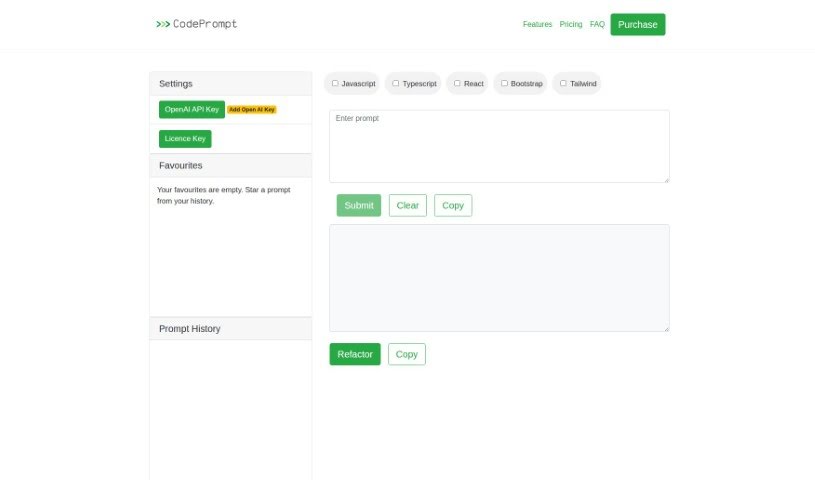
Screenshot of CodePrompt

CodePrompt

Discover what CodePrompt is and how to make the most of it in 2025. We'll dive into its features, compare it to other code generators, and explain its capabilities and limitations.

Screenshot

What is CodePrompt?

CodePrompt is a handy web application designed to help you generate code, specifically for JavaScript, TypeScript, and React. It’s built with the Bootstrap framework in mind, making it a great tool for frontend development. You’ll find a user-friendly web interface that includes some really useful features like a favorites system to save your go-to code snippets, the ability to use a license key for enhanced functionality, and a prompt history so you can easily revisit past generations. Plus, it offers code refactoring options to help you clean up your code and makes copying code a breeze with convenient links.

However, it’s good to know its current limitations. You’ll need to have JavaScript enabled in your browser to use it, and its support for languages and frameworks is a bit restricted. There’s no offline mode or a dedicated mobile version yet, and the copyright is from 2023, so some information might be a little dated. It also doesn’t currently support multi-user collaboration or offer extensive advanced refactoring tools, and it’s not designed for backend applications.

Who created CodePrompt?

CodePrompt was brought to life by Evergreen Apps, launching on June 20, 2024. This tool is specifically geared towards generating code for JavaScript, TypeScript, and React, and it plays nicely with the Bootstrap framework. You can also take advantage of features like code refactoring and a favorites system. Just a heads-up, though: you’ll need JavaScript enabled to use it, its language and framework support is somewhat limited, and there isn’t an offline or mobile version available. Also, keep in mind the copyright is from 2023.

What is CodePrompt used for?

CodePrompt is primarily used for:

  • Generating code in JavaScript, TypeScript, and React.
  • Working with the Bootstrap framework.
  • Providing a convenient web application interface.
  • Saving your favorite code snippets.
  • Using a license key for expanded features.
  • Accessing your prompt history.
  • Offering options for code refactoring.
  • Making it easy to copy generated code.
  • Providing helpful navigation links.
  • Supporting the creation of frontend applications.

Who is CodePrompt for?

This tool is particularly useful for:

  • Web Developers
  • Software developers
  • Frontend developers
  • App developers

How to use CodePrompt?

Getting started with CodePrompt is pretty straightforward. Here’s a simple guide:

  1. First, open up the CodePrompt web application interface in your browser.
  2. Next, choose the programming language and framework you’re working with – think JavaScript, TypeScript, React, or Bootstrap.
  3. Then, use the tool to generate code snippets for your frontend applications; it’s designed to make this process efficient.
  4. You can also take advantage of features like the code refactoring options and the simple ability to copy code, which makes implementation much easier.
  5. Don’t forget to explore the Favorites feature; it’s great for saving and quickly accessing code snippets you use often.
  6. Crucially, make sure JavaScript is enabled in your browser settings, as CodePrompt relies on it to function correctly.
  7. It’s worth noting that CodePrompt currently has limited framework support and doesn’t offer features like an offline mode or a mobile version.
  8. If you need more advanced capabilities, you might consider obtaining a license key.
  9. You can also browse through your prompt history to easily revisit any code snippets you’ve generated before.
  10. Be sure to check out the Evergreen Apps developer resources and the useful navigation links provided within the tool itself.
  11. Lastly, remember that CodePrompt doesn’t support backend applications and doesn’t have multi-user collaboration features.

Following these steps should give you a solid foundation for using CodePrompt effectively for your frontend web development needs.

Related AI Tools

Discover more tools in similar categories that might interest you

Stay Updated with AI Tools

Get weekly updates on the latest AI tools, trends, and insights delivered to your inbox

Join 25,000+ AI enthusiasts. No spam, unsubscribe anytime.