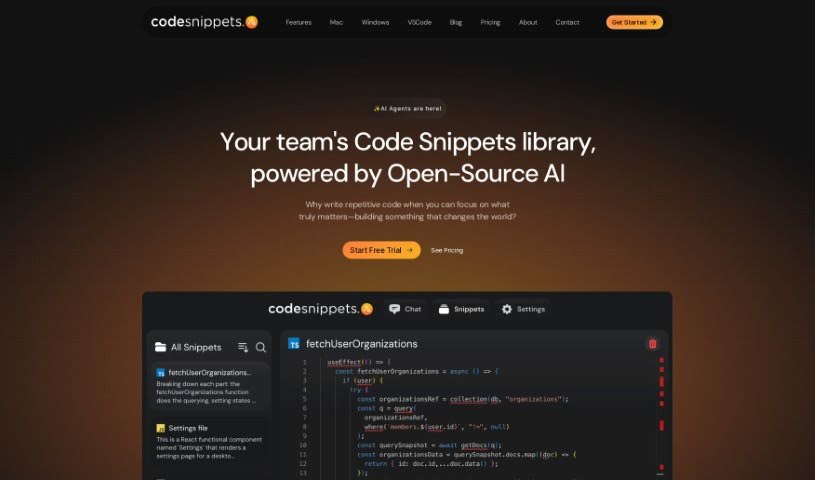
What is Code Snippets AI?
Code Snippets AI is your coding sidekick. It’s built to help developers really get a handle on their code. How? By offering AI chats that understand the context of your project, all connected to a secure library where you can store your code snippets. You can use it to generate new code, share what you’ve made with your team, clean up and fix your code (that’s refactoring and debugging), and even analyze it. Plus, it’s designed with security in mind, using end-to-end encryption to keep your code private. People who’ve used it say it’s intuitive, powerful, and a real time-saver, which is great news whether you’re just starting out or you’ve been coding for years.
Who created Code Snippets AI?
AnuNags is the person behind Code Snippets AI, as mentioned in the “code-snippets-ai.pdf” document. AnuNags founded this tool with the goal of helping beginners get better at coding and making the development process smoother. The platform really aims to change how developers code by providing AI chats that understand your project’s context, linked to a secure library for your code snippets. This lets you generate code, share it with your team, refactor and debug, analyze code, and find and fix errors more efficiently.
What is Code Snippets AI used for?
Here’s a look at what you can do with Code Snippets AI:
- Write Code Quickly: Easily create all sorts of code snippets in many different programming languages.
- AI-Powered Coding: Generate, refactor, debug, and document your code snippets using AI.
- Boost Productivity: Speed up your coding and make your workflow much smoother.
- Build a Library: Create your own secure collection of code snippets.
- Team Collaboration: Share code snippets with your team members.
- Improve Your Skills: It’s a great way for beginners to get better at coding.
- Develop Add-ons: Build custom add-ons for software applications.
- Customize Your Experience: Tailor prompts and explanations to your liking.
- Save Time & Quality: Spend less time on repetitive tasks and improve the quality of your code.
- Generate Code: Get AI to write code for you.
- Share for Collaboration: Easily share your code with others.
- Refactor & Debug: Clean up and fix your code with AI help.
- Analyze for Docs: Use AI to analyze code and create documentation.
- Find & Fix Errors: Quickly locate and resolve bugs.
- Efficiency & Less Frustration: Make coding more efficient and less annoying.
- Secure & Private: Keep your code safe with end-to-end encryption.
- Efficient Code Management: Generate, improve, and refactor code smoothly.
- Beginner Friendly: Perfect for those starting out to build their coding skills.
- AI Snippet Generation: Get AI to create code snippets for you.
- AI Assistance for Improvement: Refactor and debug your code with AI’s help.
- Easy Storage & Fetching: Keep and retrieve your code snippets without hassle.
- Teamwork: Collaborate effectively with your team using shared snippets.
- AI Documentation: Generate detailed documentation for your code using AI.
- Performance Optimization: Identify slow parts of your code and get AI suggestions to speed them up.
- Productivity Boost: Write various code snippets across multiple languages faster than ever.
- Streamline Workflow: Focus more on solving complex problems by simplifying your coding process.
- Beginner Project Development: Help beginners improve their skills and build projects.
- Personalized Prompts: Customize prompts and explanations to fit your needs.
Who is Code Snippets AI for?
This tool is designed for a wide range of people involved in coding:
- Developers
- Programmers
- Coding beginners
- Web Developers
- Mobile app developers
- Software engineers
- IT professionals
- Coders of all levels
- Development teams
How to use Code Snippets AI?
To get the most out of Code Snippets AI, here’s a simple guide:
- Get the Tool:
- You can download the desktop app for Windows or Mac.
- Alternatively, install the Code Snippets AI extension directly into VSCode.
- You’ll need to add your API keys for OpenAI and OpenRouter; these are stored locally on your machine for security.
- Use the Features:
- Index your own codebase right on your computer. This gives the AI the context it needs for smarter chats.
- You can easily switch between different AI models, both open and closed source, all within the same chat session.
- Use the AI to generate, refactor, debug, and document your code snippets.
- Language Support:
- Code with confidence in many popular languages, including Python, JavaScript, Java, C++, and many others.
- Your Data Privacy:
- Your code is kept secure and private. It’s stored only in your snippets library, protected by end-to-end encryption.
- We also monitor all interactions with AI models to ensure safety.
- Plan Options:
- There’s a free plan available, though it does have some limitations.
- Premium plans offer more features, like IDE extensions and a higher request limit.
- What’s Next:
- We’re planning to continuously improve and update the tool. This includes adding extensions for IntelliJ, Visual Studio, and JetBrains IDEs.
- Get Involved:
- We encourage you to stay engaged with Code Snippets AI. Your feedback is really important for shaping future enhancements.
By following these steps, you can really make the most of Code Snippets AI to improve your coding experience and boost your productivity effectively.