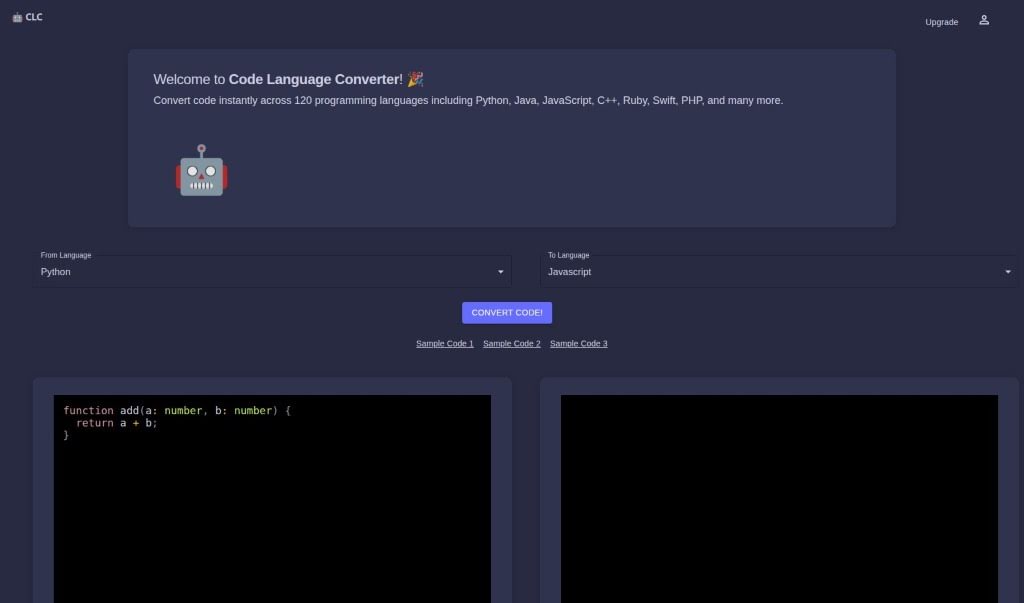
Screenshot of Code Language Converter

Code Language Converter

Discover what a Code Language Converter is and how to use it effectively in 2025. We'll explore its features, compare it to other code generators, and show you how it can boost your development workflow.

Screenshot

What is a Code Language Converter?

A Code Language Converter is essentially an AI-powered tool built to help developers switch code snippets from one programming language to another. It is a translator for your code. It’s designed to be quick and accurate, supporting a wide range of languages. You can even paste your own code directly into it for conversion, and it often provides sample code to get you started. While it’s a really helpful assistant for developers, it’s important to remember it’s not perfect – human oversight is still key to making sure the converted code is spot on. For instance, it’s great at converting code snippets into TypeScript and can efficiently handle PHP code.

Overall, this tool can be quite useful for testing out different code approaches, debugging issues, and generally making the development process more efficient.

Who Created the Code Language Converter?

We don’t have specific details about who exactly created the Code Language Converter, as that information isn’t readily available. What we do know is that it launched on June 14, 2024. Since then, it’s been offering developers a way to convert code quickly and accurately across many different programming languages. It’s built to fit smoothly into a developer’s workflow with an interface that’s easy to use, helping with fast code debugging and even learning new languages. It operates as an online platform, and you can find sample code snippets there for conversion. Usage is typically managed through a credit system. While it’s not 100% accurate, it uses AI technology to intelligently transform languages, which really helps developers be more efficient when they’re coding and testing.

What Can You Use a Code Language Converter For?

Here’s a look at what makes this tool so handy:

  • Supports Many Languages: You’re not limited to just a couple of options; it works with a broad spectrum of programming languages.
  • Fast Code Conversion: Get your code translated in a flash.
  • Accurate Conversions: It aims for high accuracy in its translations.
  • Paste Your Own Code: Easily convert code you’re currently working on.
  • Converts in Seconds: Saves you valuable time by providing results almost instantly.
  • Handles Transformation Intelligently: The AI figures out how to best translate your code.
  • Can Handle Complex Code: It’s capable of working with more intricate code structures.
  • Great for Testing: Use it to quickly see how code might look or behave in another language.
  • Adds Efficiency to Development: Streamline your coding tasks.
  • Reduces Manual Rewriting: Avoids the tedious work of rewriting code by hand.
  • Flexible Tool: Adaptable to various coding needs.
  • Helps Learn New Languages: See how concepts translate between languages, which is a great learning aid.

Who Should Use a Code Language Converter?

This tool is a great asset for a variety of tech professionals:

  • Programmers
  • Software developers
  • Web Developers
  • Computer Scientists
  • Computer Engineers
  • IT professionals
  • Developers (in general)
  • Software engineers

How Do You Use a Code Language Converter?

Using the Code Language Converter is pretty straightforward. Just follow these steps:

  1. Paste Your Code: Start by pasting the code snippet you want to convert into the dedicated text box on the Code Language Converter’s website.
  2. Select Languages: Next, choose the original programming language under ‘From Language’ and then select the language you want to convert it to under ‘To Language’.
  3. Human Supervision is Key: Remember to keep an eye on the conversion process. Since it’s not always 100% precise, human review is really important to ensure accuracy.
  4. Verify the Output: Once the conversion is done, always manually check the converted code to make sure it’s correct and works as expected.
  5. Sign Up for Credits: It’s a good idea to sign up on the website to get credits, which you’ll need to use the tool.
  6. Quick Conversions: The tool works very fast, usually giving you the converted code in just seconds.
  7. Credits for Usage: You’ll need credits to use the tool. You can get these by signing up or by purchasing them.
  8. Language Support: It supports many modern programming languages and can specifically convert TypeScript to PHP, for example.
  9. Complex Code Needs Extra Care: If you’re working with complex code, be extra thorough with your supervision to catch any potential inaccuracies.
  10. Limitations to Note: Keep in mind that the tool doesn’t support older programming languages, and it might sometimes misinterpret certain code snippets.

Following these steps should help you make the most of the Code Language Converter for all your code conversion needs.

Related AI Tools

Discover more tools in similar categories that might interest you

Stay Updated with AI Tools

Get weekly updates on the latest AI tools, trends, and insights delivered to your inbox

Join 25,000+ AI enthusiasts. No spam, unsubscribe anytime.