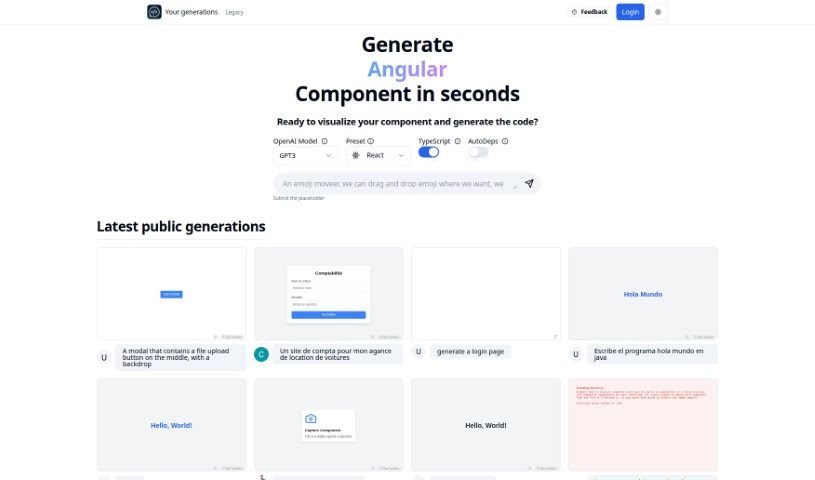
Screenshot of Chat2Code

Chat2Code

Discover Chat2Code in 2025! Learn what this AI tool is, how to use its features for React components, and how it stacks up against other code generators.

Screenshot

What is Chat2Code?

Chat2Code is a really neat platform designed to make coding, especially for React components, a whole lot better. It uses AI to help you quickly create, run, and update React components right away. It is a tool that smooths out the coding process, making it super accessible whether you’re just starting out or you’re a seasoned pro. It’s got this user-friendly setup and works efficiently. Some of its standout features include an OpenAI Model Preset that works with TypeScript and a handy AutoDeps function. This means you get smart code suggestions, and it automatically pulls in the libraries you need. Plus, you can easily share what you make, which is great for working with others. Chat2Code does more than just generate basic looks; it actually lets you interact with the components it creates, so they’re fully working and ready to be dropped into your bigger projects. You can even ask it to add libraries like Zustand or usehooks-ts, which really boosts its capabilities and makes things even more functional.

Who created Chat2Code?

Sachin Fegade is the creator behind Chat2Code. This platform really aims to change how we code, especially when it comes to React components, by using AI. Chat2Code lets you quickly see, build, and update React components in real-time, which makes things much more efficient for developers at any skill level. It also simplifies the whole coding process with features like its OpenAI Model Preset, the AutoDeps function, and the ability to render components interactively. Collaboration is also a breeze because you can share your code, and it’s open to requests for extra libraries like Zustand or usehooks-ts. This really shows their dedication to providing user-friendly and forward-thinking coding solutions.

Who is Chat2Code for?

  • Software developers
  • Web Developers
  • Programmers
  • UI/UX Designers
  • React developers

How to use Chat2Code?

Here’s a straightforward guide on how to get the most out of Chat2Code:

Chat2Code is a platform that truly reimagines the coding experience for developers, with a special focus on React components. It lets you use AI to quickly create, run, and update React components in real-time. This makes it a great tool for both beginners and experienced programmers.

  1. Getting Started: Chat2Code works within CodeSandbox, giving you an easy-to-use interface to visualize and build React components efficiently.
  2. Key Features:
    • AI Help: Use the OpenAI Model Preset with TypeScript. You’ll get smart code suggestions, and the AutoDeps feature automatically adds the libraries you need.
    • Interactive Components: You don’t just get static UI elements; you get fully functional components that are ready to be integrated into your projects.
    • Sharing: You can easily share your creations with friends or colleagues, which is perfect for teamwork.
    • Library Requests: Need something specific? You can ask for libraries like Zustand or usehooks-ts to add more functionality.
  3. How to Use It:
    • First, open Chat2Code inside CodeSandbox.
    • Picture the component you want, then describe it and input your specifications.
    • Take advantage of the AI suggestions and the automatic handling of dependencies.
    • You can share the code you’ve generated or ask for specific libraries to make it even better.
  4. Quick Questions Answered:
    • What is Chat2Code? It’s an AI platform that helps you quickly generate React components within CodeSandbox.
    • What about the code it generates? You get functional, interactive React components that you can use right away.
    • Can I share code? Yes, sharing code with your team or collaborators is simple.
    • How does it handle dependencies? The AutoDeps feature makes sure all necessary dependencies are included in your code.
    • What if I need other libraries? You can request additions like Zustand or usehooks-ts to expand what the tool can do.
  5. Pricing: For details on pricing plans and what features are included, you’ll want to check out the Chat2Code website.

By following these steps and using all the different features Chat2Code offers, developers can definitely improve their coding experience and speed up how they develop projects within CodeSandbox.

Related AI Tools

Discover more tools in similar categories that might interest you

Stay Updated with AI Tools

Get weekly updates on the latest AI tools, trends, and insights delivered to your inbox

Join 25,000+ AI enthusiasts. No spam, unsubscribe anytime.