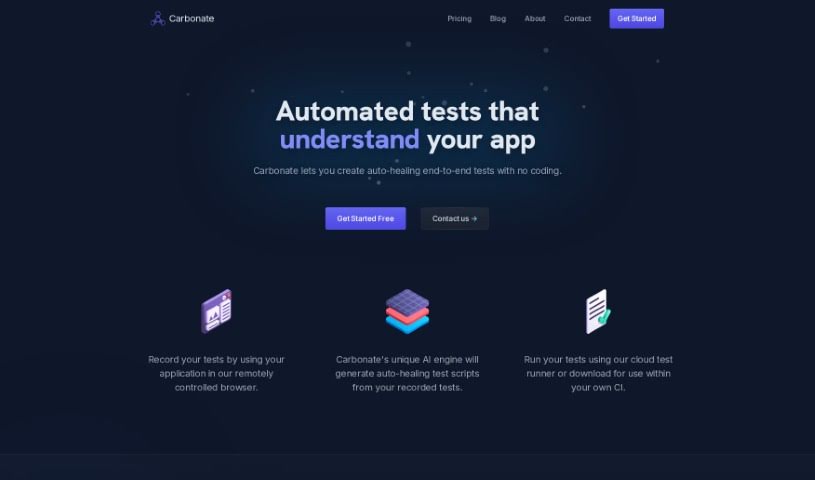
Screenshot of Carbonate

Carbonate

Discover what Carbonate is and how to use it effectively in 2025. Explore its features and see how it stacks up against other testing tools.

Screenshot

What is Carbonate?

Carbonate is an AI-powered tool that automates end-to-end testing, fitting right into your existing testing framework. What’s neat about it is you can write your tests using plain English. The first time you run them, Carbonate turns these English instructions into actual test scripts. If the HTML on your pages changes later, Carbonate smartly creates new test scripts to keep up. It’s pretty good at figuring out if a change is a real UI modification or just a minor rendering difference, which helps keep your tests reliable. Carbonate also makes setup a breeze with SDKs for PHP, Node, and Python, meaning you don’t have to alter your current testing tools. To speed things up, it uses test scripts it’s already saved locally, giving you more flexibility in how you run them. Plus, you can commit these test scripts to your code repositories for added reliability. For pages that load content dynamically, Carbonate keeps an eye on how the page loads during tests to handle them smoothly. Ultimately, Carbonate aims to make your development process more efficient and stable by automating testing, cutting down on manual work, and catching more bugs.

Who created Carbonate?

Carbonate was developed by a team of developers who really know their stuff when it comes to AI and automated testing. They launched the platform on July 31, 2023, with a clear goal: to make automated end-to-end testing accessible to everyone, whether you’re a solo freelancer or part of a big company. The founders noticed that many existing testing tools came with big price tags, often produced unreliable tests, and required special training. Using their background in machine learning, they built Carbonate to automate testing, reduce manual effort, catch more bugs, and generally make testing teams more stable and efficient.

What is Carbonate used for?

  • It speeds up development.
  • It makes your applications more stable.
  • It helps testing teams work more efficiently.
  • It automates the testing process.
  • It cuts down on manual work.
  • It helps find more bugs.
  • It frees up your time for core tasks.
  • It can handle pages that load content dynamically.
  • Your scripts can be committed right alongside your code.
  • It regenerates scripts if the HTML changes.
  • It’s optimized for performance.
  • It provides automated end-to-end testing.
  • You can create tests using English.
  • It automatically converts your English into test scripts.
  • It adapts to changes in HTML.
  • It’s resistant to UI changes.
  • It uses test scripts saved locally.
  • You can run test scripts flexibly.
  • You can incorporate your own code.

Who is Carbonate for?

  • Software developers
  • Quality Assurance Testers
  • Automation Test Engineers
  • Web Developers
  • IT professionals
  • Software engineers
  • Developers
  • Software testers
  • QA Engineers

How to use Carbonate?

To get the most out of Carbonate, here’s a simple guide:

  1. Get to Know Carbonate: Think of Carbonate as your AI assistant for automated end-to-end testing. It fits into your current testing setup. You write tests in plain English, and the first time you run them, Carbonate turns them into solid test scripts. It’s also smart about handling HTML changes, creating new scripts to match them.
  2. Boost Performance: Carbonate is designed for speed. It only analyzes your tests thoroughly during the first run. After that, it uses the test scripts it has saved locally, which really speeds things up and makes your tests run more smoothly.
  3. Add Your Own Code: You can easily include your own custom code with Carbonate. Just run the test scripts in whatever way works best for you.
  4. Connect with SDKs: Carbonate integrates smoothly with PHP, Node, and Python using SDKs. This means you can get set up quickly without needing to change any of your existing testing tools.
  5. Handle UI Changes Gracefully: Carbonate is clever about UI changes. It can tell the difference between actual UI modifications and minor rendering tweaks, adjusting your test scripts automatically to keep things consistent.
  6. Keep it Reliable: For maximum reliability, commit your test scripts to your code repository. If there are significant structural changes to your HTML, Carbonate will automatically generate new scripts to match.
  7. Working with Dynamic Pages: When you have pages that load content dynamically, Carbonate uses special tools to watch how the page loads during the initial setup. Later runs just need to wait for the right elements to appear.
  8. Testing Without Deep Coding: While you’ll need some coding knowledge to integrate Carbonate’s SDK, the team is working on a tool that will let you run tests without needing to integrate anything directly.

By following these steps, you can effectively use Carbonate for automated end-to-end testing. It’s a great way to improve performance and make your testing processes more reliable.

Related AI Tools

Discover more tools in similar categories that might interest you

Stay Updated with AI Tools

Get weekly updates on the latest AI tools, trends, and insights delivered to your inbox

Join 25,000+ AI enthusiasts. No spam, unsubscribe anytime.