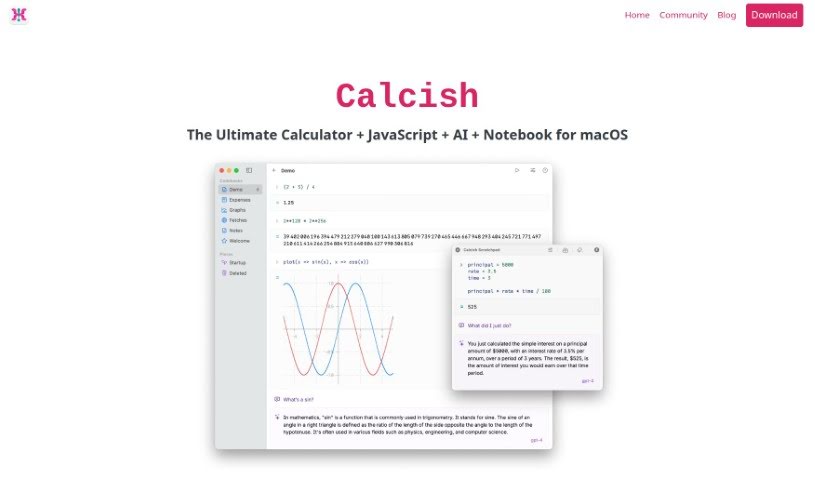
What is Calcish?
Calcish is a really handy tool built for macOS users. It is a calculator that also lets you write JavaScript scripts and has AI smarts built right in. It’s designed with a clean, notebook-like interface, making it super easy to jump into quick calculations, run your code, or even chat with AI models, whether they’re on your computer or out on the web. What makes Calcish stand out are its special features: it handles really big numbers with precision, works with fractions, can do vector and matrix math, handles currency calculations exactly, and even has a special advanced math mode. It’s also quite beginner-friendly, with great documentation to help you out. Plus, you can connect with popular AI models like OpenAI’s GPT-4 and GPT-3.5, Cohere, and TextSynth.
Who created Calcish?
Coding Robots developed Calcish, releasing it on February 29, 2024. This versatile tool is specifically for macOS users, blending calculator functions with JavaScript scripting and integrated AI capabilities. Coding Robots, based in Montenegro, focuses on creating innovative software that meets a variety of needs, from simple calculations and running scripts to interacting with AI.
What is Calcish used for?
Calcish is great for a bunch of things:
- Quick calculations: Need to crunch some numbers fast?
- Running scripts: You can easily execute your own code.
- Interacting with AI: Connect with AI models, whether they’re local or online.
- Notebook interface: Write and run code in a clear, organized way.
- Chatting with AI: Have conversations with various AI models.
- Learning programming: It’s a helpful tool if you’re learning programming or JavaScript.
- Fractional calculations: Handles fractions accurately.
- Currency calculations: Get exact results for currency conversions.
- Vector and matrix operations: Useful for more advanced math.
- Precise large number calculations: Works with very large numbers without losing accuracy.
- Exploratory programming: Great for trying out new code ideas.
- Advanced math mode: For when you need extra precision.
Who is Calcish for?
Calcish is a fantastic tool for anyone who works with numbers, code, or AI. This includes:
- Mathematicians
- Data scientists
- Financial Analysts
- Programmers
- AI researchers
- Researchers in general
- AI enthusiasts
How to use Calcish?
Here’s a simple guide to getting the most out of Calcish:
- Get to know its features: Calcish is a comprehensive tool for macOS users. It combines calculator functions, JavaScript scripting, and built-in AI. You’ll find it offers unique capabilities like precise calculations with large numbers, a dedicated mode for fractions, tools for vectors and matrices, and exact currency calculations.
- Run your JavaScript code: If you’re comfortable with JavaScript, Calcish makes it easy to handle quick tasks, experiment with code, or manage data. The notebook-style interface is really helpful for seeing your results clearly and for quickly editing and re-running code.
- Connect with AI models: Calcish lets you interact with AI models using special AI cells. You can chat with different AI models, including popular ones like OpenAI’s GPT-4 and GPT-3.5, Cohere, and TextSynth, by connecting through their APIs.
- Use the Scratchpad: Calcish includes a scratchpad feature that’s perfect for quick scripting and calculations. It can even float above your other apps for easy access, and you can set up a global hotkey to bring it up instantly.
- Save your work: Once you’re done with your tasks, you can save everything as a codebook. This is great for keeping your work organized and for easily referencing or editing it later.
- Download Calcish: You can grab Calcish directly from the Apple App Store. Once downloaded, you can start using it right away for all your calculation, coding, and AI interaction needs.
- Enjoy the user-friendly interface: Calcish is designed to be easy for beginners. It comes with thorough documentation, so you don’t need to worry about complicated setups to get started.
By following these steps, you’ll be able to use Calcish effectively for a wide range of tasks, from simple calculations to more complex scripting and AI interactions.