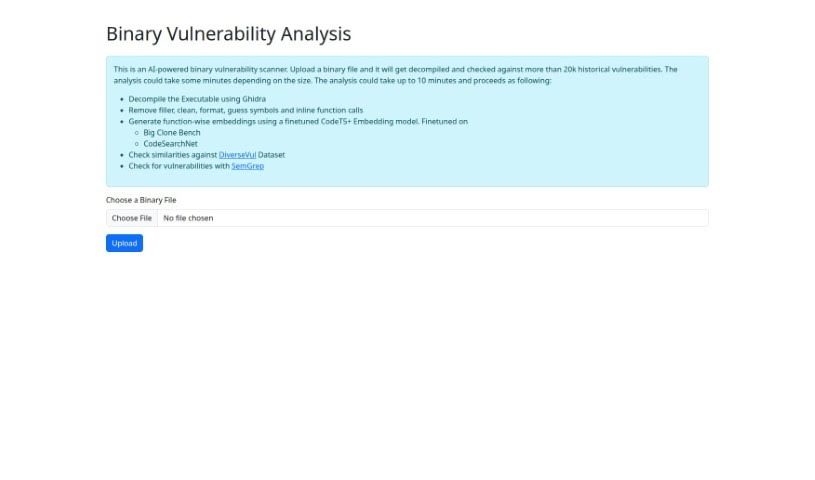
Screenshot of Binanalysis

Binanalysis

Discover what Binanalysis is and how to use it effectively in 2025. We'll explore its features and see how it stacks up against other Software Development Tools.

Screenshot

What is Binanalysis?

Binanalysis is a smart assistant for finding security weaknesses in binary files. It’s an AI-powered tool that dives deep into executables. First, it decompiles the binary, then it tidies up the code by removing unnecessary bits and formatting it nicely. After that, it compares the code against a massive database of known vulnerabilities. To do this, it creates unique digital fingerprints, called embeddings, for each function using a specialized AI model called CodeT5+. This model was fine-tuned using large code datasets like Big Clone Bench and CodeSearchNet. Binanalysis also uses the DiverseVul dataset to spot potential issues and employs SemGrep, a tool that uses specific rules, for even more thorough checks. Essentially, Binanalysis gives you a straightforward and efficient way to check how secure your binary files are, all thanks to AI and a huge collection of past vulnerability data.

Who created Binanalysis?

Binanalysis was developed by an individual or group who prefers to remain anonymous. It first appeared on November 16, 2023. This AI-driven tool is designed to scan binary files for vulnerabilities. You can upload your binary files, and it will check them against a database containing over 20,000 historical vulnerabilities. The process is quite structured: it uses Ghidra to decompile the executable, employs a fine-tuned CodeT5+ Embedding model to understand the code’s structure, and then runs checks using tools like SemGrep. All in all, Binanalysis offers a thorough way to find vulnerabilities in binary files, making it a really useful resource for anyone assessing software security.

What is Binanalysis used for?

Binanalysis is your go-to for several key tasks related to binary file security:

  • Finding Vulnerabilities: It’s great at spotting security flaws within binary files.
  • Direct Upload & Analysis: You can simply upload a binary file, and the tool gets to work.
  • Code Decompilation: It uses Ghidra to break down the executable code.
  • Vulnerability Cross-Referencing: It checks your file against a database of over 20,000 known historical vulnerabilities.
  • Code Fingerprinting: It generates unique embeddings for each function, helping to identify patterns.
  • Dataset Comparison: It checks for similarities against the DiverseVul Dataset.
  • Rule-Based Checks: It uses SemGrep to perform additional vulnerability checks based on predefined rules.
  • Overall Security Assessment: It provides a complete picture of potential vulnerabilities in binary files.
  • Efficient Security Checks: It offers a fast and reliable way to assess security.
  • AI-Powered Detection: It leverages AI algorithms to find vulnerabilities.
  • Scanning with AI: It performs AI-powered scans specifically for binary vulnerabilities.
  • Database Utilization: It uses a database of over 20,000 historical vulnerabilities for its analysis.
  • Ghidra Decompilation: It decompiles executables using the Ghidra tool.
  • CodeT5+ Embeddings: It generates function-specific embeddings with the CodeT5+ model.
  • DiverseVul Similarity Checks: It checks for similarities against the DiverseVul dataset.
  • SemGrep for Analysis: It uses SemGrep for its vulnerability checks.
  • Streamlined Security Assessment: It helps you assess binary security efficiently.
  • Comprehensive Vulnerability Approach: It offers a thorough method for finding vulnerabilities.
  • Reliable Security Evaluation: It provides a dependable way to assess security.

Who is Binanalysis for?

Binanalysis is a valuable tool for several groups of professionals:

  • Software Developers: To ensure the security of the code they build.
  • Security Professionals: For in-depth analysis and threat detection.
  • Reverse Engineers: To understand and analyze the inner workings of software.
  • Cybersecurity Analysts: To identify and mitigate security risks.
  • Security Researchers: To discover new vulnerabilities and improve security practices.

How to use Binanalysis?

Using the Binanalysis tool to check your binary files for vulnerabilities is a straightforward process. Here’s how you can do it:

  1. Upload Your File: Start by uploading the binary file you want to analyze directly into the tool.
  2. Code Cleanup: Binanalysis will then decompile the binary using Ghidra. It cleans up the code by removing filler content, applying formatting, and identifying symbols and inline function calls.
  3. Generate Embeddings: Next, it creates function-wise embeddings. This is done using a fine-tuned CodeT5+ Embedding model that was trained on datasets like Big Clone Bench and CodeSearchNet.
  4. Check Against DiverseVul: The tool then checks for similarities against the DiverseVul dataset, which helps in identifying known vulnerabilities.
  5. SemGrep Analysis: For an even deeper dive, it uses SemGrep, a tool that performs vulnerability checks based on specific rules.
  6. Review the Report: Finally, Binanalysis provides a comprehensive report detailing its findings. This report is based on its analysis against a database of over 20,000 historical vulnerabilities.

By following these steps, you can effectively use Binanalysis’s AI-powered features to quickly and accurately find vulnerabilities in your binary files, significantly boosting your software’s security assessment.

Related AI Tools

Discover more tools in similar categories that might interest you

Stay Updated with AI Tools

Get weekly updates on the latest AI tools, trends, and insights delivered to your inbox

Join 25,000+ AI enthusiasts. No spam, unsubscribe anytime.