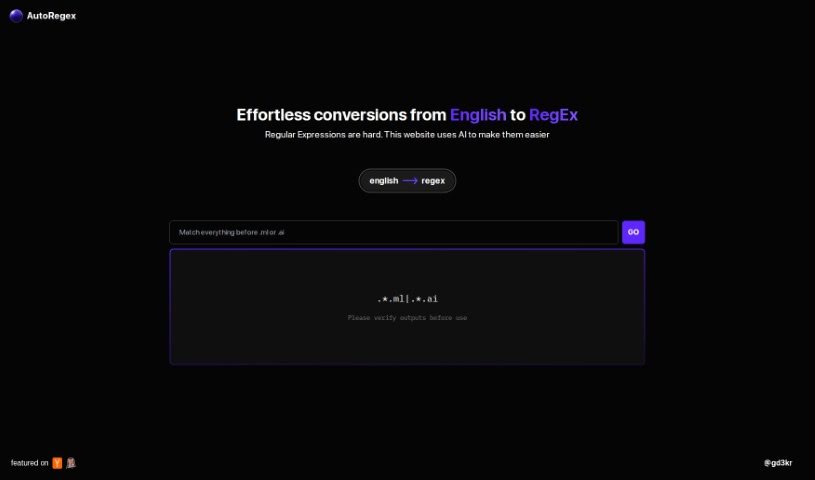
Screenshot of AutoRegex

AutoRegex

Discover what AutoRegex is and how to use it effectively in 2025. We'll explore its features and see how it stacks up against other code generators.

Screenshot

What is AutoRegex?

AutoRegex is a helpful platform designed to make turning plain English into Regular Expressions (RegEx) much simpler, all thanks to artificial intelligence. If you’ve ever found RegEx a bit tricky, this tool offers a really user-friendly way to handle it. You just type out the pattern or what you need in English, and the website uses AI to create the RegEx for you. For instance, it can help you match valid email addresses. Just a heads-up, it’s always a good idea to double-check the RegEx it generates to make sure it’s spot-on before you use it. Essentially, AutoRegex is a great tool if you want to speed up how you convert English to RegEx and be more efficient when you’re working with them.

Who created AutoRegex?

AutoRegex was developed by the folks behind the website “autoregex.xyz.” Their main goal is to simplify the whole process of turning English text into Regular Expressions (RegEx) by using artificial intelligence (AI). This makes creating RegEx patterns way more accessible for everyone. You can simply type in what you’re looking for, and the tool generates the RegEx code for you, making it feel pretty effortless. While we don’t have specific details about the founder, the team behind AutoRegex is really focused on making things easy for people who find Regular Expressions a bit of a headache.

What is AutoRegex used for?

  • It makes converting English text into Regular Expressions much simpler.
  • It provides a user-friendly experience, especially for those who find RegEx a bit challenging.
  • It uses artificial intelligence to generate RegEx patterns directly from your English descriptions.
  • You can use it to match specific patterns or requirements just by typing them out in English.
  • It’s handy for generating RegEx for tasks like making sure email addresses are valid.
  • It really helps streamline the whole process of going from plain English to RegEx.
  • It boosts your efficiency when you’re working with Regular Expressions.
  • It’s a good practice to verify the accuracy of the RegEx patterns it generates before you put them to use.
  • It helps people work with Regular Expressions more effectively overall.
  • It’s a tool that makes creating RegEx patterns more accessible and feels quite effortless.

Who is AutoRegex for?

  • Software developers
  • Data scientists
  • Web Developers
  • AI engineers
  • Data Analysts

How to use AutoRegex?

Using the AutoRegex tool is pretty straightforward. Here’s a quick rundown:

  1. First, head over to the AutoRegex website at autoregex.xyz.
  2. Next, you’ll want to type in the English text that describes the specific patterns or requirements you need to convert into a Regular Expression (RegEx).
  3. The platform, which is powered by artificial intelligence, will then generate the corresponding RegEx based on what you’ve entered.
  4. It’s a good idea to check the Regular Expression it generates to make sure it’s accurate before you implement it.
  5. You can use the tool to easily match things like valid email addresses or any other text patterns you need.
  6. You’ll appreciate the user-friendly interface that really simplifies the whole process of creating RegEx patterns.
  7. Just remember, AutoRegex is designed to make working with Regular Expressions more accessible and effortless, which should really boost your productivity when you’re converting text.

By following these simple steps, you can easily use AutoRegex to streamline the conversion of English text into Regular Expressions, making the process smooth and efficient.

Related AI Tools

Discover more tools in similar categories that might interest you

Stay Updated with AI Tools

Get weekly updates on the latest AI tools, trends, and insights delivered to your inbox

Join 25,000+ AI enthusiasts. No spam, unsubscribe anytime.