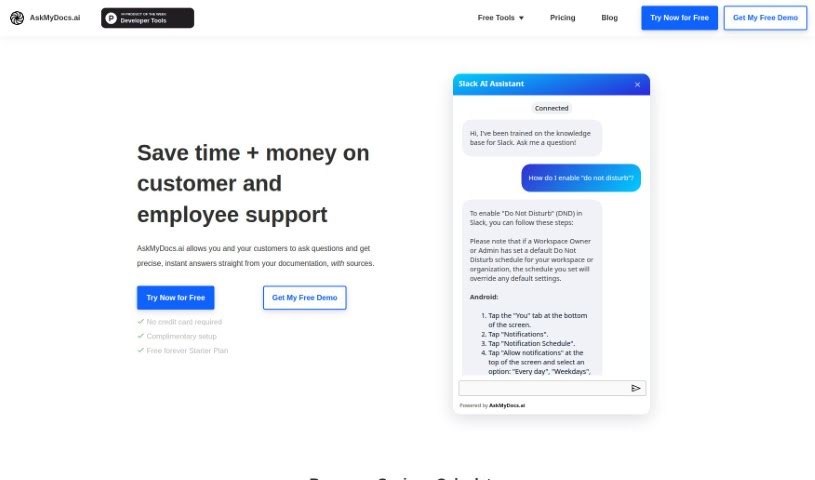
Screenshot of Askmydocs

Askmydocs

Discover what Askmydocs is and how to use it effectively in 2025. We'll explore its features and see how it stacks up against other documentation tools.

Screenshot

What is Askmydocs?

AskMyDocs.ai is a really handy tool designed to cut down on the time and cost of customer and employee support. How? By giving you precise, instant answers straight from your documentation sources. Basically, you can ask it questions, and it’ll pull the answers directly from your docs. It connects with lots of different services like Zendesk and Gitbook, so you can link them up, train the AI on your knowledge bases, and then ask away to get the information you need.

Who created Askmydocs?

Steve is the person behind AskMyDocs. He launched the platform on July 7, 2023, with a big goal: to completely change how we handle documentation using AI. The aim is to make documentation management efficient, accurate, and easy to access. The company offers a range of pricing plans to suit businesses of all sizes, from small startups to large enterprises. They even have custom options available for their Enterprise plan.

What is Askmydocs used for?

Here’s a look at what you can do with AskMyDocs:

  • Boost customer support: Give customers instant, spot-on answers from your documentation.
  • Connect with your tools: It works with platforms like Zendesk, Gitbook, Sitemaps, PDFs, Slack, and even chatbots.
  • Smart documents: Turn your regular documents into intelligent resources that can provide quick, accurate responses.
  • Tailor your chatbots: Customize chatbots and other features to fit exactly what your business needs.
  • Simple pricing: They offer a straightforward pricing structure with both free and paid options.
  • Your feedback matters: They really encourage user feedback to keep improving the tool.
  • Multilingual support: It handles multiple languages, including English, Spanish, French, German, Italian, Portuguese, Dutch, Russian, Chinese, Japanese, and Korean.
  • Flexible plans: There’s a free starter plan, and then paid options like the Builder, Innovator, and Enterprise plans with custom features.
  • PDFs as databases: You can turn your PDFs into searchable databases, making them much easier to use.
  • Future integrations: They’re planning to connect with more platforms like ReadMe and Docusaurus down the line.
  • Precise answers: AskMyDocs is used to get exact, instant answers straight from your documents.
  • Lots of integrations: As mentioned, it integrates with services like Zendesk, Gitbook, Slack, and more.
  • Intelligent resources: It transforms documents into smart resources for quick, accurate answers.
  • Less manual work: It improves customer support by cutting down on the need for people to manually find answers.
  • Works anywhere: It’s a platform-agnostic tool, meaning your documentation is accessible no matter what platform you’re using.
  • Custom chatbots: You can customize embedded chatbots to match your specific business needs.
  • Plans for everyone: Free and paid pricing plans are available to fit different business sizes.
  • Help with setup: They even offer a complimentary white-glove setup service if you’d like some help getting started.
  • Always improving: User feedback is encouraged to continuously enhance the tool.
  • More integrations coming: They plan to integrate with additional platforms in the future.

Who is Askmydocs for?

AskMyDocs is a great fit for:

  • Customer Support Representatives
  • Documentation Managers
  • Small Business Owners
  • Enterprise businesses
  • Anyone involved in customer support or documentation management
  • Businesses that rely heavily on managing documents

How to use Askmydocs?

Using AskMyDocs is pretty straightforward. Just follow these steps:

  1. Sign Up: First, create an account on the AskMyDocs website.
  2. Connect & Query: Use the integrated chat tool. You can ask questions directly about your documents or connect it to platforms like Zendesk, Gitbook, Sitemaps, PDFs, Slack, and Chatbot.
  3. Customize: Tailor the embedded chatbots and features to perfectly match your business requirements.
  4. Choose Your Plan: You can start with the Free Starter plan, or pick from the Builder, Innovator, or Enterprise plans depending on what you need.
  5. Setup Process: To get started, create a datastore, upload your documents, ask questions to your docs, and then embed the function wherever you need it.
  6. Embed Chatbot: Want the chatbot on your website? Just copy the embed code from the Chat Bots integration page.
  7. Give Feedback: Use the ‘Feedback’ button on the website to share your thoughts – it really helps us improve the tool.
  8. Platform Freedom: Enjoy the platform-agnostic feature, which makes accessing your documentation easy no matter which platform you’re on.
  9. Multilingual Access: Benefit from the tool’s support for multiple languages, making it more user-friendly and accessible for everyone.

Related AI Tools

Discover more tools in similar categories that might interest you

Stay Updated with AI Tools

Get weekly updates on the latest AI tools, trends, and insights delivered to your inbox

Join 25,000+ AI enthusiasts. No spam, unsubscribe anytime.