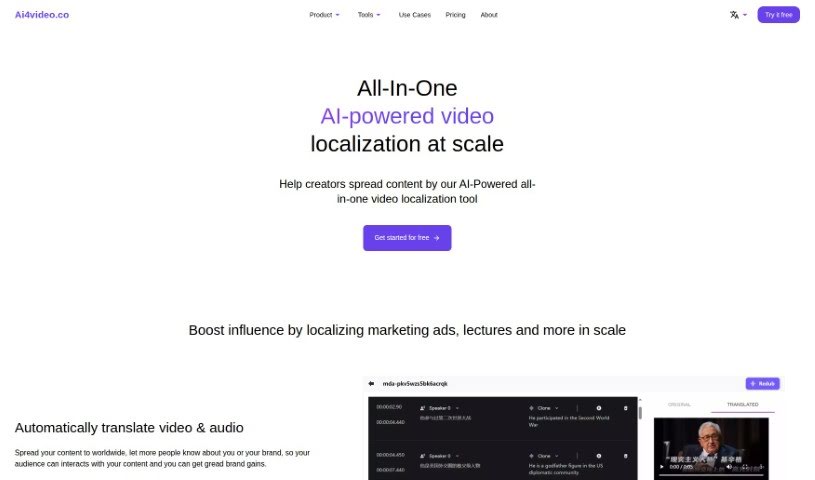
Screenshot of Ai4Video

Ai4Video

Discover Ai4Video, an AI-powered video localization tool. Learn about its features like translation, dubbing, and upscaling, and see how it stacks up against other video editing tools in 2025.

Screenshot

What is Ai4Video?

Ai4Video is a comprehensive, AI-driven platform designed to make video localization simple and effective. It is your all-in-one solution for adapting video content for a global audience. It offers a wide range of features, including translating your videos, dubbing them with realistic speaker voices, and even cloning the original speaker’s voice. Beyond that, it helps you adjust content to fit different languages, upscale your videos to stunning 4K quality, add color to black and white footage, remove unwanted elements with inpainting, and edit backgrounds. It supports translation into many different languages and has smart tools that can identify things like animals, plants, currencies, and landmarks within your images. The AI Rewriter feature is particularly neat, as it can tweak your content to match the natural flow and timing of different languages. Ai4Video also handles audio-to-text translation, which really smooths out the whole localization process. You can even try it out with a free trial, and if you need help, their support team is available via email at [email protected].

Who created Ai4Video?

Ai4Video was developed by a company dedicated to creating powerful, AI-driven tools for video localization. Their platform is packed with features like video translation, speaker dubbing, voice cloning, and content adjustments. It also boasts impressive capabilities such as upscaling videos to 4K, colorizing old footage, removing objects with inpainting, and editing video backgrounds. Launched on July 25, 2023, the specific details about the company’s founder or its exact origins aren’t readily available in the information provided.

What is Ai4Video used for?

Ai4Video is incredibly versatile, serving many needs for video professionals:

  • Video Translation: Easily translate your video content into multiple languages.
  • Speaker Identification: Pinpoint speakers for accurate dubbing.
  • Voice Cloning: Recreate the original speaker’s voice for natural-sounding dubs.
  • Content Adjustment: Adapt your video’s content to suit the nuances of different languages.
  • Video Upscaling: Enhance video quality by upscaling it to 4K resolution.
  • Video Colorization: Bring life to black and white videos by adding color.
  • Inpainting: Remove unwanted objects or distractions from your footage.
  • Background Editing: Modify or replace video backgrounds with ease.
  • Audio Translation: Automatically translate audio tracks, streamlining the localization workflow.
  • Diverse Editing Tools: Access a broad suite of tools for various video editing tasks.
  • Object Recognition: Identify animals, plants, currencies, and landmarks within images.

Who is Ai4Video for?

This tool is a fantastic asset for a variety of professionals working with video content:

  • Video Editors
  • Content Creators
  • Localization Specialists
  • Multimedia Producers
  • AI Developers
  • Translators
  • Marketing Professionals

How to use Ai4Video?

Getting started with Ai4Video is straightforward. Here’s a breakdown of how you can leverage its capabilities:

  1. Video Localization: Ai4Video excels at translating videos, dubbing them with accurate speaker voices, cloning voices, and adjusting content for different languages.
  2. Automatic Translation: The platform automatically translates both video and audio, making it much easier to reach a global audience.
  3. Speaker Identification: It can identify multiple speakers in a video, allowing you to dub each one individually, complete with voice cloning options.
  4. Content Adjustment: The tool intelligently modifies content to better suit the linguistic characteristics and flow of various languages.
  5. Video Editing: You’ll find tools for upscaling to 4K, colorizing old footage, removing objects, and editing backgrounds.
  6. Identifying Objects: Its AI can recognize animals, plants, currencies, and landmarks in your images.
  7. Multiple Language Support: Ai4Video supports translation into over 30 languages, opening up vast possibilities.
  8. AI Rewriter: This feature automatically adjusts content duration, ensuring a consistent viewing experience across different languages.
  9. Background Editing: Instantly remove, blur, or change video backgrounds.
  10. Video Inpainting: Use AI-powered inpainting to effortlessly remove unwanted objects from your videos.

Ready to dive in? Just sign up for a free trial on the Ai4Video website to start exploring these powerful video localization and editing tools. If you have any questions or need further assistance, don’t hesitate to reach out to their support team via email at [email protected]. Happy video editing!

Related AI Tools

Discover more tools in similar categories that might interest you

Stay Updated with AI Tools

Get weekly updates on the latest AI tools, trends, and insights delivered to your inbox

Join 25,000+ AI enthusiasts. No spam, unsubscribe anytime.