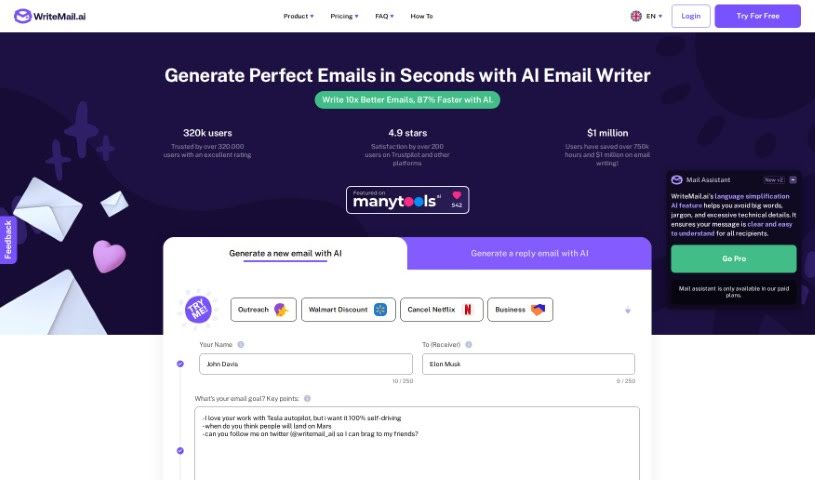
Screenshot of Writemail

Writemail

Discover what Writemail is and how to use it effectively in 2025. We'll explore its features and see how it stacks up against other email writing tools.

Screenshot

What is Writemail?

WriteMail.ai is a smart tool that uses AI to make your email communication better. It offers a bunch of helpful features. You can actually customize the tone and style of your emails, which is great for different situations – whether you need to sound super professional or just casual. The idea is to save you time by making sure your emails are clear and to the point. This way, people are more likely to do what you’re asking. Plus, WriteMail.ai can even help you write follow-up emails to get more responses, and it has ways to personalize your messages to get more clicks and conversions. It also supports multiple languages and gives you AI-generated ideas for your content, helping you write emails faster and more effectively. All in all, it’s designed to boost your productivity and the overall quality of your emails.

Who created Writemail?

Uros Gazvoda, the founder of Futuristica, is the person behind Writemail. He launched the platform on February 17, 2023. Uros Gazvoda’s goal with Writemail.ai was to completely change how people write emails, making it feel effortless. Futuristica, the company he leads, focuses on creating innovative solutions for today’s challenges, and Writemail is one of those.

What is Writemail used for?

Here are some common ways people use Writemail:

  • Writing those initial cold emails to potential clients or customers.
  • Sending follow-up messages after submitting proposals or when someone has made an inquiry.
  • Crafting thank you emails or other types of outreach messages.
  • Composing marketing emails or regular newsletters.
  • Responding to customer support questions.
  • Even writing personal emails to friends and family.

Who is Writemail for?

Writemail is a great tool for a wide range of people:

  • Sales professionals who need to connect with leads.
  • Marketers looking to craft engaging campaigns.
  • Customer Support Representatives aiming for clear and helpful communication.
  • Business professionals who manage a lot of email.
  • Anyone who finds themselves writing a lot of emails regularly.
  • Sales Representatives.
  • Customer Support Agents.
  • Individuals managing personal correspondence.
  • Teams collaborating via email.
  • Potential clients you’re trying to reach.
  • Customers you’re communicating with.
  • And yes, even individuals writing personal emails to friends and family.

How to use Writemail?

To really get the most out of WriteMail, here’s a simple guide:

  1. Pick Your Writing Style: Try out the different “Write As” styles to give your emails a unique voice that feels just right.
  2. Choose the Right Tone: Use the tone selector to set the mood for your email – whether it needs to be professional or more casual.
  3. Be Clear and Specific: Make sure your emails are detailed and to the point. This saves time for everyone involved.
  4. Craft Persuasive Messages: WriteMail can help you create emails that are more persuasive, making your communication more impactful.
  5. Follow Up Effectively: Generate well-crafted follow-up emails, ideally within about 14 days, to really boost your response rates.
  6. Personalize Your Emails: Take advantage of the personalization features to help improve click-through rates and get better conversion results.
  7. Structure Your Content Well: Make sure the key points in your email really stand out. This helps ensure the recipient understands the whole message.
  8. Consider Cultural Differences: If you’re communicating with people who don’t speak English as their first language, use the tone analyzer to help make things clearer.
  9. Be Polite and Respectful: Aim for a tone that’s polite and shows respect, even if you’re disagreeing on something.
  10. Keep Emails Concise: Shorter emails are generally easier to read and have more impact.
  11. Be Specific About Tasks: Clearly state what tasks or goals you have in your emails. This makes them much more effective.
  12. Polish Your Emails: The AI-powered editing can help you perfect your grammar and make sure your message is crystal clear.
  13. Use the Mail Assistant: Get suggestions and feedback in real-time to help improve your emails as you write them.

When you’re ready to send emails using WriteMail, just make sure your browser is set up to handle ‘mailto:’ links with your preferred email service. WriteMail itself doesn’t actually send the emails; instead, it prepares the content for your email client, letting you keep using your usual email workflow and security settings.

Related AI Tools

Discover more tools in similar categories that might interest you

Stay Updated with AI Tools

Get weekly updates on the latest AI tools, trends, and insights delivered to your inbox

Join 25,000+ AI enthusiasts. No spam, unsubscribe anytime.