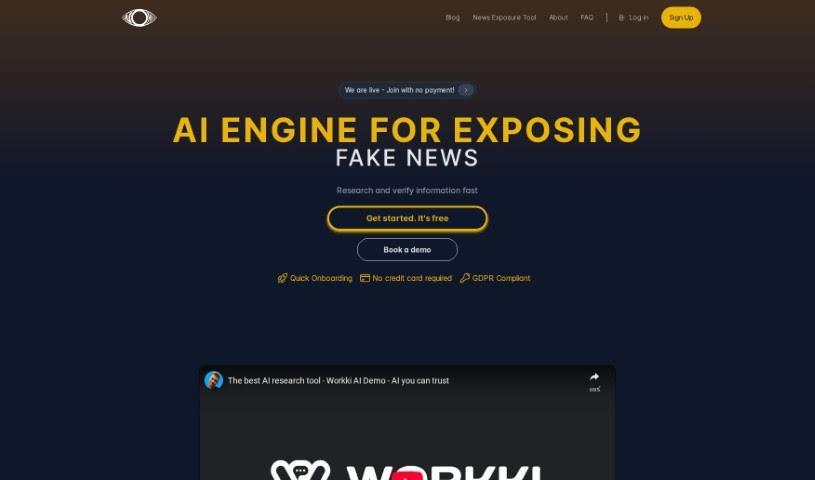
Screenshot of Workki AI

Workki AI

Discover what Workki AI is and how to use it effectively in 2025. We'll explore its features and see how it stacks up against other Meeting Assistants.

Screenshot

What is Workki AI?

Workki AI is your smart virtual assistant, designed to really boost your productivity and make managing tasks a breeze. It can handle things like scheduling your meetings, drafting emails, and it connects smoothly with your email accounts like Gmail and Outlook. Plus, you can just talk to it naturally to get things done. Need a chart or a graph? Workki AI can whip one up for you. It also helps you set reminders and manage your events. It’s built for all sorts of people, whether you’re writing professional emails, digging into market research, or analyzing data to find new customers. And don’t worry about needing help during the week – their customer support is available even on weekends. Ultimately, Workki AI is all about making you more efficient, saving you precious time, and smoothing out your workflow, whether you’re working solo or as part of a business.

Who created Workki AI?

Workki AI, this handy AI virtual assistant, was actually created to help people be more productive by making task management, email writing, and meeting scheduling much simpler. It first launched on July 22, 2023. The company behind it really focuses on making workflows more efficient for everyone, from personal and corporate assistants to office workers, managers, executives, entrepreneurs, and anyone involved in market research. This virtual assistant is packed with features, including understanding natural language, integrating with Gmail and Microsoft Outlook, showing data in charts, and setting reminders in your calendar or task manager. Workki AI can also help you write professional emails, conduct market research, and analyze data to spot potential customers or even competitors. If you ever need a hand, their customer support is available seven days a week, all aimed at saving you time and making your work life more efficient.

What is Workki AI used for?

  • Compose emails: Need to send a quick note or a more formal message? Workki AI can help you draft it.
  • Schedule meetings: Say goodbye to back-and-forth emails trying to find a time that works. Workki AI can handle the scheduling for you.
  • Governments can use Workki AI to make better policies: By quickly finding and checking reliable information from many sources, it helps governments make smarter decisions. It’s also great at spotting fake news, which keeps people safe and well-informed.
  • Universities benefit from Workki AI: Students and professors can use it to speed up research. It makes literature reviews, source verification, and data gathering much faster.
  • Private equity firms utilize Workki AI: These firms can use it to quickly review financial statements and market reports, helping them spot trends, risks, and opportunities more efficiently.
  • News media companies rely on Workki AI: To ensure accuracy, news outlets use it to verify sources and references, summarize articles, and detect fake news, which helps them maintain their credibility.
  • Workki AI acts as an AI-powered virtual assistant: It streamlines tasks, schedules meetings, composes emails, and connects with your email providers. It can also generate charts and graphs, set reminders, and generally supports a wide range of user needs.
  • Workki AI assists in writing professional and polite emails: It helps you communicate clearly and courteously. It also helps with market research and analyzing online data to find potential customers or competitors.
  • Companies can access Workki AI: You can explore its features through free trials or demos. Plus, they offer great customer support, available even on weekends.
  • The platform aims to enhance efficiency: It’s designed to save you time and make workflow management smoother for both individuals and businesses.
  • Conduct market research: Get insights into your market and competitors.
  • Effortlessly manage tasks: Keep your to-do list organized and under control.
  • Connect with email providers: Works seamlessly with services like Gmail and Microsoft Office Outlook.
  • Use natural language: Just speak or type your requests naturally.
  • Generate charts and graphs: Visualize your data easily.
  • Set reminders and events: Never miss an important date or task.
  • Write professional and polite emails: Ensure your communications are always on point.
  • Analyzing data from the internet: Find potential customers or competitors by looking at online information.

Who is Workki AI for?

Workki AI is designed to help a variety of users and organizations, including:

  • Governments: For policy-making and information verification.
  • Universities: To support student and professor research.
  • Private Equity Firms: For efficient financial and market analysis.
  • News Media Companies: To ensure accuracy and combat misinformation.

How to use Workki AI?

Workki AI is a really powerful virtual assistant that can seriously boost your productivity and make your tasks much smoother. Here’s a simple step-by-step guide to get you started with this innovative tool:

  1. Sign Up and Log In: First, create your account on the Workki AI platform and then log in using your details.
  2. Connect Your Email Account: Link up your email, like Gmail or Microsoft Office Outlook. This makes sending emails super easy, so you don’t have to copy and paste manually.
  3. Use Natural Language: You can give Workki AI complex instructions just by talking or typing naturally. It’s great for tasks like scheduling meetings or writing emails.
  4. Generate Charts and Graphs: Need to visualize your data? Use Workki AI to create charts and graphs that make information easier to understand and analyze.
  5. Set Reminders and Events: Stay on top of your schedule by setting reminders and events directly in your calendar or task manager through Workki AI.
  6. Explore All the Features: Whether you’re a personal assistant, a manager, an executive, an entrepreneur, or a marketer, Workki AI has features that cater to a wide range of user profiles and needs.
  7. Get Help Writing Emails: Workki AI can assist you in crafting professional and polite emails, which saves you time and ensures your communication is effective.
  8. Do Market Research and Data Analysis: You can use Workki AI to conduct market research and analyze data found on the internet, helping you identify potential customers or competitors.
  9. Try a Free Trial or Demo: Before you commit, you can test out Workki AI with a free trial or request a demo to explore all its capabilities.
  10. Customer Support is Ready: You’ll benefit from comprehensive customer support, and they’re available to help even on weekends if you have any questions or run into any issues while using the tool.

By following these steps, you can really make the most of Workki AI to boost your efficiency, save time, and manage your workflows more effectively, whether it’s for your personal tasks or your business.

Related AI Tools

Discover more tools in similar categories that might interest you

Stay Updated with AI Tools

Get weekly updates on the latest AI tools, trends, and insights delivered to your inbox

Join 25,000+ AI enthusiasts. No spam, unsubscribe anytime.