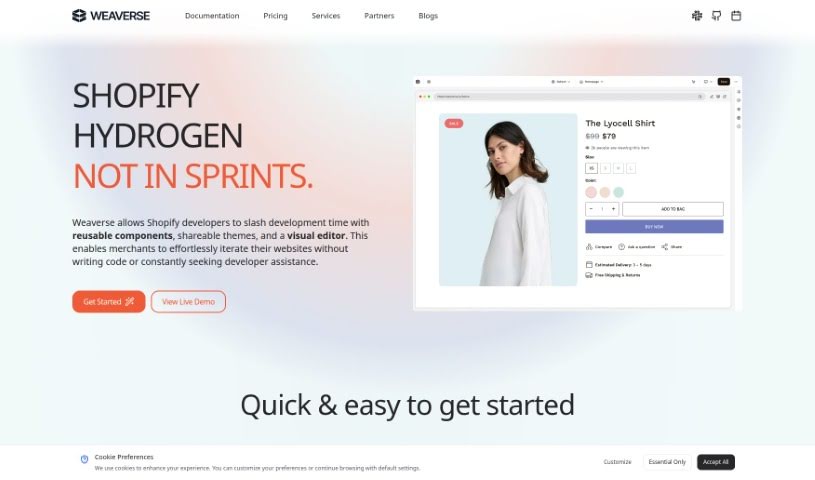
What is Weaverse?
Weaverse is an AI-powered website builder specifically made for Shopify sellers. It helps you create really fast eCommerce storefronts that are also super easy to use. It does this by using headless frameworks like Shopify Hydrogen, Remix, and NextJS. You get a drag-and-drop page builder, a smart grid system that makes placing elements a breeze, and everything is designed to look great on mobile. Plus, there’s a code editor if you want to tweak things further. Weaverse also has an AI assistant that handles those repetitive tasks, speeding up how quickly you can build your pages.
What’s great is that Weaverse offers a free plan, so you can try it out before committing to a paid one. It’s perfect for Shopify sellers who want to build stores that convert well, even if they don’t have any CSS or web design experience. With Weaverse, you’ll enjoy pages that load quickly, that drag-and-drop builder, a custom code editor, AI help, mobile-friendly design, that smart grid layout, and a whole library of design elements to make your Shopify store look attractive and work effectively.
The Weaverse smart grid layout system makes it simple to put elements exactly where you want them on a page. This really smooths out the design process, whether you’re a seasoned pro or just starting out. Weaverse also lets you customize your source code safely, offers a library of pre-made sections, lets you add your own custom code, and uses headless frameworks like Shopify Hydrogen, Remix, and NextJS to boost performance.
Basically, Weaverse is a complete package designed for Shopify sellers. It makes creating beautiful, high-performing eCommerce stores straightforward and efficient.
Who created Weaverse?
Weaverse was developed by a dedicated team, headed up by its founder. The platform officially launched on March 2, 2023. The main goal was to make headless commerce less daunting for Shopify developers and more accessible for everyone. Weaverse is built to help Shopify sellers create stores that convert well, offering features like a visual drag-and-drop page builder, a smart grid layout system, and designs that are responsive on mobile devices. The company behind Weaverse is focused on providing the essential tools needed for businesses looking to adopt headless strategies in eCommerce.
What is Weaverse used for?
- Building High-Performance Stores: Create fast eCommerce storefronts specifically for Shopify sellers.
- Leveraging Headless Frameworks: Use frameworks like Shopify Hydrogen, Remix, and NextJS for super-fast page loading.
- Easy eCommerce Shop Creation: Build your online store with a focus on user-friendliness.
- Drag-and-Drop Page Building: Easily design pages by dragging and dropping elements.
- AI Task Automation: Let the AI assistant handle repetitive tasks to speed up page building.
- Custom Code Editing: Personalize your site’s code using an embedded script editor.
- Mobile-Responsive Design: Ensure your store looks great and works perfectly on all mobile devices.
- Smart Grid Layout: Effortlessly position elements on your pages with a smart grid system.
- Extensive Design Library: Access over 20 drag-and-drop page elements to create attractive designs.
- High-Converting Stores: Build Shopify stores designed to turn visitors into customers.
- Optimized for Shopify: Create eCommerce shops specifically tailored for Shopify sellers.
- Effortless Code Customization: Easily modify source code with the embedded script editor.
- Fast Page Rendering: Benefit from headless frameworks like Shopify Hydrogen, Remix, and NextJS for quick loading.
- Visual Building Without Code: Create pages with drag-and-drop functionality, no complex frontend code needed.
- AI-Powered Efficiency: Automate tedious tasks using Weaverse’s AI assistant.
- Seamless Mobile Experience: Ensure your design is responsive across all devices.
- User-Friendly Design Tools: Utilize a smart grid layout for easy element placement.
- Flexible Design Options: Choose from over 20 drag-and-drop elements in the design library.
- Template Variety: Work with mobile-responsive templates and a custom code editor.
- Free Starter Plan: Explore features with a free plan before upgrading.
- No Design Expertise Needed: Build websites even without CSS or web design knowledge.
Who is Weaverse for?
- Shopify Sellers: Anyone selling products on Shopify looking to enhance their online store.
- Web Developers: Professionals who want to build fast, modern eCommerce sites more efficiently.
- E-commerce Managers: Individuals responsible for managing and optimizing online stores.
How to use Weaverse?
Here’s a simple guide to getting started with Weaverse:
- Start with the Basics: First, sign up for Weaverse. Take some time to explore its features, like the drag-and-drop visual page builder, the embedded script editor for code tweaks, the smart grid layout system, and how the mobile-responsive design works.
- Build Your eCommerce Shop: Use Weaverse’s specialized tools, especially those designed for Shopify sellers, to create stores that are built to convert visitors into customers.
- Customize Your Source Code: If you like to get hands-on, use the embedded script editor to personalize your source code. This allows for unique, tailored modifications to your site.
- Let AI Help You: Take advantage of Weaverse’s AI assistant. It’s there to automate tasks, which can save you a lot of time and make the whole page-building process much simpler.
- Make Sure It’s Mobile-Friendly: It’s crucial that your website works perfectly on mobile devices. Weaverse helps ensure a great user experience no matter what platform someone is using.
- Use the Design Element Library: You’ll find over 20 drag-and-drop page elements, plus mobile-responsive templates and a custom code editor, all within Weaverse’s design library. This gives you tons of options for customization.
- Check Out the Pricing Plans: Weaverse offers different plans, including a free starter option. It’s a good idea to look at these to understand the full range of features available and choose what’s best for you.
- Who Benefits Most: Weaverse is ideal for Shopify sellers who want to create stores that convert well but don’t have deep CSS or web design knowledge.
- Build Without Coding Worries: Thanks to the drag-and-drop visual page builder, you can create websites without needing prior CSS or web design skills, making it very beginner-friendly.
- Master the Smart Grid Layout: Make the most of Weaverse’s smart grid layout system. It helps you position elements effortlessly, which is a big help for both design experts and newcomers.
By following these steps, you can really make the most of Weaverse to build and customize your website, especially if you’re a Shopify seller aiming for a store that converts well.