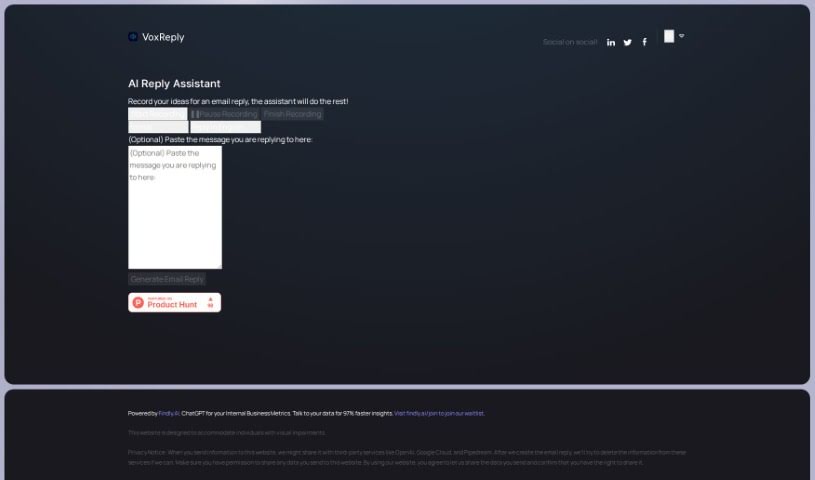
Screenshot of Voxreplay

Voxreplay

Discover what Voxreplay is and how to use it effectively in 2025. Explore its features, writing styles, and how it compares to other Email Writing Tools.

Screenshot

What is Voxreplay?

VoxReply is a smart writing assistant that lets you craft email replies simply by speaking. You can paste the email you need to answer, then just record your thoughts out loud. VoxReply takes your voice input and turns it into a well-written response that’s grammatically correct and fits the context. You can even pick from different writing styles – think informal, business-like, friendly, or formal. Plus, it handles multiple languages, including English, Arabic, French, German, and Japanese, among others. This tool is especially helpful for visually impaired individuals, giving them a voice-driven way to create email replies. To make this work, VoxReply might share your input data with services like OpenAI, Google Cloud, and Pipedream. They do aim to remove this information from those external platforms once your email is ready, which is a good step for privacy.

Who created Voxreplay?

Findly.ai, a company known for its chatbot platform for data warehouses, is behind Voxreplay. They launched this AI writing assistant on April 11, 2023. Essentially, it lets you compose email replies by just recording your ideas. The system then understands and transforms these ideas into polished, grammatically sound responses. Findly.ai’s technology is what powers Voxreplay, helping to deliver quicker insights from data.

What is Voxreplay used for?

  • It supports a variety of languages.
  • It helps you write email replies using just your voice.
  • It’s designed for visually impaired individuals, letting them record reply ideas.
  • You can choose from different writing styles for your responses.
  • It handles multiple languages when generating email replies.
  • User input data is shared with third-party services like OpenAI, Google Cloud, and Pipedream.
  • The tool works to protect your privacy by trying to delete your information from third-party services after generating the email.
  • You can personalize your emails by selecting different writing styles.
  • It assists people who aren’t very confident with writing emails by structuring their responses.
  • It’s powered by Findly.ai, a chatbot platform for data warehouses.
  • There’s a waitlist available for early access to the tool.
  • You can compose emails using your voice.
  • It offers various writing styles.
  • It’s built with visually impaired users in mind.
  • It integrates with third-party services.
  • You can send emails directly from the website.
  • It includes a feature to copy replies to your clipboard.
  • It’s powered by a chatbot platform.
  • You can register for a waitlist.
  • It partners with Google Cloud.
  • It’s built for visually impaired users.
  • It takes steps for data protection.
  • You can send emails directly from the website.
  • It collaborates with Pipedream.
  • It offers substantial accessibility features.

Who is Voxreplay for?

  • Primarily, it’s a great tool for visually impaired individuals.

How to use Voxreplay?

Here’s how you can make the most of VoxReply:

  1. Paste Your Email: Start by pasting the email you need to reply to right into VoxReply.
  2. Record Your Reply: Use your voice to record your thoughts for the reply. VoxReply will figure out what you’re saying.
  3. Pick a Style: Choose the writing style that best suits your message – maybe informal, business, friendly, or formal.
  4. Generate the Email: VoxReply will use your voice input to create a grammatically correct and contextually relevant email response.
  5. Send It Off: You can either copy the reply to your clipboard or send it straight from VoxReply’s website.
  6. Customize Further: Make your email reply your own by picking different writing styles that match your preference.
  7. Privacy Considerations: While VoxReply shares user data with services like OpenAI, Google Cloud, and Pipedream, it does try to delete your information after the email is generated to protect your privacy.
  8. Language Options: VoxReply supports many languages, making it useful for people all over the world.
  9. Accessibility Focus: It’s designed to help visually impaired individuals, allowing them to interact with the tool using just their voice.
  10. Join the Waitlist: If you’re keen to try it out, you can join the waitlist for early access to this chatbot service from Findly.ai, the company behind VoxReply.

By following these steps, you can efficiently use VoxReply to compose email responses using your voice, complete with personalized styles and language support.

Related AI Tools

Discover more tools in similar categories that might interest you

Stay Updated with AI Tools

Get weekly updates on the latest AI tools, trends, and insights delivered to your inbox

Join 25,000+ AI enthusiasts. No spam, unsubscribe anytime.