What is Vimcal?
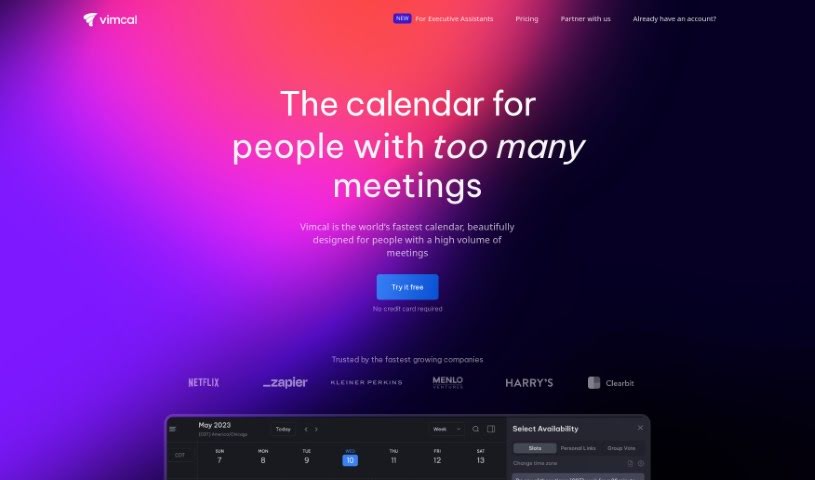
Vimcal is a really fast and efficient calendar tool built to boost productivity, especially for busy folks and teams. It’s packed with features that make managing your schedule a breeze. You can color-code your events to keep things organized, see all your different calendars in one place, and even integrate social profiles. Plus, it lets you create events using natural language – just type what you need! There’s also a ‘Do Not Disturb’ mode, which is great for those times you really need to focus without interruptions. Vimcal helps you save time with its AI scheduling assistant, makes managing different time zones super simple, and connects smoothly with your Google or Outlook/Exchange accounts. It’s earned a lot of praise from industry pros and users alike for how well it streamlines scheduling and generally makes people more productive.
Who created Vimcal?
Alex MacCaw, who also founded Reflect and Clearbit, is the person behind Vimcal. This calendar app first launched on July 13, 2023, and it’s quickly become popular because it’s so efficient and easy to use. People really like its innovative features, like being able to color-code events, easily coordinate work and personal calendars, and access social profiles and company details right from the app. Vimcal is known for being incredibly fast and having a smart AI scheduling assistant, making it a top pick for anyone juggling a busy schedule.
What is Vimcal used for?
- Scheduling across time zones: It makes coordinating meetings with people in different parts of the world much simpler.
- AI scheduling help: It uses AI to automate many of your scheduling tasks, saving you a lot of manual effort.
- Account compatibility: It works seamlessly with your existing Google or Outlook/Exchange accounts.
- Color-coded events: You can assign different colors to events to quickly see what type of meeting or task it is.
- Booking links: Share your availability easily with others by creating custom booking links.
- Mobile-first design: It’s built with mobile users in mind, offering a great experience on your phone.
- Efficient polling: Create polls to find the best meeting times for groups.
- Social profile integration: See social profiles of people you’re meeting with.
- Company dossier access: Get quick access to information about companies.
- Unified account view: See all your personal and work calendars in one single, consolidated view.
- Automating scheduling tasks: The AI assistant handles much of the back-and-forth for scheduling.
- Saving time: Users report saving up to three hours each week thanks to Vimcal’s efficiency.
- Managing multiple accounts: Keep all your personal and work calendars organized in one place.
- Quick time zone access: Just type a city name to instantly see its time zone.
- ‘Do Not Disturb’ mode: Customize settings to block notifications and focus on your work.
- Mobile compatibility: It’s fully functional and powerful on iOS devices.
- Lightning-fast operations: The app is designed for speed and responsiveness.
- Natural language commands: Schedule events by simply typing what you need.
- Saves significant user time: Beyond the reported three hours, it generally makes your day more efficient.
Who is Vimcal for?
- Executives and Executive Assistants: For managing complex schedules and high-level meetings.
- Remote Workers: To easily coordinate with colleagues and clients across different locations.
- Anyone with a Busy Schedule: If your calendar is constantly full, Vimcal can help.
- Virtual Assistants & Administrative Assistants: To efficiently manage schedules for others.
- Users in Work and School: For balancing academic and professional commitments.
- Teams: To improve group scheduling and coordination.
- Professionals: Across various industries who need efficient time management.
- Digital Marketing Generalists: For coordinating campaigns and client meetings.
- Investors & Developers (VCs, CEOs): To streamline deal-making and investor relations.
How to use Vimcal?
Getting the most out of Vimcal is pretty straightforward. Here’s a simple guide:
- Sign Up: Start by heading over to the Vimcal website and filling out the sign-up form. It’s quick and easy.
- Access Everywhere: You can use Vimcal on your desktop, on your iOS device, or even as a handy Chrome extension. It’s designed to be where you need it.
- Connect Your Accounts: Link up your Google or Outlook/Exchange accounts. This lets Vimcal pull everything together seamlessly.
- Explore Key Features: Dive into features like color coding for better organization, keyboard shortcuts to speed things up, booking links for easy sharing, polls to find meeting times, and the ‘Do Not Disturb’ mode for focused work.
- Let AI Help: Make sure to use Vimcal’s AI scheduling assistant. It’s there to automate tasks and give you back valuable time.
- Unified Calendar View: Get rid of tab-switching! Manage all your personal and work calendars in one clean, unified view.
- Effortless Time Zones: Handling different time zones is a snap. Just type the city name, and Vimcal shows you the relevant times.
- Mobile Power: Use the robust mobile calendar, especially designed for work and school on iOS.
- Trust the Endorsements: Feel confident using Vimcal, knowing it’s recommended by notable figures like the Former CEO of Twitter and other industry executives.
- Consider Advanced Tiers: If you need more specialized features, like for executive assistance or enterprise-level use, you can request access to tiers like Vimcal EA or the Enterprise version.
By following these steps, you can really make Vimcal work for you, streamlining your schedule and boosting your productivity, especially if you’re working remotely.