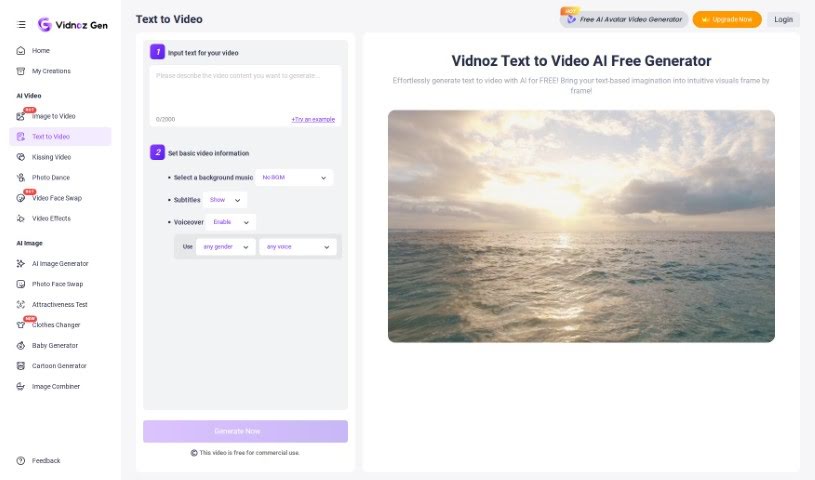
Screenshot of Vidnoz AI Text to Video

Vidnoz AI Text to Video

Discover what Vidnoz AI Text to Video is and how to use it effectively in 2025. We'll explore its features and see how it stacks up against other Text To Video tools.

Screenshot

What is Vidnoz AI Text to Video?

Text to Video is a way to turn your written words into a video, all thanks to artificial intelligence. Tools like Vidnoz AI’s text-to-video generator can take a simple text prompt or an idea you have and automatically create visuals, write a script, record a voiceover, and even pick out background music. It’s pretty neat! You can feed it text from all sorts of places – like blog posts, PDFs, or even website links. Then, you can give it specific instructions to fine-tune the video, and it can whip up something in just minutes. Plus, these tools let you personalize things like the voiceover and subtitles, offering a wide selection of AI-generated voices in different languages and accents. Essentially, Text to Video tools make creating video content much simpler and more engaging for all sorts of uses.

Who created Vidnoz AI Text to Video?

The specific founder behind Vidnoz AI isn’t mentioned in the information I have. What I do know is that Vidnoz AI offers a text-to-video generator that uses AI to efficiently create videos from text. The company provides a library of AI voices, allows video generation from various text files, and offers a broad range of media assets to make your videos even better. Vidnoz AI’s main goal is to simplify the video creation process, making it more accessible and engaging for everyone.

How to use Vidnoz AI Text to Video?

Here’s a straightforward, step-by-step guide to using the Text to Video tool:

  1. Get started for free: First, sign up for the Vidnoz AI Text to Video Generator. It’s free to join.
  2. Add your script: Next, simply input your video script directly into the tool.
  3. Pick your music: Choose background music that matches the mood of your script. This helps set the emotional tone.
  4. Customize your video: You can decide whether you want a voiceover and subtitles. Just enable or disable them based on what you prefer.
  5. Let the AI work: Generate the text-to-video. The AI will then analyze your content, think about it, come up with ideas, and put it all together.
  6. Review and share: Once it’s done, you can preview your video. After that, you’re free to download it or share your script-based video.

Just a heads-up, Vidnoz AI’s text-to-video generator has lots of voice options – you can choose based on age, gender, accent, and even emotion. Typically, the text limit is around 3600 characters. The tool supports English, with various accents like American, modern British, middle-aged British, Indian, and Australian. If you’re looking for 1080P video quality, you’ll need to upgrade your account, as the free version provides 720P videos and includes a small watermark in the corner.

Related AI Tools

Discover more tools in similar categories that might interest you

Stay Updated with AI Tools

Get weekly updates on the latest AI tools, trends, and insights delivered to your inbox

Join 25,000+ AI enthusiasts. No spam, unsubscribe anytime.