What is Userdoc?
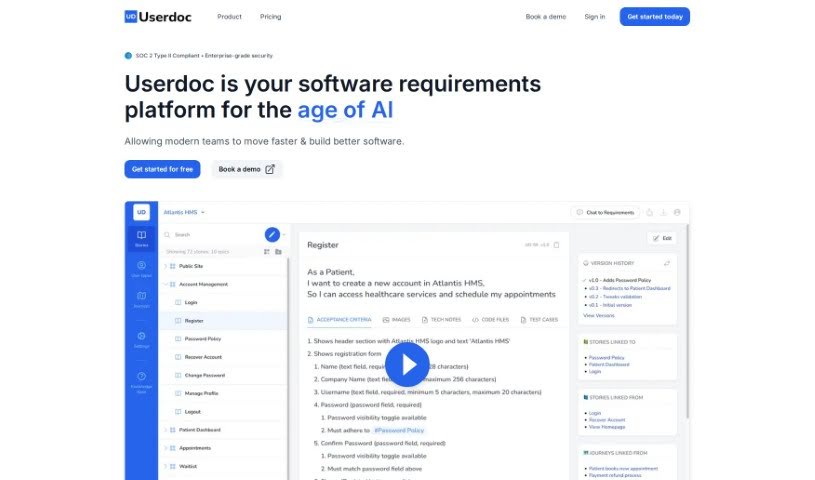
Userdoc is a software platform built to help you manage your software requirements smoothly and efficiently. It is your digital assistant for all things requirements. It comes packed with features like an AI Scoping Copilot that helps you quickly define the scope of your features. You can also organize and sync your requirements directly with your favorite project management tools, get help with compliance, manage different versions of your requirements, and collaborate easily with your team. Plus, you can export everything in various formats. People who use Userdoc often say it really speeds up how they gather user requirements, makes it much simpler to get stakeholders involved, and provides genuinely useful AI-generated requirements. The AI can whip up detailed user stories, acceptance criteria, personas, and user journeys, saving you a ton of time and effort. Users also love how it keeps everything organized, makes collaboration a breeze, and ensures your software requirements are spot-on. Ultimately, Userdoc aims to help teams create requirements faster and build better software by using smart AI tools and integrating seamlessly with the project management tools you already use. And for peace of mind, Userdoc is SOC2 Type 1 compliant, meaning your data is kept secure and private.
Who created Userdoc?
Userdoc was brought to life by a team of software developers and product experts who are truly passionate about what they do. They’ve got over 15 years of experience under their belts, building large-scale technical systems. They noticed that getting software requirements right was a huge piece of the puzzle for project success. That’s why they created Userdoc – to make the process of creating and managing requirements much more efficient. The platform uses smart AI to help generate detailed user stories, acceptance criteria, personas, and user journeys. Their goal? To help teams build better software, faster.
What is Userdoc used for?
- Userdoc makes it super easy to get stakeholders involved in writing user stories.
- It acts like a digital assistant to speed up how you gather user requirements.
- You can efficiently document and link user stories and their acceptance criteria.
- It helps you define requirements and map out user flows through your systems effectively.
- You can kick off new features by mapping out detailed user stories.
- It enhances your project requirements by using AI to suggest what you might need.
- Userdoc keeps all your requirements in one central place, making organization simple.
- You can create detailed maps of your systems using user stories, personas, and user journeys.
- It helps improve the success rate of your software projects with its sophisticated AI.
- It keeps the focus on your users by helping you create detailed personas, including their backgrounds, motivations, and frustrations.
- It really accelerates the process of gathering user requirements.
- You can generate personas and user journeys with ease.
- It helps you organize and link user stories and acceptance criteria.
- Userdoc lets you create a comprehensive map of your entire system.
- It ensures your requirements accurately match expectations with story approval statuses.
- You can build clear relationships between user stories, personas, and user journeys.
- The versioning feature lets you easily refer back to previous requirements.
- It makes collaborating with your team, stakeholders, and clients a smooth process.
- You can export requirements in various formats for easy knowledge sharing.
- It synchronizes your requirements with project management tools and other systems.
- Userdoc can quickly scope out features in mere seconds, thanks to its AI that understands your software system in detail.
- It helps organize and maintain up-to-date documentation for all your software requirements.
- You can build strong relationships between user stories, personas, and user journeys to create an easy-to-follow map of your system.
- Sync your requirements to project management tools and other systems with just a simple click.
- It assists in achieving compliance and passing audits by providing all the necessary documentation.
- The versioning feature is a lifesaver for referencing previous versions of your requirements.
- It facilitates collaboration by allowing you to share requirements with your team, stakeholders, and clients, all with tight access control.
- You can download your requirements in various formats like Word docs, Excel spreadsheets, or CSV files for simple sharing.
- It helps you create detailed personas, complete with backgrounds, motivations, and frustrations.
- Userdoc captures requirements in a standard way, using user stories and acceptance criteria.
- It’s great for gathering requirements and scoping out software.
- It really accelerates user requirements.
- Userdoc provides a digital assistant that suggests requirements and generates personas.
- You can document and link user stories and acceptance criteria.
- It helps create detailed personas with backgrounds, motivations, and frustrations.
- It explains workflows through the system using user journeys.
- Userdoc helps organize requirements by user type, folder, or label.
- It syncs requirements with project management tools and other systems.
- You can share requirements with your team, stakeholders, and clients, all while maintaining tight access control.
- It makes engaging stakeholders in writing user stories much easier.
- Userdoc helps define requirements and user flow through a system.
- You can share requirements with your team, stakeholders, and clients.
- It accelerates user requirements with AI assistance.
- Userdoc helps keep requirements organized in one place.
- It’s useful for defining requirements and user flows in software development.
- You can map out detailed user stories for new features.
- It helps create project requirements with AI assistance.
- Userdoc ensures accurate software requirements for clients and your team.
Who is Userdoc for?
- Product Owners
- Business Analysts
- Project Managers
- CEOs
- Developers
- Product Owners
- Business Analysts
- Project Managers
- CEOs
- Developers
How to use Userdoc?
To get the most out of Userdoc, just follow these simple steps:
- Project Scoping: Start by using Userdoc’s AI project wizard. It’ll guide you through scoping your project, helping you define user types, features, goals, and journeys quickly, just like a business analyst would.
- Detailed Documentation: Let Userdoc automatically create detailed user stories and acceptance criteria for you. You’ll get an excellent first draft that you can then easily tweak and refine.
- Persona Development: Create thorough personas with detailed backgrounds, motivations, and frustrations. You can do this manually or let Userdoc’s AI help, making sure everyone on the team really understands who the actual users are.
- User Journey Mapping: Explain complex workflows in your system by using user journeys. Connect the touchpoints with your user stories and clearly identify which personas are involved at each stage.
- Integration and Export: Easily connect Userdoc with your existing project management tools and systems. When you’re ready, export your data in various formats like Word docs, Excel sheets, or CSV files.
- Long-Term Documentation: Turn your project requirements into lasting documentation with Userdoc. You can maintain and update requirements easily, even after the project is officially complete.
- Collaboration and Sharing: Share your requirements with team members, stakeholders, and clients, all while keeping tight control over who can see what. This helps prevent knowledge silos and really promotes collaboration.
- Versioning and Compliance: Keep track of all your requirement changes with the versioning feature. You can also ensure compliance and make audits much smoother by using Userdoc’s detailed documentation capabilities.
- AI Capabilities: Make the most of Userdoc’s AI to rapidly and accurately scope out features. The AI understands your software system and can generate requirements with impressive precision.
- Pricing and Trial: Give Userdoc a spin with a 14-day free trial. Then, you can pick a pricing plan that best fits your team’s size and needs.
By following these steps, you’ll be able to streamline your project management, boost collaboration, and ensure you have accurate, detailed software requirements, all thanks to Userdoc’s smart AI capabilities.