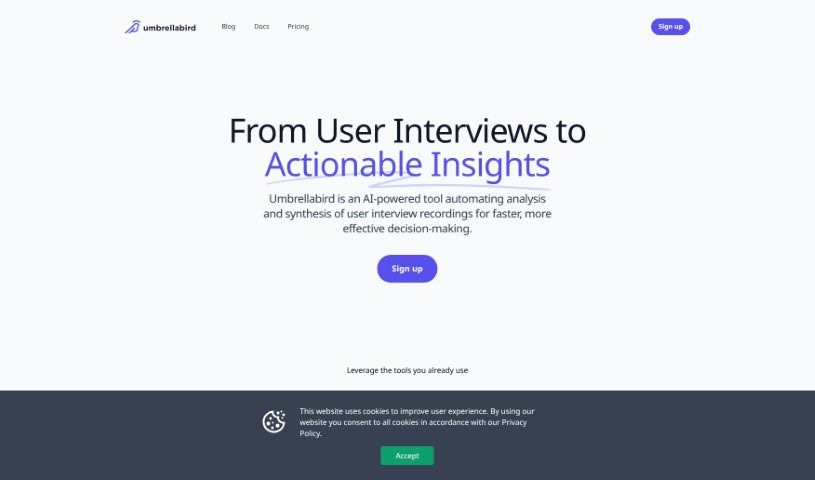
Screenshot of Umbrellabird

Umbrellabird

Discover Umbrellabird, an AI tool for product teams. Learn how to use it effectively in 2025, explore its features, and see how it stacks up against other documentation tools.

Screenshot

What is Umbrellabird?

Umbrellabird is a smart AI tool built specifically for product teams. Its main job is to take your user-interview recordings and automatically create product documents from them. It is a super-efficient assistant that listens to your interviews, pulls out the important stuff, and then writes up the documents for you. It can grab transcripts, create summaries, and pinpoint crucial details like what users are struggling with (pains), what they’re looking for (gains), and what they want to achieve (desired outcomes). This means your team can quickly get comprehensive drafts ready to go. Umbrellabird also plays nicely with tools you probably already use, like Google Meet and Google Drive, and makes it super easy to export the documents it creates. What’s really neat is how fast it is – it can turn your recordings into product documents in just seconds, meaning you skip the whole manual transcription step.

Who created Umbrellabird?

Umbrellabird was developed by a company also named Umbrellabird. Their goal was to really simplify how product teams analyze and put together information from user interviews. They launched the tool on August 27, 2023, and it’s designed to make creating product documents from meeting recordings a breeze. By automatically generating drafts, pulling out transcripts, summarizing key points, and identifying those vital user pains, gains, and desired outcomes, it saves a ton of time. Plus, it integrates smoothly with Google Meet and Google Drive, and they even offer a free trial so you can give it a spin before committing.

What is Umbrellabird used for?

Umbrellabird is incredibly useful for a variety of tasks that help product teams work smarter and faster:

  • Team Collaboration: It makes it easier for your whole team to work together on product insights.
  • Automated Analysis: It automatically analyzes and synthesizes user interview recordings, which speeds up decision-making significantly.
  • Faster Document Creation: It transforms your user interviews into actionable insights, really accelerating how quickly you can create product documents.
  • Automated Document Generation: It handles the heavy lifting of creating documents directly from your user interview recordings.
  • Key Insight Extraction: It automatically pulls out transcripts, summaries, and identifies user pains, gains, and desired outcomes from your interviews.
  • Drafting Comprehensive Documents: It helps you create detailed drafts, like product one-page briefs, perfect for sharing with stakeholders.
  • Workflow Enhancement: It boosts your workflow by quickly synthesizing recordings into useful product documents in mere seconds.
  • Efficient Drafting: It combines information from multiple sources to build comprehensive drafts efficiently.
  • Easy Exporting: It provides a straightforward way to export all the documents you generate.
  • Time-Saving Automation: It offers automated document generation, saving you valuable time and effort.
  • Insight Analysis: It helps you analyze user pains, gains, and desired outcomes within the documents it creates.
  • Organizational Collaboration: It supports collaboration across different teams within your organization.
  • Streamlined Creation: It automates the entire document creation process.
  • Insight Transformation: It effectively transforms raw interview data into clear, actionable insights.
  • Identifying Key Details: It’s great at pinpointing those crucial insights from your conversations.
  • Source Combination: You can easily combine different sources for a more complete picture.
  • Quick Export: Getting your documents out is a simple process.
  • Speedy Document Creation: It’s designed for rapid document generation.
  • One-Page Briefs: It can quickly create concise one-page briefs.
  • Automatic Transcripts: It automatically extracts transcripts from your recordings.
  • Automatic Summaries: It also automatically generates summaries.
  • Brief Creation: It’s capable of creating those handy one-page briefs.

Who is Umbrellabird for?

Umbrellabird is a fantastic tool for:

  • Product Managers
  • Teams within Software Companies
  • UX Researchers
  • Software companies in general

How to use Umbrellabird?

Getting the most out of Umbrellabird is pretty straightforward. Just follow these steps:

  1. First, head over to the Umbrellabird website and sign up for an account.
  2. Next, upload your user-interview recordings directly onto the platform.
  3. Then, let Umbrellabird work its magic! It will automatically extract transcripts, summaries, and all the key insights from your recordings.
  4. If you have multiple recordings or sources you want to combine, you can do that to build more comprehensive drafts, like those useful product one-page briefs.
  5. Once the documents are generated, take a moment to review them. You’ll find the extracted insights like user pains, gains, and desired outcomes clearly laid out.
  6. Collaboration is key, so invite your team members to share and work together on the generated insights and documents.
  7. When you’re ready, export the documents easily. The tool’s workflow is designed to be streamlined and user-friendly.
  8. For an even smoother experience, take advantage of its integrations with platforms like Google Meet and Google Drive.

Seriously, the document creation process is incredibly fast with Umbrellabird. It synthesizes meeting recordings into product documents in just seconds!

And if you’re not sure yet, there’s a free trial available. You can try Umbrellabird for 14 days to explore all its features and see how it fits your needs before picking a pricing plan.

Basically, Umbrellabird’s tool makes generating product documents from user-interview recordings much simpler and faster by automating the whole process and giving product teams those valuable insights they need. By following these steps, you can really use Umbrellabird’s capabilities efficiently and make your workflow much better.

Related AI Tools

Discover more tools in similar categories that might interest you

Stay Updated with AI Tools

Get weekly updates on the latest AI tools, trends, and insights delivered to your inbox

Join 25,000+ AI enthusiasts. No spam, unsubscribe anytime.