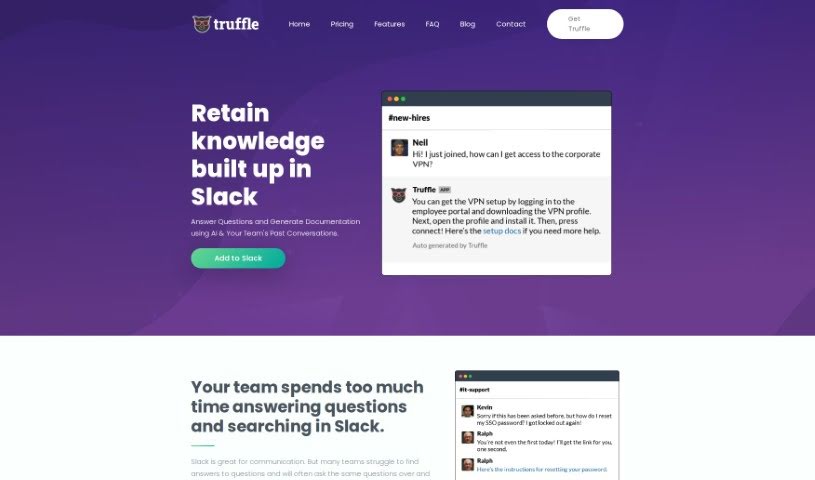
Screenshot of Truffle

Truffle

Discover what Truffle is and how to use it effectively in 2025. Explore its features and see how it stacks up against other documentation tools.

Screenshot

What is Truffle?

Truffle is a really neat tool that uses smart AI to turn your team’s past Slack conversations into searchable documentation. Think about it: instead of digging through endless messages, Truffle automatically summarizes key discussions, creating a handy knowledge base. This saves everyone a ton of time and stops those repetitive questions that pop up all the time. You can try it out for free in one Slack channel, or if you need it everywhere, the premium plan is $199 a month, with a 14-day free trial – no credit card needed.

Who created Truffle?

Truffle was launched on July 22, 2024, by its founder, whose name isn’t publicly shared. The company offers a simple pricing structure: you can add Truffle to a single Slack channel at no cost. If you need it across all your channels, the premium plan is available for $199 per month. They also offer a 14-day free trial, so you can test it out without any commitment.

What is Truffle used for?

  • It makes sharing knowledge within your team automatic.
  • It turns your conversations into actual documentation.
  • You get instant answers to your questions.
  • It summarizes important discussions so you don’t have to.
  • It cuts down on the time spent answering the same questions over and over.
  • It works seamlessly with Slack.
  • It helps keep all that valuable team knowledge safe.
  • It makes your team work more efficiently.
  • Your knowledge base just keeps growing, all by itself.
  • It can even ask questions and get answers for you.
  • It generates documentation straight from your team’s Slack chats.
  • It answers questions in Slack automatically.
  • It summarizes key conversations.
  • It creates summaries of Slack chats to use as documentation.
  • It uses AI to grow your knowledge base.
  • It boosts team efficiency by reducing repetitive questions.
  • It preserves important team knowledge.
  • It helps HR teams focus on their main tasks instead of constantly answering questions like, ‘Where can I find my benefits information?’
  • It helps IT support by providing quick answers to common questions, such as ‘How do I reset my password?’ or ‘How do I use the printer?’
  • Product teams can stay current by looking up information based on the latest data.
  • It automates knowledge sharing.
  • It generates documentation from past Slack conversations.
  • It provides immediate answers to queries.
  • It reduces time spent on repetitive questions.
  • It improves team efficiency by streamlining information access.
  • It preserves important team knowledge for the future.
  • It helps answer questions like ‘Where do I find my benefits?’ so HR can focus elsewhere.
  • It assists IT support with common questions like password resets or printer usage.
  • It uses AI and past team chats to answer questions and create documentation.
  • It turns Slack conversations into documentation summaries.
  • It offers instant answers within Slack.
  • It reduces repetitive questions by summarizing important chats.
  • It integrates with Slack for smooth knowledge sharing.
  • It improves team efficiency by preserving knowledge and automatically growing the knowledge base.
  • It makes important conversations easy to search.
  • It’s perfect for teams that struggle to find answers to common questions in their Slack chats.
  • It automates answering questions in Slack.
  • It builds a knowledge base from Slack conversations.
  • It provides instant answers based on accumulated knowledge.
  • It improves team efficiency by cutting down search time.
  • It summarizes important conversations for easy reference.
  • It preserves tribal knowledge within the team.
  • It integrates with Slack for easy access.
  • It enhances team productivity by reducing repetitive questions.
  • It makes important conversations searchable and easily accessible.
  • It answers questions based on past team interactions.

Who is Truffle for?

  • Project managers
  • Software developers
  • Product Managers
  • Customer Support Representatives
  • Team leaders
  • Marketing professionals
  • Human Resources Specialists
  • Data Analysts
  • Sales Representatives
  • Content creators

How to use Truffle?

Here’s a simple guide to get the most out of Truffle:

  1. Set Truffle up: First, add Truffle to your Slack channel. You can add it for free to just one channel, or if you need it everywhere, the premium plan costs $199 per month for unlimited channels. There’s also a 14-day free trial, and you don’t need a credit card to start.
  2. Use the AI Documentation: Truffle uses smart AI to create documentation from your team’s Slack chats. This makes it super easy for everyone to find past discussions.
  3. Grow Your Knowledge Base Automatically: Truffle automatically summarizes important conversations, so they’re always searchable when you need them. This feature helps your knowledge base grow without you lifting a finger.
  4. Simple Pricing: Truffle’s pricing is straightforward. You can start with the free version for one Slack channel, or go for the premium plan for unlimited channels, which includes a 14-day free trial and no credit card required.

By following these steps, you’ll be able to use Truffle’s features to really improve how your team communicates and manages its documentation in Slack.

Related AI Tools

Discover more tools in similar categories that might interest you

Stay Updated with AI Tools

Get weekly updates on the latest AI tools, trends, and insights delivered to your inbox

Join 25,000+ AI enthusiasts. No spam, unsubscribe anytime.