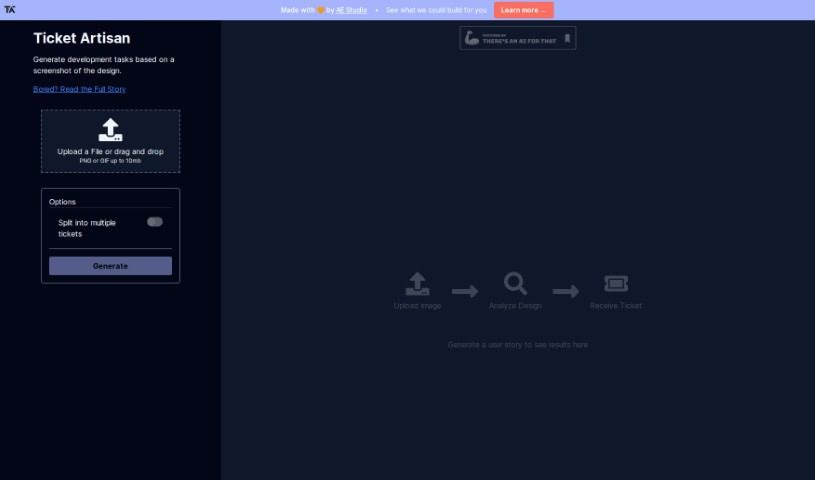
Screenshot of Ticket Artisan

Ticket Artisan

Discover Ticket Artisan in 2025: learn what this AI tool does, how to use its features effectively, and how it stacks up against other project management tools.

Screenshot

What is Ticket Artisan?

Ticket Artisan is a really smart tool from AE Studio designed to make turning design files into development tasks much smoother. It is an AI assistant that looks at your design files and then creates detailed tickets your development team can use right away. It lays out clear user stories, which helps save a ton of time and cuts down on confusion during the workflow. You can upload designs as PNG or GIF files, as long as they’re under 10MB. If a design is pretty complex, you can even split it into several tickets to keep things organized.

Basically, Ticket Artisan acts as a helpful link between your designers and developers. It automatically generates the development tickets you need from the design files you upload, making the whole process of creating user stories much simpler.

Who created Ticket Artisan?

AE Studio, a company known for creating innovative software solutions, developed Ticket Artisan. This AI-powered tool is all about making it easier to turn design files into development tickets by providing clear, detailed user stories for development teams. AE Studio built Ticket Artisan with efficiency and teamwork in mind, aiming to solve those common headaches that come with writing development tickets from design mockups.

What is Ticket Artisan used for?

  • It automatically converts design files into development tickets.
  • You can split complex designs into multiple tickets for better organization.
  • It accepts design uploads in PNG or GIF formats, up to 10MB.
  • It generates user stories that are ready for development cycles.
  • It saves you time and reduces misunderstandings in your workflow.
  • It creates detailed, accurate user stories that developers can act on immediately.
  • It boosts efficiency and improves team collaboration.
  • It significantly cuts down the time spent preparing for sprints.
  • It brings more clarity to development tasks.
  • It provides a smooth connection between the design and development phases.
  • It automates turning design files into development tickets.
  • You have the option to split complex designs into several tickets for clearer task management.
  • It handles design uploads in PNG or GIF formats, up to 10MB.
  • It creates user stories that are ready to go for development.
  • It reduces prep time for sprints, letting teams focus on creating new things.
  • It clarifies development tasks by automating ticket creation.
  • It helps avoid rework that can happen from misunderstandings or missed design details.
  • It streamlines the development process by cutting down on back-and-forth between designers and developers.
  • It’s incredibly precise, capturing even the finest pixel details when creating tickets.
  • It turns your design ideas into tickets that are ready for platforms like Jira, Asana, or Trello.
  • It provides a clear, concise, and accurate set of stories for developers.
  • It really cuts down on the time needed for sprint preparation.
  • It ensures development tasks are clear and easy to understand.
  • It offers a seamless bridge between design and development.
  • It streamlines your workflow, saving time and reducing misunderstandings.
  • It transforms visual concepts into structured tickets ready for platforms like Jira, Asana, or Trello.
  • It makes sprint preparation more efficient by reducing administrative work for product managers and designers.
  • It brings clarity to development tasks by removing ambiguity and reducing back-and-forth between designers and developers.
  • It helps prevent rework caused by misunderstandings or overlooked design elements.
  • It provides clear, concise, and accurate user stories for developers.
  • It allows you to split complex designs into multiple tickets for better task management.
  • It delivers pixel-perfect precision to accurately reflect the intended user experience.
  • It streamlines your workflow, saving time and reducing misunderstandings.
  • It addresses common issues that arise when writing development tickets from design files.
  • It was developed by AE Studio, focusing on efficiency and team collaboration.
  • It leads to a significant reduction in sprint preparation time.
  • It ensures clarity when creating development tasks.
  • It improves efficiency in sprint planning.
  • It transforms design visions into development tickets with both precision and ease.

Who is Ticket Artisan for?

  • Product Managers
  • Project Managers
  • Scrum Masters

How to use Ticket Artisan?

Using Ticket Artisan is pretty straightforward. Just follow these simple steps:

  1. Upload Your Design Image: First, upload an image of your UI design. You can do this directly from your favorite design tool right onto the Ticket Artisan platform.
  2. AI Does the Analysis: Ticket Artisan’s smart AI technology then gets to work, analyzing all the design elements. This includes things like buttons, color schemes, fonts, and how the layout is structured.
  3. It Interprets Everything: Using advanced machine learning, the tool figures out what each UI component means, following best practices for development.
  4. Tickets Are Generated: Ticket Artisan automatically creates detailed, easy-to-understand development tickets. These tickets will have all the necessary details based on its analysis of your design.
  5. Integrate with Your Tools: Once generated, these tickets are ready to be smoothly added to your team’s sprint planning tools, like Jira, Asana, or Trello.

The main advantages of using Ticket Artisan are increased efficiency, better clarity, and more accuracy in your development process. By automating the creation of development tickets from your design files, the tool really cuts down on the time you need to prepare for sprints. It also minimizes misunderstandings between designers and developers and makes sure every ticket accurately reflects the user experience you’re aiming for.

Ticket Artisan also comes with other helpful features. These include AI-powered analysis, the ability to split complex designs into multiple tickets for greater clarity, support for PNG or GIF design uploads (up to 10MB), and a strong focus on efficiency and team collaboration.

Plus, AE Studio, a company that specializes in innovative software solutions, developed Ticket Artisan using technologies like Preact, Next.js, and Tailwind CSS.

All in all, Ticket Artisan really helps streamline how designs turn into actionable development tasks. It creates a faster, more efficient workflow from your initial design vision all the way to project completion. With its user-friendly interface and AI capabilities, it’s a valuable asset for product managers, project managers, and scrum masters looking to improve how they manage the agile development process.

Related AI Tools

Discover more tools in similar categories that might interest you

Stay Updated with AI Tools

Get weekly updates on the latest AI tools, trends, and insights delivered to your inbox

Join 25,000+ AI enthusiasts. No spam, unsubscribe anytime.