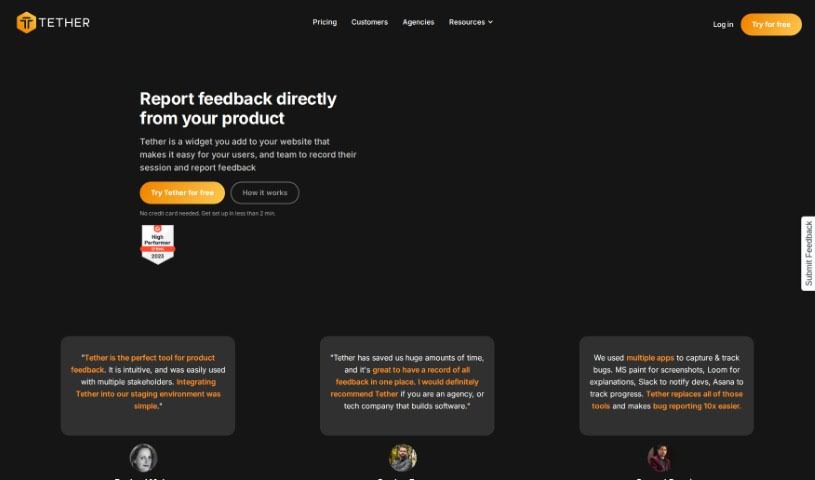
Screenshot of Tether

Tether

Discover what Tether is and how to use it effectively in 2025. We'll explore its features and see how it stacks up against other project management tools.

Screenshot

What is Tether?

Tether is a handy tool designed to make collecting and managing feedback from everyone involved – like users and your own team members – super simple. You can easily report bugs, suggest new features, or even ask for copy changes, all in one place. It really helps save time, keeps all that feedback nicely organized, and makes teamwork smoother by sending out notifications and keeping everyone on the same page. It’s a real game-changer, especially for web agencies and SaaS companies, no matter their size. Plus, it plays well with other tools you might already use, like Github, Jira, and Linear.

One of Tether’s coolest features is its AI-Powered Changelog tool. It uses GPT-4 to automatically create detailed changelogs for you, so you don’t have to do any coding yourself. You can even customize it to match your brand’s look and feel. If you ever need a hand or want to share your thoughts, Tether has a supportive community with resources like blogs and a Slack channel.

Basically, Tether makes gathering and handling feedback much easier for teams, which is pretty essential for working efficiently and developing great products.

Who created Tether?

Tether was founded by Gordon Frayne, who also co-founded Aztech Digital. His company specializes in a widget that’s perfect for collecting website feedback, reporting bugs, and handling design QA. The whole idea is to make the testing and review process smoother for all sorts of clients. Tether is built to simplify feedback reporting for teams of any size, including web agencies and SaaS companies. It integrates smoothly with different platforms and offers features like capturing screenshots right from the app, providing detailed reports packed with data, and really focusing on making collaboration and feedback organization a breeze.

What is Tether used for?

  • Makes collaboration easier
  • Helps with design quality assurance (QA)
  • For reporting bugs
  • General quality assurance (QA)
  • Reporting product feedback
  • Pinpointing problems in web projects
  • Tracking bugs
  • Gathering feedback from clients
  • Submitting change requests
  • Capturing screenshots directly in the app
  • Keeping feedback organized
  • Collecting product feedback
  • Gathering customer feedback
  • Reporting bugs
  • Streamlining the testing and review process
  • Capturing and tracking bugs
  • Making web QA simple
  • Enabling users to easily report feedback
  • Reducing the time spent on QA
  • Increasing product suggestions throughout the company
  • Handling web QA for both teams and clients
  • Capturing and tracking bugs
  • Getting more product suggestions
  • Reporting change requests and suggestions
  • Saving time on QA processes
  • Aligning the team through feedback notifications
  • Boosting team velocity
  • Organizing feedback

Who is Tether for?

  • Project Managers (PMs)
  • Developers
  • Designers
  • Operations Managers
  • Directors of Product
  • Product Designers
  • Co-Founders

How to use Tether?

Here’s how you can get the most out of Tether:

  1. Install the Widget:
    • Add the Tether widget to your website. This lets users and your team record sessions and report feedback easily. You don’t need a credit card, and setup takes less than 2 minutes.
  2. Collect Feedback:
    • Use the in-app screen capture feature to easily record screens, add markups, and take pixel-perfect screenshots. This makes reporting feedback super clear for everyone.
  3. Get Data-Rich Reports:
    • Tether automatically collects technical data. This helps developers find and fix issues faster, cutting down on back-and-forth communication.
  4. Integrate Seamlessly:
    • Connect Tether with tools you already use, like Slack and Notion. This keeps your team in the loop and makes tasks flow more smoothly.
  5. Organize Your Feedback:
    • Tether offers a central place for all your feedback, so you won’t have to search through different channels. Everything stays organized and easy to find.
  6. Use the Chrome Extension:
    • The Chrome extension lets you set things up quickly without needing to install any JavaScript manually. It makes getting started really smooth.
  7. Get Support:
    • If you have questions or need help, just reach out via email, chat, or Slack. The support team aims to respond quickly.

By following these steps, you can really streamline how you collect feedback, report bugs, and handle QA. Tether’s easy-to-use features and integrations are designed to boost your product development workflow. Why not get started today and see the difference?

Related AI Tools

Discover more tools in similar categories that might interest you

Stay Updated with AI Tools

Get weekly updates on the latest AI tools, trends, and insights delivered to your inbox

Join 25,000+ AI enthusiasts. No spam, unsubscribe anytime.