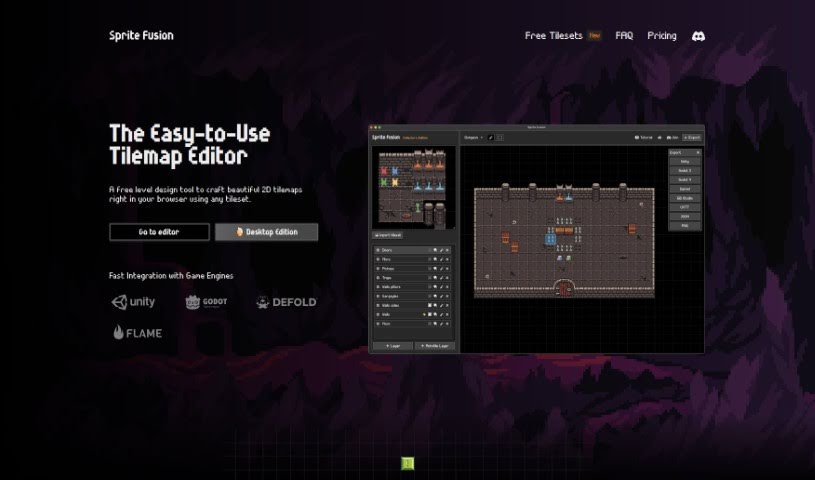
Screenshot of Sprite Fusion

Sprite Fusion

Discover Sprite Fusion, a free tilemap editor and game design tool. Learn how to use its features effectively in 2025, compare it with other game development tools, and see how it simplifies creating 2D maps for various game genres.

Screenshot

What is Sprite Fusion?

Sprite Fusion is a fantastic, free tool for anyone designing 2D games. It is a tilemap editor and a game design assistant all rolled into one. It lets you create 2D maps for your games, which are essentially grids made up of small, repeating images called tiles. What’s really neat is that you can then easily export these maps to popular game engines like Unity and Godot, or really any engine you prefer. It’s super handy for all sorts of game styles, whether you’re building a platformer with jumping challenges or an RPG with sprawling worlds.

For Unity users, Sprite Fusion can export tilemaps as native Unity packages, which makes plugging them into your project a breeze. If you’re into mobile game development, it’s got you covered too, offering native map export for Defold, a really popular engine for mobile titles. And for those who love that retro feel, it even includes built-in helpers specifically for GB Studio, making it much simpler to create classic Game Boy games. Beyond that, Sprite Fusion packs in useful features like support for collisions, handy auto-tiling to speed up terrain map design, and a super easy way to import tilesets – just drag and drop or paste from your clipboard! Best of all, it’s web-based, so no downloads are needed, and it runs smoothly on most modern devices without needing a super-powerful computer. Plus, it’s completely free to use for commercial projects, meaning you don’t need to pay or ask for permission.

Who created Sprite Fusion?

While the specific individual or team behind Sprite Fusion isn’t mentioned in the details I have, it’s clear they’ve created a really valuable, free tilemap editor and game design tool. This tool is designed to help people create 2D maps for their games and then export them to engines like Unity and Godot, or any other game engine they might be using. It’s built to support making tilemaps for all sorts of games, including those for mobile devices and retro consoles. Features like the built-in helpers for GB Studio are a big plus for anyone aiming for that retro Game Boy aesthetic. It’s great that Sprite Fusion is web-based, free to use, and even works for commercial projects without needing special permission or payment. I also heard a desktop version is in the works, which sounds exciting!

What is Sprite Fusion used for?

Sprite Fusion is incredibly versatile for game development. Here’s a quick rundown of what you can do with it:

  • Design 2D maps for your games: This is its core function, letting you build out the visual environments for your game.
  • Export maps to various engines: You can easily send your creations to Unity, Godot, or pretty much any other game engine you’re working with.
  • Support mobile game development: It’s great for creating maps specifically for mobile titles.
  • Design retro games: If you’re aiming for a classic look, it’s perfect for that.
  • Help with Game Boy games: It offers specific assistance for creating games using GB Studio.
  • Import tilesets easily: You can drag and drop your image files or paste them from your clipboard to get your tilesets into the editor quickly.
  • Export in multiple formats: Get your tilemaps out as Unity packages, Godot Scenes, or even JSON files, giving you flexibility.
  • Add collisions: You can set up layers to handle collision detection in your game.
  • Speed up terrain design: The auto-tiling feature makes creating terrain maps much faster.
  • Use it commercially for free: You can use Sprite Fusion in your commercial projects without paying anything or needing to ask for permission.

How to use Sprite Fusion?

Getting started with Sprite Fusion is pretty straightforward. Here’s a breakdown of how you can use it:

  1. Get to Know Sprite Fusion: First off, remember it’s a free tilemap editor and game design tool. Its main job is helping you create 2D maps for games and then export them to engines like Unity and Godot, among others. It’s designed to be user-friendly for all sorts of game genres, from platformers to RPGs.
  2. Start Creating Your Tilemaps: Begin by designing your game’s map within Sprite Fusion. These maps are built using tiles – those small, repeating images. It’s a great way to build out your game world, no matter the genre.
  3. Export to Unity or Godot: Once your map is ready, Sprite Fusion makes it simple to export. You can get it as a native Unity package, which means integrating it into your Unity project is super smooth. Or, you can export it for Godot.
  4. Consider Mobile Game Compatibility: If you’re developing for mobile, Sprite Fusion is a solid choice. It offers native map export specifically for Defold, which is a popular engine for mobile game creation.
  5. Dive into Retro Game Design: For those nostalgic for older consoles, Sprite Fusion is ideal. It even has built-in support for GB Studio, a fantastic engine for creating games for the original Game Boy.
  6. Import Your Tilesets with Ease: Getting your tiles into the editor is a snap. You can simply drag and drop your tileset image file directly into the editor, or if you’ve copied it, just paste it from your clipboard.
  7. Choose Your Export Format: When you’re ready to export your tilemap, you have options. You can get it as a native Unity package, as Godot Scenes, or as a JSON file, which gives you flexibility depending on your game engine.
  8. Utilize Collisions and Auto-tiling: Sprite Fusion helps with gameplay mechanics too. You can set up layers to act as colliders for collision detection. Plus, the auto-tiling feature is a real time-saver for quickly designing terrain maps.
  9. Work in the Web-Based Editor: One of the best parts is that Sprite Fusion is web-based. This means you don’t need to download any software, making it accessible from any laptop or desktop device you have.
  10. Use it Commercially, No Strings Attached: You’re free to use Sprite Fusion for your commercial projects without any cost or need for permission. It’s a great way to get professional results without upfront investment. You can even share your finished games on Discord for recognition!
  11. Check Device Compatibility: It’s designed to run on any modern device, including Macs, so you don’t need a high-end gaming laptop to get started.

Keep in mind that Sprite Fusion is always being improved, and they’re even planning a desktop version. Enjoy using this versatile and user-friendly tool to bring your 2D game maps to life!

Related AI Tools

Discover more tools in similar categories that might interest you

Stay Updated with AI Tools

Get weekly updates on the latest AI tools, trends, and insights delivered to your inbox

Join 25,000+ AI enthusiasts. No spam, unsubscribe anytime.