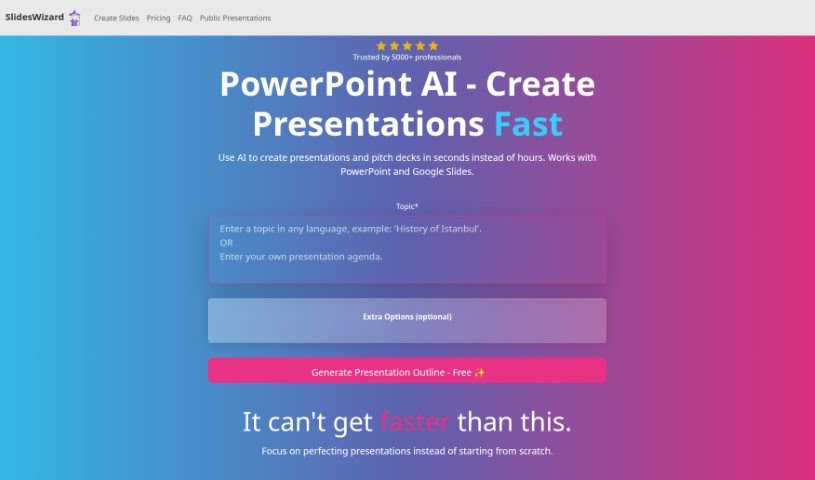
Screenshot of Slides Wizard

Slides Wizard

Discover what Slides Wizard is and how to use it effectively in 2025. We'll explore its features, compare it to other presentation makers, and show you how to create stunning presentations quickly.

Screenshot

What is Slides Wizard?

Slides Wizard is a smart AI tool that makes creating PowerPoint presentations and pitch decks much easier. It uses artificial intelligence to generate slide content from your text and adds relevant images to make your presentations look great. You can use it with both PowerPoint and Google Slides, which means sharing and exporting your work is a breeze. There’s a free option, and if you want to download your creations, it’s a pay-per-use model, so you only pay for what you download.

Who created Slides Wizard?

Slides Wizard was developed by an anonymous founder and first launched on October 22, 2023. The company behind it can be reached via email at [email protected]. As an AI-powered tool, Slides Wizard is designed for quickly and efficiently building PowerPoint presentations and pitch decks. It leverages AI to create slide content based on text you provide, integrates fitting images, and works seamlessly with PowerPoint and Google Slides. Whether you need slides on any topic, Slides Wizard offers both free and pay-per-use options. Many professionals across different fields rely on Slides Wizard for their presentation needs.

What is Slides Wizard used for?

  • Generate content for your slides
  • Add images that fit your topic
  • Create presentations from your outline
  • Works with PowerPoint
  • Works with Google Slides
  • View your presentations online
  • Share presentations easily
  • Export presentations to PowerPoint
  • Export presentations to Google Slides
  • Download presentations as a PDF
  • Remove watermarks
  • Build presentations from your outline
  • Share presentations online
  • Create presentations on any topic you need
  • Make slides for any subject
  • View your presentation online
  • Share slides with friends
  • Export to PowerPoint
  • Export to Google Slides
  • Download as PDF
  • Generates slide content
  • Includes relevant images
  • Creates presentations in seconds
  • Helps you perfect your presentation
  • Generates content using ChatGPT

Who is Slides Wizard for?

  • Professionals who regularly create presentations and pitch decks.
  • Professionals in fields like marketing, consulting, education, and many others.
  • Anyone who needs to create presentations frequently.

How to use Slides Wizard?

Using Slides Wizard is straightforward. Just follow these steps:

  1. Create Your Outline: First, structure your presentation. Jot down the key points and sections you want to cover.
  2. Visit Slides Wizard: Go to the Slides Wizard website to access the tool.
  3. Paste Your Outline: Copy your outline and paste it into the designated area. Slides Wizard uses this text to generate your slides.
  4. AI Content Generation: The tool uses the GPT model to create slide content based on your outline. It crafts relevant and contextual slide content efficiently.
  5. Add Images: Slides Wizard automatically finds and integrates images into your slides from a photo search engine, making them more visually appealing.
  6. Choose Slide Templates: Select from various slide templates like bullet points, text and image layouts, timelines, Venn diagrams, and pie charts to best present your content.
  7. Perfect Your Presentation: Since Slides Wizard speeds up the initial creation, you can focus on refining your presentation instead of starting from scratch.
  8. Export Your Work: Once your presentation is ready, you can export it to PowerPoint, Google Slides, or download it as a PDF.
  9. Share and View: You can easily share your presentations online, view them, and collaborate with others without any hassle.
  10. Understand the Cost: Slides Wizard offers a free version. For downloads, there’s a pay-per-use option costing $2.50 per presentation download.

By following these steps, you can efficiently create professional PowerPoint presentations with Slides Wizard.

Related AI Tools

Discover more tools in similar categories that might interest you

Stay Updated with AI Tools

Get weekly updates on the latest AI tools, trends, and insights delivered to your inbox

Join 25,000+ AI enthusiasts. No spam, unsubscribe anytime.