What Exactly is Slidcast AI Presentation Maker?
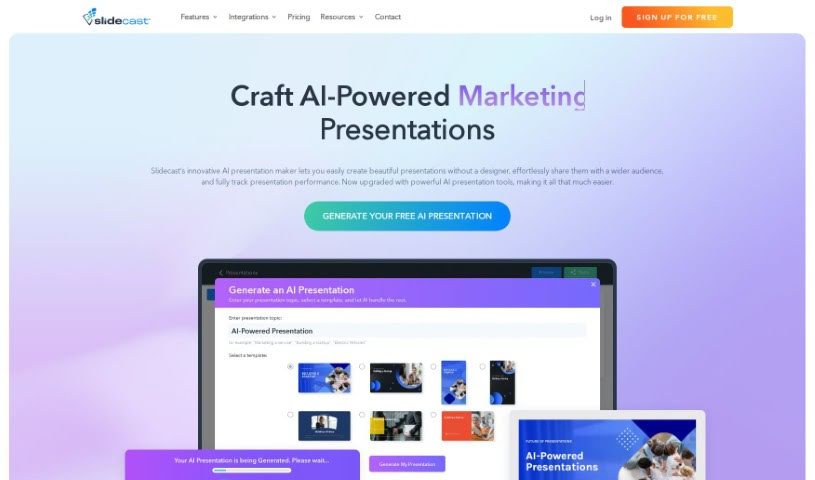
Slidcast AI Presentation Maker is a tool that uses artificial intelligence to help you create professional-looking presentations with surprising ease. It is having an AI assistant for your slides. You can generate entire presentations, complete with text and design elements, all thanks to the Slidecast platform. Beyond that, Slidecast offers a lot of flexibility. You can customize presentations to your heart’s content, upload different kinds of files, and share your work in various ways – through email, text messages, direct links, or even QR codes. You can also print your presentations, import images, and work with your team on them, just like you would with PowerPoint. What’s really neat is that Slidecast gives you insights into how people are interacting with your presentations. You can see how long they watch, where they’re located, if they scan QR codes, and how many finish watching. For those who want to dive deeper, you can start with a free account that has some limitations, or choose a paid plan starting at $15 a month for more features.
Who’s Behind Slidcast AI Presentation Maker?
Slidcast was developed by a forward-thinking team, spearheaded by its founder who’s quite the visionary in the world of AI-powered presentations. Their main goal is to create a platform that’s not only user-friendly but also makes creating, sharing, and tracking presentations a breeze, all powered by advanced AI. This approach makes putting together great presentations much more accessible and efficient for everyone. The platform really shines with its fully AI-generated presentations, plenty of customization options, and tools for tracking engagement, all designed to make your presentations more impactful and help you achieve better results, whether you’re a business or an individual.
What Can You Actually Do with Slidcast AI Presentation Maker?
Slidcast is quite versatile and can be used for a range of tasks:
- Managing Contacts: Keep your contact information organized.
- Bulk Texting Presentations: Send your presentations to many people via text message all at once.
- Voice Calls: Make voice calls using a virtual phone number provided by Slidecast.
- Voice Call Recording: Record your voice calls, especially useful with Enterprise plans.
- Video Calls: Connect with others through video calls directly within the platform.
- Bulk Emailing Presentations: Send your presentations to a large list of contacts via email.
- Single Emailing Presentations: Send your presentations to individual contacts.
- Contact Management: Keep your contacts organized within Slidecast’s database.
- Importing Contacts: Easily import contact lists from Excel files.
- Google Sync: Sync your contacts with your Google account.
- Deep Contact Search: Find specific contacts quickly within your database.
- Voice Calls: Make and manage voice calls.
- Voice Call Recording: Record your important calls.
- Video Calls: Conduct video meetings and presentations.
Who Benefits Most from Slidcast AI Presentation Maker?
Slidcast is particularly useful for professionals in:
- Sales: Streamlining outreach and follow-ups.
- Marketing: Creating engaging content and campaigns.
- Business: Enhancing internal and external communications.
- Education: Developing dynamic learning materials and lectures.
How Do I Get Started with Slidcast AI Presentation Maker?
Using Slidecast effectively is pretty straightforward. Here’s a breakdown of how to make the most of it:
-
Building Your Presentations:
- You can start from scratch by creating your slide deck directly in Slidecast, or if you already have a presentation, you can easily import your existing PowerPoint files.
- To make your slides pop, Slidecast gives you access to a massive library with over 1 million high-quality photos and ready-to-use templates. This makes customization a breeze.
-
Leveraging AI for Presentations:
- Need a presentation fast? Just describe your topic to the AI, and it can generate a complete presentation with text and design elements in mere seconds. It’s pretty impressive!
- Want to add a professional touch? You can even enhance your presentations with AI-generated voiceovers, choosing from 35 different unique voices.
-
Customizing and Sharing Your Work:
- Once you have your AI-generated content, you can tweak it easily using a drag-and-drop builder. Plus, Slidecast lets you import all sorts of files, like images, audio narration, GIFs, and even forms, giving you complete control.
- Sharing your presentation is super simple. You can send it out via email, text messages, share a direct URL, or even generate a QR code for easy access.
-
Tracking Engagement and Performance:
- Slidecast provides really valuable insights into how your audience interacts with your presentations. You can see details like how long they watch, their geographic location, whether they scanned a QR code, and their completion rates.
- This means you can monitor analytics in real-time, keep track of how prospects are progressing, and adjust your approach to be more effective.
-
Team Collaboration and Security:
- Working with a team? Slidecast makes collaboration easy. You can share and edit presentations together, much like you would in Google Docs.
- You can also feel confident about security. The platform is designed to be reliable, giving you control over who sees and interacts with your presentation materials.
-
Understanding Pricing and Features:
- Slidecast offers flexibility with both free and paid account options. Paid plans start at an affordable $15 per month and unlock more features, including things like bulk emailing, voice calls, and integrations with popular tools such as HubSpot and Salesforce.
By following these steps, you’ll be well on your way to creating polished presentations, understanding how they’re received, collaborating smoothly with your team, and really making the most of Slidecast’s powerful AI features to boost your presentation game.