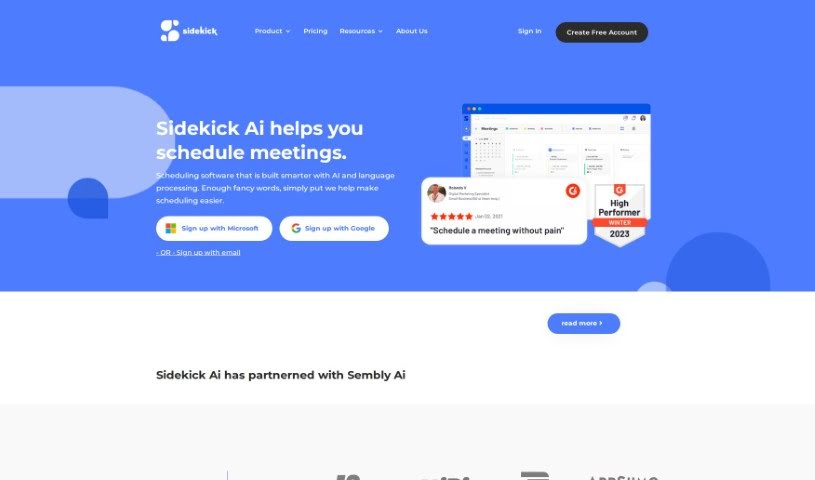
What is Sidekick Ai?
Sidekick Ai is your smart assistant for setting up meetings. It’s an AI-powered tool designed to make scheduling way simpler. You can use it through email, your phone, or the web. It lets you create your own personal scheduling pages, automatically sets up appointments if you forward an email to it, and syncs up with other users’ calendars. Sidekick Ai plays nicely with popular tools like Microsoft Teams and Google Calendars, sending out reminders, creating calendar events, and sending invites to keep everything running smoothly. What really sets it apart is its focus on AI scheduling, offering a few different ways to get meetings booked, starting with its neat ‘Forward to Schedule’ feature.
Who created Sidekick Ai?
Nathan Jean came up with the idea for Sidekick Ai. He was getting pretty frustrated with how much time scheduling took when he was growing his software development agency, Kyros Digital. So, he decided to build a better way. Nathan teamed up with Chris Ake and Jon Butler, who are partners at Grand Apps. They jumped in to lead the Sidekick Ai team. Chris Ake, who’s already had a lot of success as an entrepreneur, is the CEO. Jon Butler, known for his sales skills, is in charge of business development. And Nathan Jean, with his software development background, heads up the product side, with a goal to build what he hopes will be the world’s smartest scheduling platform.
What is Sidekick Ai used for?
- Smart AI Communication: It makes scheduling easy through email, mobile, and web apps.
- Personalized Pages: You can create your own scheduling pages, either for yourself or your whole team.
- Email to Schedule: Just forward an email to Sidekick, and it’ll set up the meeting for you automatically.
- Connects with Popular Tools: It works smoothly with services like Microsoft Teams and Google Calendars.
- Boosts Productivity: It sends reminders, creates calendar events, and sends out invites without you lifting a finger.
- Simple Scheduling: You can schedule meetings by forwarding an email, using dedicated scheduling pages, or through Sidekick Scheduling within the software itself.
- Quick Booking: Set up a scheduling page in a snap and start getting meetings booked.
- Finds Best Times: Sidekick scheduling helps you find good meeting times, especially when coordinating with other Sidekick users.
- Integrates with Your Favorites: Schedule meetings easily with popular tools like Microsoft Teams and Google Calendars.
- Team Scheduling: Use Team Pages to make scheduling meetings with multiple team members and partners a breeze.
- Smarter Communication: It simplifies scheduling across email, mobile, and web.
- Custom Pages: Create individual and team pages for personalized scheduling.
- Forward to Schedule: Schedule meetings just by forwarding an email to Sidekick.
- Automated Invites: Get reminders, calendar events, and meeting invites sent out automatically.
- Team Coordination: Use Team Pages for smoother scheduling with multiple team members.
- Partner Meetings: Send out Partner Team Pages to make scheduling with partners easier.
- Custom Branding: Paid plans let you remove Sidekick Ai branding from your scheduling pages.
- Automated Outreach: Get reminders, calendar events, and meeting invites sent to everyone involved.
- AI-Powered Efficiency: This software streamlines meeting arrangements using AI and language processing.
- Best Time Finder: It automatically finds the best times to meet, whether people use Sidekick or not.
- Team Page Integration: Use Sidekick for team scheduling with Team Pages.
- Branding Options: Remove Sidekick Ai branding from scheduling pages.
Who is Sidekick Ai for?
- Sales Teams
- Business Development Professionals
- Software Developers
- Entrepreneurs
- Sales Professionals
- Freelancers
How to use Sidekick Ai?
To get the most out of Sidekick Ai, here’s a simple guide:
- Scheduling Meetings:
- You’ve got several ways to schedule meetings: use the dedicated Scheduling Pages, the ‘Forward to Schedule’ feature, or Sidekick Scheduling right within the software.
- Need to book a meeting? Just forward an email to Sidekick Ai, and it’ll take care of the rest.
- Want to make booking easier? Set up your own personalized scheduling pages, perfect for individuals or teams.
- Connecting with Tools:
- Sidekick Ai integrates smoothly with popular services like Microsoft Teams and Google Calendars, making your scheduling even better.
- It also works with other email providers, not just Gmail and Outlook, so you can use it with tools like Thunderbird too.
- Boosting Productivity:
- Take advantage of helpful features like reminders, automatic calendar event creation, and automatic sending of meeting invites.
- Let Sidekick Ai instantly find the best meeting times when you’re coordinating with other Sidekick users.
- Team Scheduling Made Easy:
- Enable team scheduling using Team Pages. You can invite your team members to join for free by syncing their calendars.
- You have control over who can make changes within Team Pages, which really helps with collaboration and flexibility.
- Managing Your Subscription:
- If you want access to advanced features, like creating Team Pages, you can upgrade to the Superhero plan.
- If you cancel your subscription, you can still use the premium features until your next billing date. Plus, you’ll get a free Visitor account.
- Just a heads-up: deleting your account removes all your data. If you decide to come back later, you’ll need to start fresh.
By following these steps, you can really make Sidekick Ai work for you, streamlining your meeting schedules and boosting your team’s productivity.