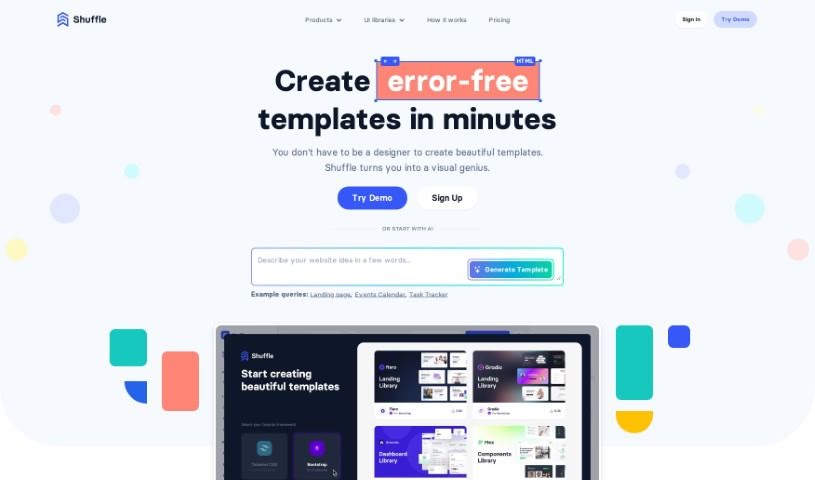
What is Shuffle?
Shuffle is essentially your AI-powered design buddy, built right into the Shuffle platform. It is a smart assistant that helps you whip up website templates super fast. It’s got this cool chat feature that lets you easily tweak text, swap out images, or change colors on your website designs. If you’re looking at pricing, Shuffle offers a few options: you can go monthly for $24, grab an annual plan for $99, or even get a lifetime deal for a one-time payment of $249. What’s really neat is the sheer number of UI components available – over 7,500 of them! They’re nicely organized by popular frameworks like Tailwind CSS, Bootstrap, Material-UI, and Bulma, making it a breeze to create all sorts of website layouts. The goal here is to let anyone build beautiful, responsive websites, even if you don’t have a ton of design experience.
Who created Shuffle?
Shuffle was brought to life by Dawid Andrzejewski, who’s the founder of the company behind the whole Shuffle platform. It first launched on April 13, 2023, and it’s basically a super user-friendly online editor designed to help developers build great-looking layouts really quickly. You get access to over 11,000 UI components, and it plays nicely with frameworks like Tailwind CSS, Bootstrap, Bulma, and Material-UI. You can customize styles, work in your favorite technologies, and export as many projects as you want. Plus, there’s the Shuffle Assistant, also known as the ChatGPT Assistant. This AI tool is integrated right into Shuffle to help you create and manage your website templates efficiently.
What is Shuffle used for?
Shuffle is incredibly versatile! Here’s a rundown of what you can do with it:
- Flexible Pricing: Choose a plan that fits your budget, with monthly, annual, and lifetime options.
- Create Landing Pages: Easily design engaging landing pages to capture leads or promote products.
- Build Dashboards: Develop functional and visually appealing dashboards for data visualization or user interfaces.
- Design E-commerce Templates: Craft attractive templates for online stores.
- Automate Front-End Development: Streamline repetitive tasks in building the user interface of websites.
- Improve Website Building Efficiency: Speed up your workflow and get more done in less time.
- Customize Website Templates: Tailor existing templates to your specific needs.
- Change Text and Colors: Quickly update the look and feel of your websites.
- Support Multiple CSS Frameworks: Works seamlessly with Tailwind CSS, Bootstrap, Bulma, and Material-UI.
- Generate SVG Patterns: Create unique SVG patterns with a single click for design elements.
- Create Beautiful Layouts Quickly: Build stunning website designs with ease.
- Easily Create Landing Pages, Dashboards, and E-commerce Templates: All in one place.
- Supports Multiple CSS Editors: Offers flexibility in how you style your projects.
- Chat-Based Website Building: Use AI to guide your design process.
- Customizable Layouts: Adapt designs to fit your vision.
- Plugin Support: Enhance your work within any IDE.
- Build and Export Unlimited Projects: Take your creations anywhere.
- Offload Design Tasks: Let Shuffle handle repetitive design work for your team.
- Enhance Front-End Developer Efficiency: Make the development process smoother and faster.
- Speed Up Workflow: Get your layouts done faster.
- Automate Repetitive Activities: Reduce manual effort in web development.
- Build Stunning Layouts Quickly: Focus on creativity, not tedious tasks.
- Efficiently Style Websites: Use pre-designed components to style your sites.
- Generate SVG Patterns with a Single Click: Add unique visual flair effortlessly.
- Customize Text, Colors, and Images: Make your templates truly your own.
- Work with Various Frameworks: Flexibility to use your preferred tools.
- Improves the Efficiency of Front-End Web Development: A significant boost for developers.
- Automate Styling Tasks: Simplify the styling process.
- Allow for Chat-Based Website Building: Interact with AI to create.
- Provide Plugin Support for IDEs: Integrate Shuffle into your existing workflow.
Who is Shuffle for?
Shuffle is a fantastic tool for anyone involved in web design and development. This includes:
- Front-end developers
- Web designers
- Developers
- Website designers
- Web Developers
- UI Designers
- Designers
- Website Builders
- UI/UX Designers
Basically, if you’re building websites and want to do it faster and more efficiently, Shuffle is for you!
How to use Shuffle?
Getting started with Shuffle is pretty straightforward. Here’s a simple guide:
- Access Shuffle: Begin by opening Shuffle. You’ll immediately see over 11,000 fully responsive UI components ready to help you create templates with ease.
- Choose Your Framework & Project Type: Pick from the various supported frameworks and start building your landing pages, dashboards, or e-commerce templates.
- Build Your Layouts: Select components from the extensive library – they’re categorized into helpful sections like navigations, headers, features, and more – to construct your desired layout.
- Leverage the AI Assistant: Use the Shuffle ChatGPT Assistant for smart, AI-powered help in creating and customizing your website templates.
- Chat for Customization: The ChatGPT Assistant can change text, colors, and perform specific tasks on your templates just by chatting with it.
- Experience the Integration: Benefit from how the ChatGPT Assistant works seamlessly with Shuffle, making website template creation even better with AI.
- Explore Subscription Options: Check out the flexible plans for the ChatGPT Assistant – monthly, annual, or lifetime – to support your efficient website building.
- Generate SVG Patterns & More: Create unique SVG patterns with a single click, browse the vast UI component library, and enjoy highly customizable layouts.
- Use the VS Code Extension: For even more project enhancements, make use of the Visual Studio Code extension offered by the ChatGPT Assistant.
- Agree to Terms: Before you subscribe to the ChatGPT Assistant and start creating multiple website layouts efficiently, just make sure to agree to Shuffle’s terms of use and privacy policy.