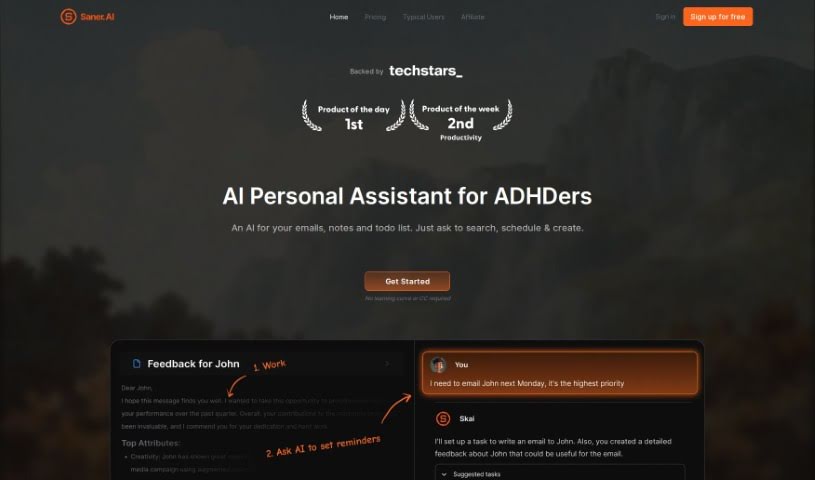
Screenshot of Saner.ai

Saner.ai

Discover Saner.ai, an AI note-taking app designed for ADHD users. Learn how to use its features in 2025, compare it to other AI note-takers, and boost your productivity.

Screenshot

What is Saner.ai?

Saner.ai is an AI note-taking app built with individuals who have ADHD in mind. Its core goal is to help you avoid switching between different apps and windows, making it easier to stay focused and productive. The app’s co-founder, who also has ADHD, created Saner.ai because they struggled to find tools that effectively managed information for their specific needs. This personal experience really shaped the app, ensuring it’s both simple and powerful for handling your knowledge.

Saner.ai offers a free package, and there’s also a beta version available if you want to try out its smart AI productivity assistant. Your data is a top priority here; the app keeps your information secure, follows strict data protection rules, and gives you complete control over your notes. You can easily import or export thousands of notes, and Saner.ai is great for all sorts of knowledge tasks – think brainstorming, summarizing meetings, or even creating newsletters. It uses a smart mix of AI and advanced systems to give you intelligent answers quickly, making it a really well-rounded AI note app for anyone working with information, especially when you compare it to basic chatbots.

Who created Saner.ai?

Saner.ai was actually started by one of its co-founders who has ADHD. They felt frustrated by the lack of good apps that could really help manage information effectively for someone with ADHD. So, they decided to build it themselves! The company is all about encouraging innovation and boosting productivity, with a special focus on making workflows smoother for knowledge professionals, particularly those with ADHD. Saner.ai provides a simple yet powerful AI productivity app designed to cut down on context switching and really improve how productive you are.

What is Saner.ai used for?

  • Research: Dive deep into topics and gather information.
  • Learning: Absorb and understand new knowledge effectively.
  • Brainstorming: Generate and explore new ideas.
  • Summarizing: Quickly get the gist of your meeting notes.
  • Task Management: Keep your daily to-do list organized.
  • Writing: Draft articles, reports, or any written content.
  • Note Organization: Keep all your notes tidy and accessible.
  • Information Retrieval: Find what you need, when you need it.
  • Extracting Insights: Pull out key takeaways from your accumulated notes.
  • Knowledge Building: Handle and grow your personal knowledge base.
  • Consolidation: Bring together notes, searches, and to-dos all in one place.
  • Quick Capture: Save information as soon as you think of it.
  • Brain Dumping: Get your thoughts out and save them easily.
  • Easy Finding & Brainstorming: Search and brainstorm without hassle.
  • Recalling Knowledge: Remember things you might have forgotten.
  • All-in-One Knowledge Work: Do all your knowledge-related tasks in one spot.
  • Avoiding Context Switching: Stay focused by not jumping between apps.
  • Automatic Organization: Let the app help sort your information.
  • Support for Entrepreneurs, Learners, Creators: Tailored help for these groups.
  • Support for Knowledge Professionals (especially with ADHD): Designed for those who work with information, with a special focus on ADHD needs.
  • Newsletter Creation: Easily put together your newsletters.
  • Synthesizing Documents: Combine information to create training materials or reports.

Who is Saner.ai for?

  • Entrepreneurs: Keep track of ideas, plans, and tasks.
  • Managers: Organize team information, meeting notes, and action items.
  • Researchers: Gather, synthesize, and analyze data and findings.
  • Content Creators: Brainstorm ideas, draft content, and manage projects.
  • Newsletter Creators: Compile information and draft content for your newsletters.
  • Students: Organize study notes, research, and assignments.

How to use Saner.ai?

Here’s a simple guide to get the most out of Saner.ai:

  1. Sign Up: Start by registering for an account. You can choose the Free, Starter, or Standard plan based on what works best for you.
  2. Import Your Notes: Bring in all your existing notes – you can import thousands! This lets Saner.ai help you find insights and build on your knowledge base easily.
  3. Explore Use Cases: Try out the different ways you can use the app. Whether it’s for learning, brainstorming, summarizing notes, or other tasks, Saner.ai is designed to be an ADHD-friendly AI note-taker.
  4. Trust Your Data Security: You can feel confident about your data. Saner.ai offers secure storage, follows privacy rules, gives you control, and has data recovery options.
  5. Get Intelligent Responses: Saner.ai uses the latest AI technology and its own advanced systems to give you smart, efficient answers.
  6. Export Your Data: If you ever need to, you can request to export your notes in markdown format.
  7. Enjoy Personalized Help: Think of Saner.ai as your personal AI assistant. It understands your notes, making it easier to search and suggesting relevant information based on what you’ve saved.
  8. Connect with the Community: Join the Saner.ai community! Share your feedback, stay updated on new features, and help shape the tool.

By following these steps, you’ll be able to use Saner.ai effectively to boost your productivity and manage your knowledge better.

Related AI Tools

Discover more tools in similar categories that might interest you

Stay Updated with AI Tools

Get weekly updates on the latest AI tools, trends, and insights delivered to your inbox

Join 25,000+ AI enthusiasts. No spam, unsubscribe anytime.